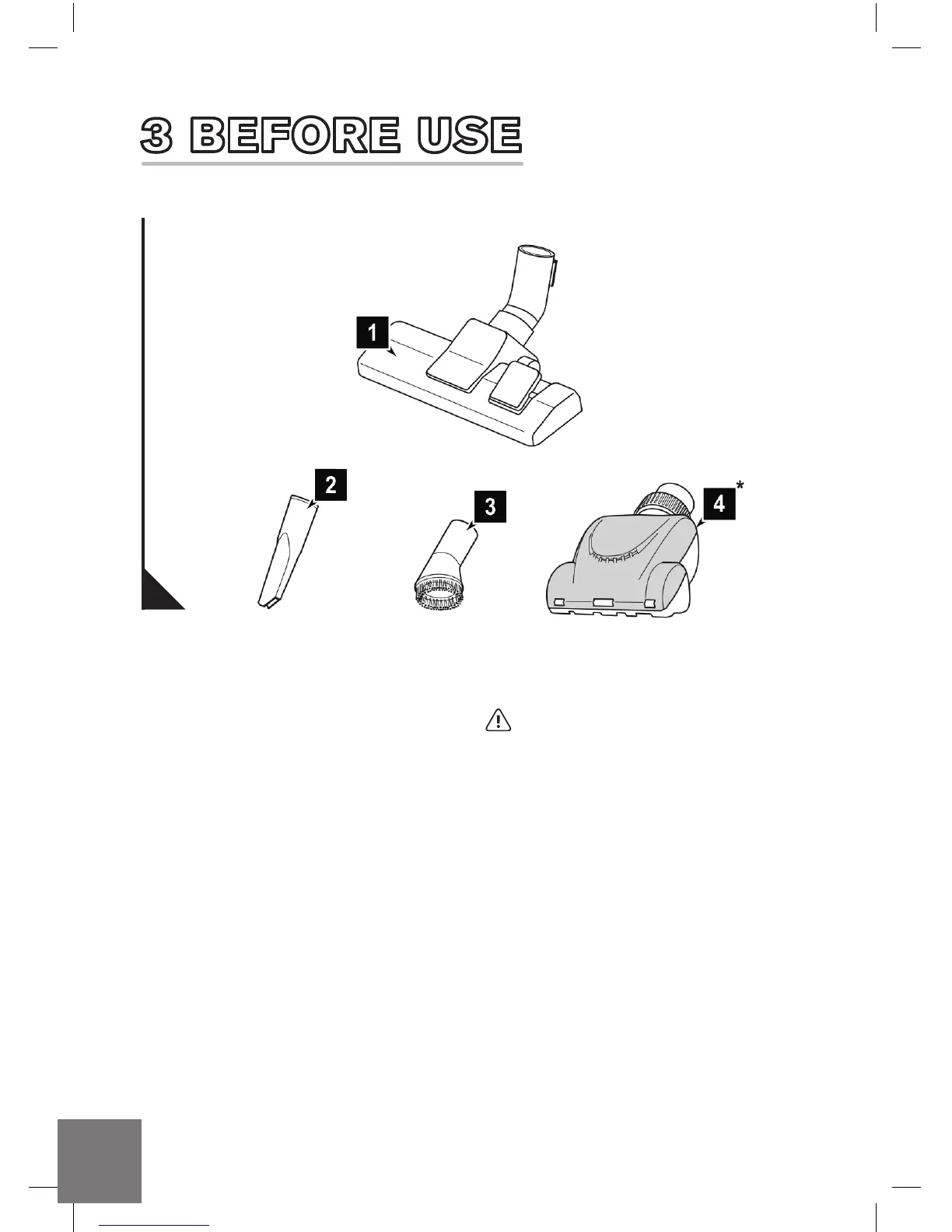
2. Check the selected tool/accessory
for damage.
6
1. Select the tool/accessory according to
the surface to be cleaned:
- Combi tool (Fig. 2/1):
Floor tool for cleaning both carpets
and hard ooring.
- Crevice tool (Fig. 2/2):
Use this to vacuum dust from hard
to reach places.
- Dusting brush (Fig. 2/3):
Use this to vacuum dust off objects
that have sensitive surfaces.
- Turbo tool (Fig. 2/4*):
Is used to vacuum non-sensitive carpets,
runners, mats, and the like.
*Some models only:
ATTENTION: Use only intact tool/accessory.
If damaged, the nozzle may allow dust to escape
or scratch the surface.
3.1 SELECTING A TOOL/ACCESSORY
2
DD_Real Power M28_OUTPUT-RK.indd 6 26/03/2015 10:48



 To Next Page