Using)the)SMARTClock)
!
The!SMARTClock!operates!in!two!modes:!!Tap!Tempo!and!Preset.!
!
Tap)Tempo)Mode)
!
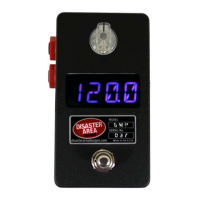
In!Tap!Temp o !Mo de ,!the!encoder! knob!flashes!blue!while!the!clock!is!running.!
!
LEE!%N@!)HO!
Tap!the!footswitch! to!set!the!clock!rate .!!While!tapp ing,!the!display!sh ow s!TAP.!!T w o!seconds!after!
the!last!tap,!the!display!reverts!to!show !the !tem po!in!B eats!Pe r!M inute !(BPM .)!!
Hold!the!footswitch!to!sa ve!the !curren t!tem po !to!the!last!load ed!pre set.!!
!
GF)E5G(O$
Turn!the!encoder!to!manually!set!the!clock!rate.!
Tap!the!encoder!to!select!the!subdivisions!menu!for!Tempo!Outpu ts!A!and!B.!
Hold!the!encoder!to!enter!Preset!mode.!
!
Preset)Mode)
$
In!Preset!Mode ,!the!encoder! knob!flashes!green!while!the!clock!is!running.!
!
LEE!%N@!)HO$
Tap!the!footswitch!to!select! the!next!preset.!!If!the!clock!is! currently!stopped,!tapping!the!footswitch!
will!restart!the!clock!at!the!last!tempo.!
Hold!the!footswitch!to!stop!the!clock.!
!
GF)E5G(O$
Turn!the!encoder!to! sele ct!a!preset.!!If!PRO G!is!set!to! ON ,!selecting!a!preset!either!by! fo ot!or!with!the!
encoder!will!send!the!corresponding!MIDI!program!change!on!the!SMARTClock’s!MIDI!channel.!
Hold!the!encoder!to!enter!Tap!Tempo !m ode .!
!
If!PROG!is!set!to!ON!in!the!Setup!Menu,! the!SMARTClock!will!send!a!MIDI!program! change!message!
on! its! MIDI! Channel! each! time! a! preset! is! selected.! ! The! program! change! is! one! lower! than! the!
indicated!p r ese t:!!P !0 1!s en d s!P ro g ra m!Change!00;!P04!sends!Program!Change!03,!etc.!
!
!
! )


 To Next Page
 Loading...