Tempo)Outputs)and)Subdivisions)
!
The!SMARTClock!has!three!Tempo!Outputs!that!are!capable!of!sending!taps!to!nonYMIDI!devices.!!The!
Tempo!Outputs!are!electrically! isolated!for!low!noise,! and! can! act! as! “norm a lly ! open ”! or! “normally!
closed”!switches.!!M ost!tap!tempo!capable!devices!use!normally!ope n!switching,! m ost!Boss! / !R oland!
products!use!normally!closed.!!Please!consult!the!user!manual!of!your!tap! tempo!pedals!to! determine!
the!correct!switch!type.!
!
The!SMARTClock!can!easily!send!out!different!tap!ratios,!by!subdividing!the!clock! rate.!! Fu rthermore,!
each! preset! m ay! be! saved! with! different! subdivisions! for! each! Tempo! Output,! so! tha t ! a ! variety ! o f!
delay!or!modulation!rates!can!be!achieved.!
!
To! set! the! subdivisions,! enter! Tap! Tempo! mode! and! tap! the! encoder.! ! ! The! d is p l ay! w ill! show! the!
currently! selected! Tempo! Output! and! subdivision.! ! Turn! the! encoder! to! set! the! subd ivision,! tap! to!
move!between!tempo!and!subdivision!menus.!!Setting!an!output’s!subdivision!to!“OFF”!will!prevent!
the! SMARTC lock! from ! sen ding! an y! taps! from ! th at! output.! ! Each! Tempo! Preset! m ay! have! its! own!
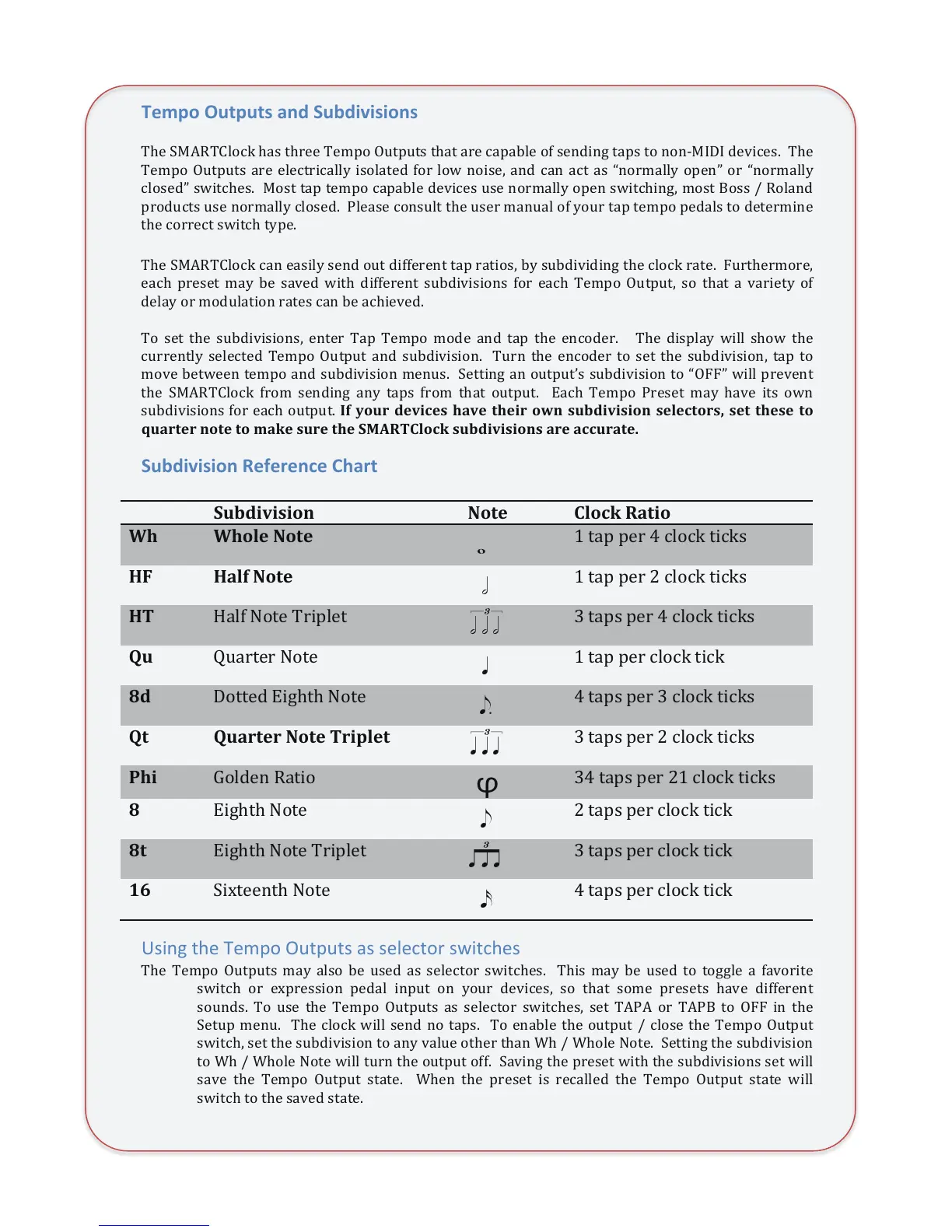
subdivisions!for!each!output.!@4$=+>2$ 7#:., #/ $ "1:# $ 3"#.2$ +P < $ />9 7.: ./.+ <$ /#*# ,3+ 2/B$ /#3$ 3"#/# $ 3+$
Q>123#2$<+3#$3+$A1-#$/>2#$3"#$%&'(!)*+,-$/>97.:./.+</$12#$1,,>213#?!
Subdivision)Reference)Chart)
!
Using&the&Tempo&Outputs&as&selector&switches&
The! Tempo! Outputs!may! also! be! used! as! selector! switches.! ! This! m ay! be! used! to! toggle!a! favorite!
switch! or! expression! pedal! input! on! your! devices,! so! that! some! presets! have! different!
sounds.! To! use! the! Tempo! O utputs! as! selector! switches,! set! TAPA! or! TAPB! to! OFF! in! the!
Setup!menu.!!The!clock!will!send!no! taps.!! To! ena ble!th e ! ou tput!/ ! clo se ! the ! Tempo!Outpu t !
switch,!set!the ! su bdivision!to!any!value!othe r! th an!Wh! /!Whole!N ote .! !Setting!the!subdivision!
to! W h !/!Whole!Note!will!turn!the! o utpu t!off.!! Savin g!the!preset!with!the!subdivisions! set!will!
save! the! Tempo ! O utput! state.! ! When! the! preset! is! recalled! the! Tempo! Output! state! will!
switch!to!the!saved!state.!!


 To Next Page
 Loading...