Page 7
Connecting the Satellite Receiver to an Available Ethernet
Port
If the satellite receiver is located close to the router, gateway, or Ethernet switch, use the steps Connecting
the Satellite Receiver Using Ethernet Cable, below. If the satellite receiver is not located close to the
router, gateway or Ethernet switch, use the steps Connecting the Satellite Receiver Using a HomePlug-to-
Ethernet Adapter on page 8.
Connecting the Satellite Receiver Using Ethernet Cable
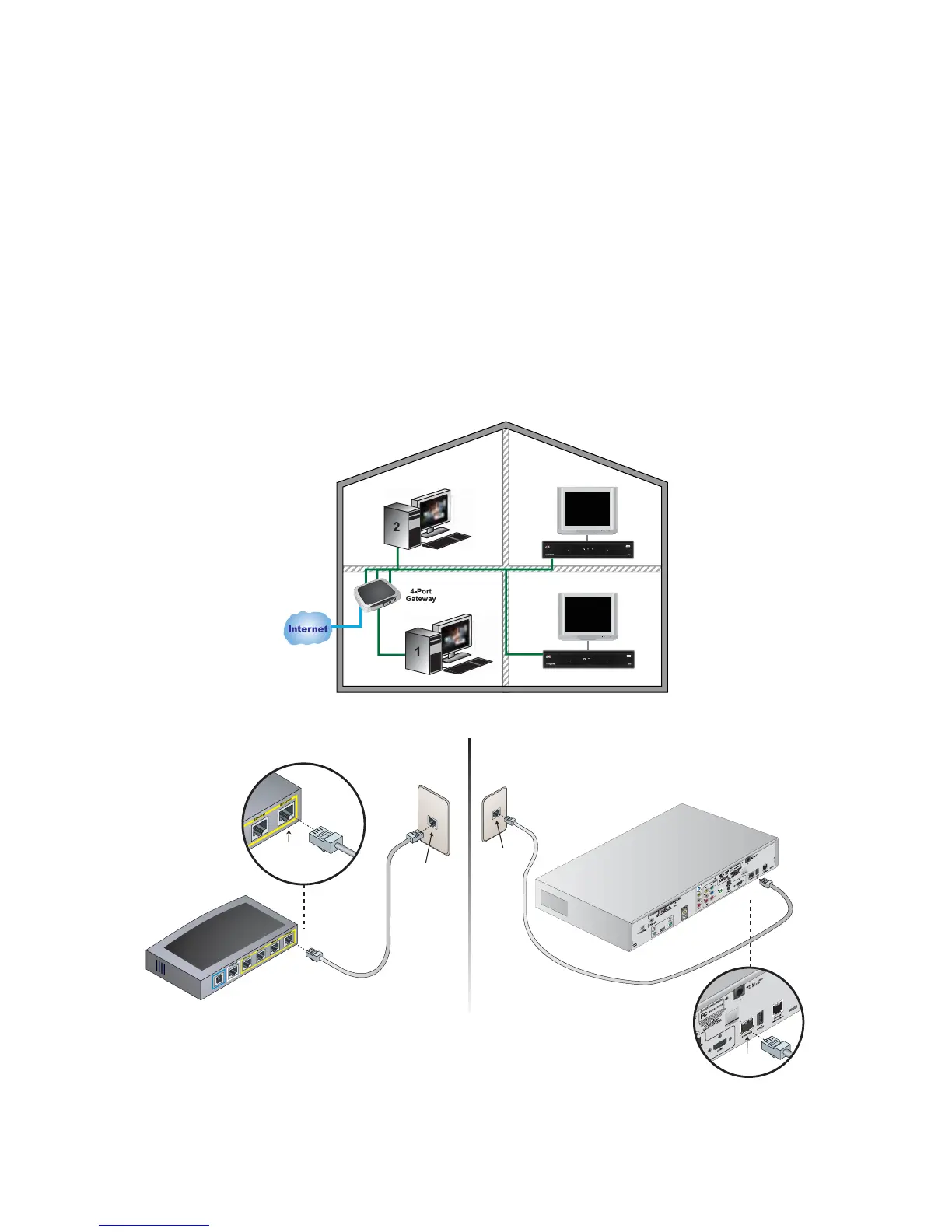
Refer to Diagrams 3 and 4 and the instructions below to connect the satellite receiver to the router,
gateway, or Ethernet switch using an Ethernet cable.
Note: If using pre-existing Ethernet jacks in the home, the jacks must be properly wired for Ethernet. Some
home phone systems use Cat-5 cable and jacks that are wired to support phone systems, not Ethernet. Refer
to your local consumer electronics store or home network installer for more details. Using a HomePlug-to-
Ethernet adapter will likely result in an easier installation.
Diagram 3. Overview of Home Network with Receiver Connected by Ethernet Cable
Diagram 4. Connecting the Receiver to the Router Using Ethernet Cable
Ethernet
Port
Ethernet
Jack
Ethernet
Port
Ethernet
Jack










 To Next Page