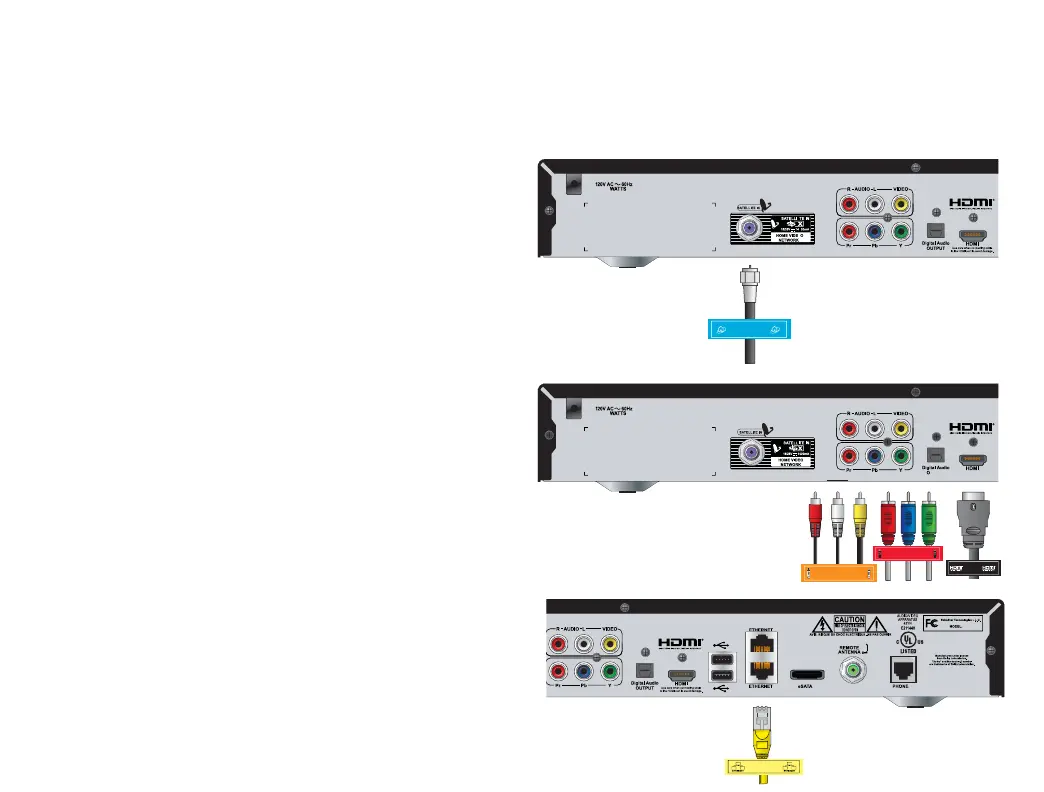
3. Connecting the Cables to Your Replacement Receiver
U.S. PATENTS 5602597,
5604544, 5606374, 6151479
MAY APPLY TO THIS PRODUCT.
US:5GXXXXXXXXXXX
DE50
FCC ID: DKNTK421
FCC ID: DKNTK422
125
HOME VIDEO
NETWORK
a.
Connect the Home Video Network
cable to the "Home Video
Network" port on your 4K Joey.
b. Connect the HDMI cable, YPbPR
cables, or RCA cables from the TV
to the corresponding port(s) on
the replacement receiver.
RCA
COMPOSITE
RCA
COMPOSITE
component
Ccomponent
C
YPbPr
YPbPr
c. Connect the Ethernet cable to the
"Ethernet" port on the replacement
receiver.


 To Next Page