3.
Connecting the Cables to Your Replacement Receiver (Cont’d)
U.S. PATENTS 5602597,
5604544, 5606374, 6151479
MAY APPLY TO THIS PRODUCT.
US:5GXXXXXXXXXXX
DE50
FCC ID: DKNTK421
FCC ID: DKNTK422
U.S. PATENTS 5602597,
5604544, 5606374, 6151479
MAY APPLY TO THIS PRODUCT.
US:5GXXXXXXXXXXX
DE50
FCC ID: DKNTK421
FCC ID: DKNTK422
INSERT CARD FIRMLY
THIS SIDE UP
Inserte firmemente
con este lado hacia arriba
d.
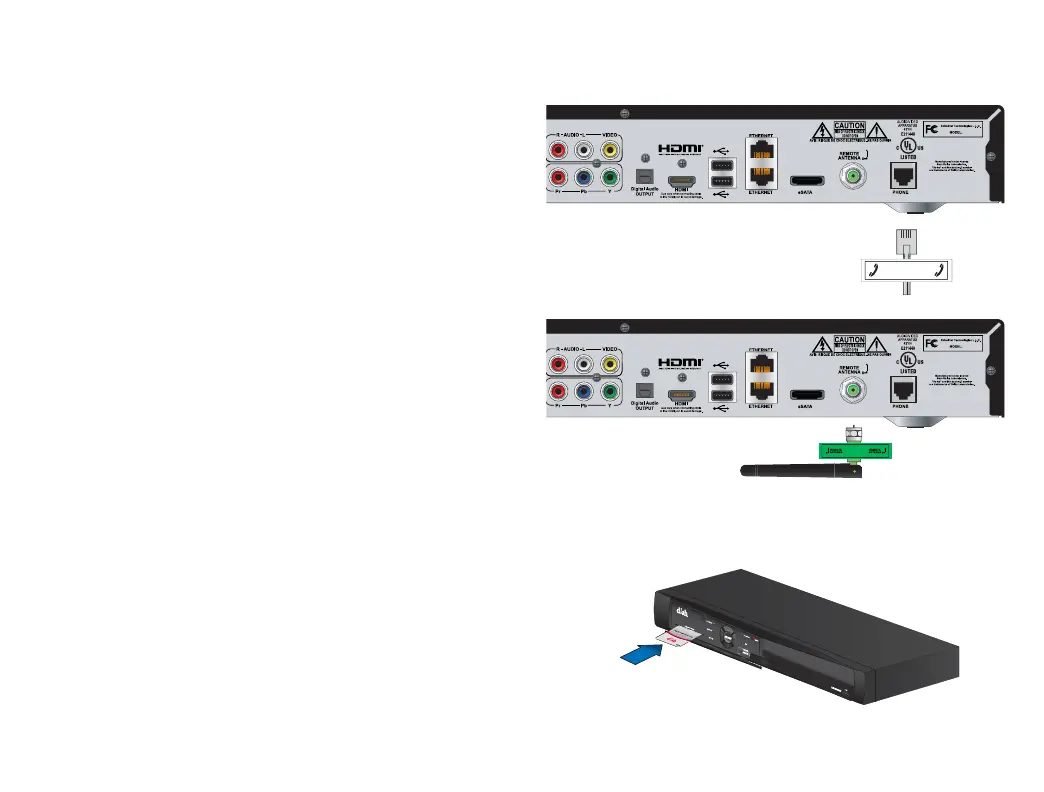
Connect the Phone cable to the
"Phone" port on the replacement
receiver.
You may not have this cable.
PHONE
PHONE
e.
Connect the remote antenna to
the "Remote Antenna" port on
the replacement receiver.
f
.
Open the panel on the front of
the new receiver and make
sure the Smart Card is
secured firmly in the slot.
Not all receivers will have a
SmartCard. If your receiver does not
have a SmartCard, go to Step 4.


 To Next Page