Need help?
Do you have a question about the DJ-Tech DJM-303 and is the answer not in the manual?
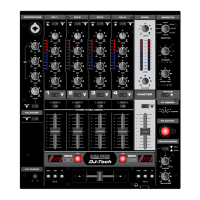
Adjusts the level of the master output signal.
Adjusts the microphone input level.
Controls the high and low tone levels for the microphone.
Sets microphone on/off and enables talkover function to reduce music volume.
Selects audio sources for headphone monitoring, with visual indicators.
Rotary knob to adjust the output level for headphones.
Enables automatic playback/stop of connected CD players via crossfader.
Master on/off button for activating and deactivating effects.
Contours the frequency response for each channel (+/-2dB).
Determines the level meter mode (Master output or PFL).
Selects the audio input source for each channel.
Mixes audio sound between the two channels.
Adjusts the volume level for CH1 and CH2.
Turns the unit power ON or OFF.
 General
| Channels | 2 |
|---|---|
| Crossfader | Replaceable crossfader |
| EQ | 3-band |
| Input Types | Line, Phono |
| Inputs | 2 x Line (RCA), 2 x Phono (RCA), 1 x Mic (1/4" TS) |
| Output Types | RCA |
| Outputs | 1 x Master (RCA), 1 x Headphone (1/4" TRS) |

 To Next Page