Need help?
Do you have a question about the dji DL LENS and is the answer not in the manual?
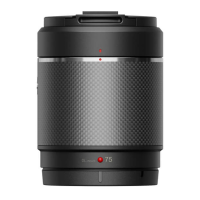
The DJI DL/DL-S Lenses are professional prime lenses specifically designed for photography, offering a range of focal lengths when mounted on ZENMUSE™ gimbal cameras via the DJI DL mount (58 mm diameter). These lenses are engineered with an integrated carbon fiber casing, which effectively reduces the payload on the gimbal and camera, thereby enhancing stability during shooting.
The product line includes several full-frame lenses, such as the new DJI DL 18mm F2.8 ultra-wide lens, which is specially designed for 8K aerial photography. This 18mm lens provides a wide 100° Field of View (FOV), allowing for the capture of expansive scenes. Other full-frame lenses in the group include 24mm, 35mm, and 50mm options, providing a versatile system from wide-angle to telephoto. Additionally, the DJI DL-S 16mm F2.8 ND ASPH lens features a built-in ND4 filter and is capable of recording Super 35mm video. When this 16mm lens is used with the Zenmuse X7 gimbal camera, it has a focal length crop factor of 1.5.
The DJI DL/DL-S Lenses are compatible with Zenmuse X7, X9, and X9-8K Air gimbal cameras. However, it's important to note that the DJI DL 18mm F2.8 ASPH Lens is not compatible with the Zenmuse X7 gimbal camera. DJI plans to support more of its gimbal cameras with these lenses in the future, and users are advised to visit the official website for the latest compatibility information.
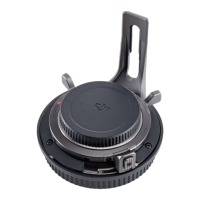
Each lens package comes pre-installed with a lens cap, lens rear cap, lens hood, and a balancing ring. The specific components may vary based on the actual product purchased. For instance, a DJI DL 24mm F2.8 LS ASPH Lens package would include these items.
The installation process involves a few straightforward steps, using the DJI DL 24mm F2.8 LS ASPH lens as an example for Zenmuse X7, and the DJI DL 18mm F2.8 LS ASPH lens for Zenmuse X9-8K Air.
For Zenmuse X7:
For Zenmuse X9-8K Air:
DJI offers a range of DL/DL-S lens protectors and filters, available through the DJI online store. These accessories are designed to enhance shooting performance and protect the lens.
Note: The DJI DL 18mm F2.8 ASPH Lens only supports filters with a diameter of 55 mm. Third-party filters must be purchased separately for this lens.
When mounting the lens onto the gimbal camera, the following combinations are recommended to achieve optimal shooting performance: a. Lens hood + lens protector b. Lens hood + balancing ring c. Lens hood + ND filter d. Two ND filters
The total weight of any of these combinations should be between 10 to 35 g. For optimal video recording performance, it is recommended to keep the total weight of attached components around 20 g when balancing the gimbal.
| Lens | Focal Length | Aperture Range | 35mm Equivalent | Field of View (FOV) | Close Focus | Filter Diameter | Elements/Groups/ASPH | Barrel Dimensions (DxL, incl. hood) | Weight (incl. ring & hood) |
|---|---|---|---|---|---|---|---|---|---|
| DL-S 16mm F2.8 ND ASPH* | 16 mm | F2.8~F16 | / | / | 0.40 m | 46 mm | 13/12/4 | Φ55.0 x 69.1 mm | Approx. 178 g |
| DL 18mm F2.8 ASPH | 18 mm | F2.8~F22 | 18 mm | 90.0×66.8° | 0.30 m | 55 mm | 9/8/3 | Φ64.5 x 62.8 mm | Approx. 182 g |
| DL 24mm F2.8 LS ASPH | 24 mm | F2.8~F16 | 24 mm | 73.7×53.1° | 0.65 m | 46 mm | 9/8/3 | Φ55.0 x 71.2 mm | Approx. 178 g |
| DL 35mm F2.8 LS ASPH | 35 mm | F2.8~F16 | 35 mm | 54.4×37.8° | 0.85 m | 46 mm | 9/8/3 | Φ55.0 x 71.2 mm | Approx. 179 g |
| DL 50mm F2.8 LS ASPH | 50 mm | F2.8~F16 | 50 mm | 39.6×27° | 0.93 m | 46 mm | 9/7/2 | Φ55.0 x 71.2 mm | Approx. 182 g |
*The DJI DL-S 16mm F2.8 ND ASPH lens has a built-in ND4 filter that can be configured in DJI GO 4.
MTF charts are used to evaluate a lens's ability to reproduce contrast and resolve fine details. Lower spatial frequencies on the chart indicate overall contrast, while higher spatial frequencies represent detail resolution. The "Image Height" axis shows the distance from the center of the sensor to a given point on the lens. An MTF value of 100% signifies perfect performance. The manual provides MTF charts for each lens model (DL-S 16mm F2.8 ND ASPH, DL 18mm F2.8 ASPH, DL 24mm F2.8 LS ASPH, DL 35mm F2.8 LS ASPH, and DL 50mm F2.8 LS ASPH), illustrating their sagittal and meridional performance at 10, 30, and 45 lp/mm.
 General
| Brand | dji |
|---|---|
| Model | DL LENS |
| Category | Drone & Quadcopter Accessories |
| Language | English |

 To Next Page