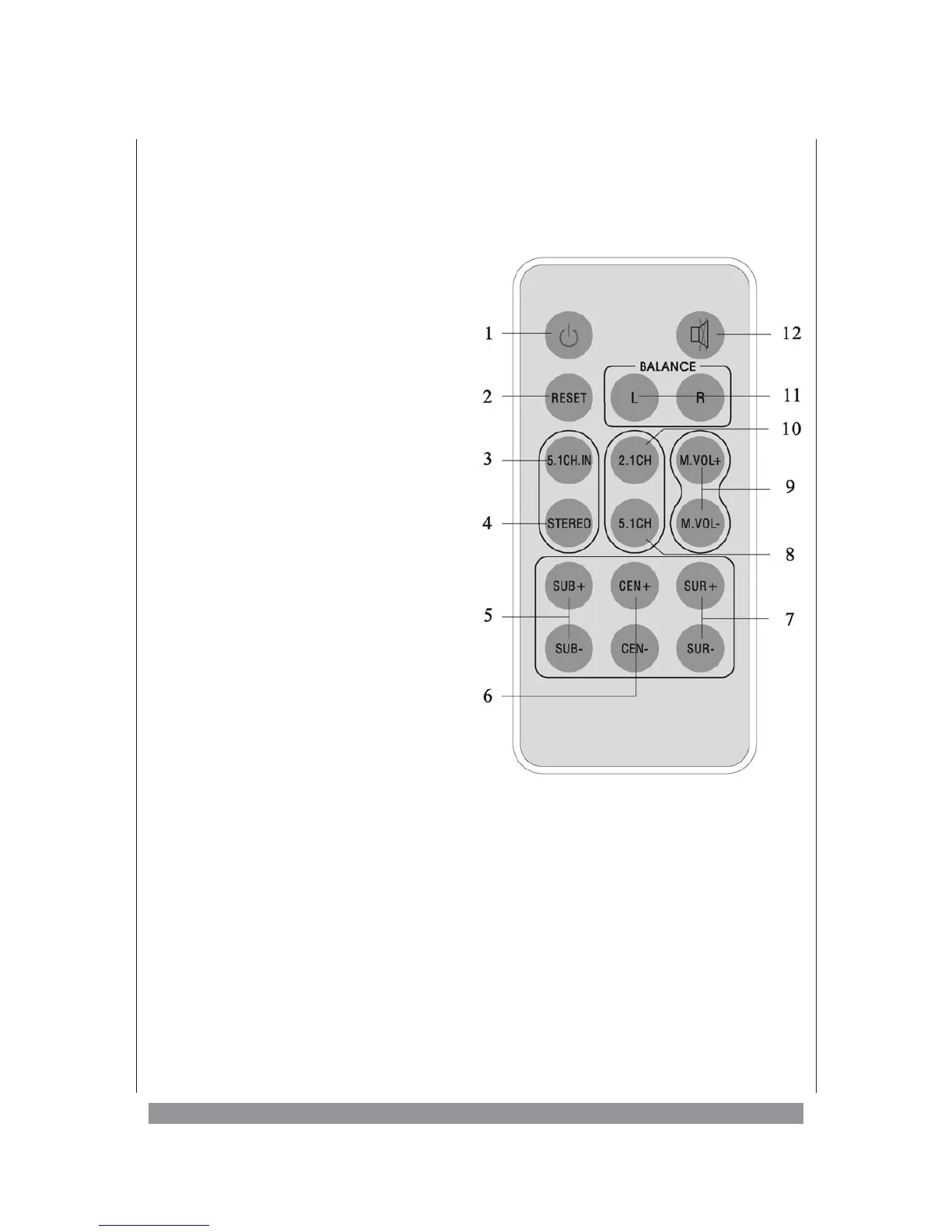
The Remote Control
1 STANDBY:
Use this key to switch the unit on and off in
stand-by mode, provided the MAIN POWER
switch on the subwoofer’s rear panel is in ON
position (I).
2 RESET:
If you want to restore the unit’s initial factory
settings, press this button.
3 5.1 CH:
Press this button to activate the 5.1 INPUT
CHANNEL.
4 STEREO:
Press this button to activate the STEREO
INPUT CHANNEL.
5 SUB +/-:
Press the + or - button, if you want to
increase or decrease the volume of the
subwoofer.
6 CEN +/-:
Press the + or - button, if you want to
increase or decrease the volume of the
centre speaker.
7 SUR +/-:
Press the + or - button, if you want to
increase or decrease the volume of the rear
surround speakers.
8 5.1 CH:
Press this button if you want to operate the
unit in 5.1 mode (all speakers active).
9 MASTER VOLUME +/-:
With the MASTER VOLUME +/- buttons you
set the overall volume of your home cinema
system.
10 2.1 CH:
Press th 2.1 CH button to operate the unit in
2.1 mode (just front speakers & subwoofer).
11 BALANCE:
This button lets you set the volume ration
between the 2 front speakers.
12 MUTE:
Press this button to silence the sound. Press
it again to reactivate the sound.
7


 To Next Page