Establishing the connection
In order to avoid malfunctions and / or damage of the speakers
or other connected devices, please establish all connections while
the device is switched off. Please take care to connect the marked
wire (white line) of the speaker cable with the red terminal of
both the subwoofer and the speakers. Connect the other (black)
wire with the black terminals. Otherwise the sound will be spoiled
and the main unit or the speakers may be seriously damaged.
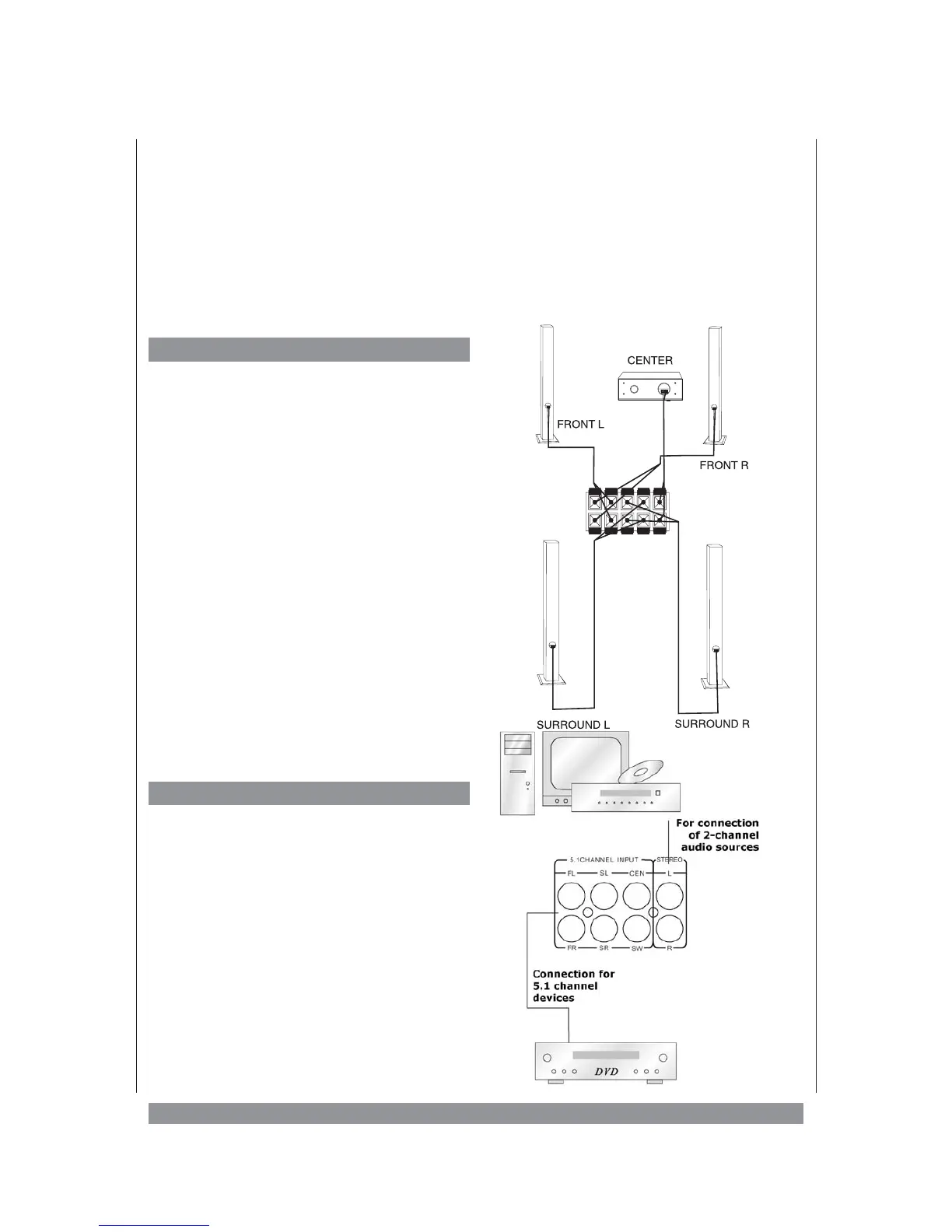
Connecting the Speakers
1. Connect the right front speaker to the FR
(+/-) terminals at the subwoofer’s rear
panel.
2. Connect the left front speaker to the FL
(+/-) terminals at the subwoofer’s rear
panel.
3. Connect the right surround speaker to the
SR (+/-) terminals at the subwoofer’s
rear panel.
4. Connect the left surround speaker to the
SL (+/-) terminals at the subwoofer’s
rear panel.
5. Connect the centre speaker to the CEN
(+/-) terminals at the subwoofer’s rear
panel.
Connecting Audio Sources
1. Connect the 5.1 CHANNEL INPUT at the
subwoofer’s back panel to devices provi
-
ding audio signals via separated outputs
for front, surround, centre, and subwoo
-
fer, e. g. DVD players.
2. Connect the STEREO input at the sub
-
woofer’s back panel to stereo devices like
television, CD players, or cassette tapes.
8
FR FL SR SL CEN


 To Next Page