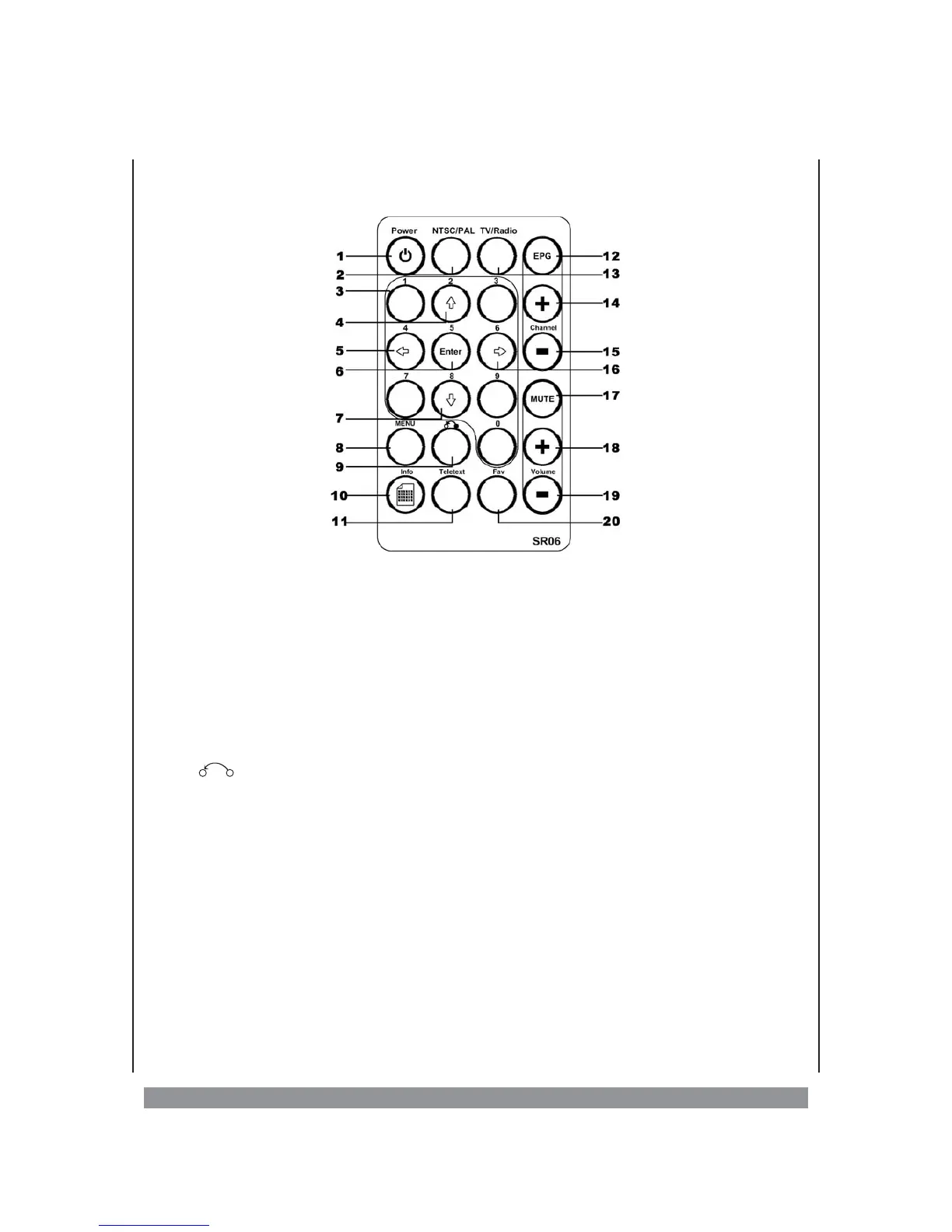
The Remote Control (R/C)
1. POWER - To switch-on/off the device
2. NTSC/PAL - Changes the colour system (PAL/NTSC)
3. Numeric buttons - To change the program and to enter the
numbers in the screen menu
4. 5 - To move the selection bar in the menu upwards
5. 3 - To move the selection in the menu towards left
6. ENTER - To confirm your entry in the menu
7. 6 - To move selection bar in the menu downwards
8. MENU - Calls the main menu for picture and system
setting / to exit from the current menu
9. - Changes to the last selected program/ to exit
individual menu
10. INFO - Shows information about the current station
11. Teletext - Shows the teletext
12. EPG - Starts the Electronic Programme Guide
13. TV / Radio - Changes from TV to radio service (if it is
available)
14. CH + - To the next program selection
15. CH — - The previous program selection
16. 4 - To move the selection in the menu towards right
17. MUTE - Switches the loudspeaker of the device to mute
18. VOL + - To increase the volume level
19. VOL — - To decrease the volume level
20. FAV - Activates the favorite-function
6



 To Next Page