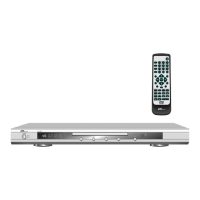
1. POWER - On / off switch
2. REPEAT - activates the repeat mode
3. N/P - toggles between NTSC and PAL as colour system
4. SUBTITLE - displays the subtitles available
5. ANGLE - changes the camera angle (if this is supported by
the DVD inserted)
6. LANGUAGE - for changing to the DVD sound options
7. SETUP - recalls the menus for the unit setting
8, 9, 27, 29.
3456 - navigation buttons for controlling the menus
10. ENTER - for confirming particular menu points
11. PBC - playback control (only for VCD 2.0)
12. VOL — - to decrease the volume
13. ZOOM - activates the 3-step zoom
14. RETURN - return function (only for VCD)
15. USB/CARD - to select the memory medium
16. PROGRAM - allows an individual sequence of the programme
17. CLEAR - to delete a previous input
18. PREV 9 - to skip to the previous chapter (DVD) or to the
previous audio track (CD)
19. NEXT : - switches to the next chapter (DVD) or to the next
audio track (CD)
20. V-MODE - activates the desired video output
21. STOP - stops the play mode
22. OPEN/CLOSE - opens/closes the disc compartment
23. A-B - repeats a programme section
24. 0-9, +10 - digit buttons
25. TIME - activates the target scanning
26. TITLE - recalls the title menu (if available on the DVD)
28. MENU - displays the programme options of the DVD
30. VOL + - to increase the volume
31. SLOW - slow motion function
32. STEP - activates still / single frame function
33. DISPLAY - displays the time information about the programme
34. MUTE - turns the sound off / on
35. FWD 8 - activates the scanning forward,
2x, 4x, 8x to 16x
36. REV 7 - activates the scanning reverse,
2x, 4x, 8x to 16x
37. PLAY/PAUSE
4; - starts/pauses the play mode
11


 To Next Page