Operating Instructions
Let’s get started
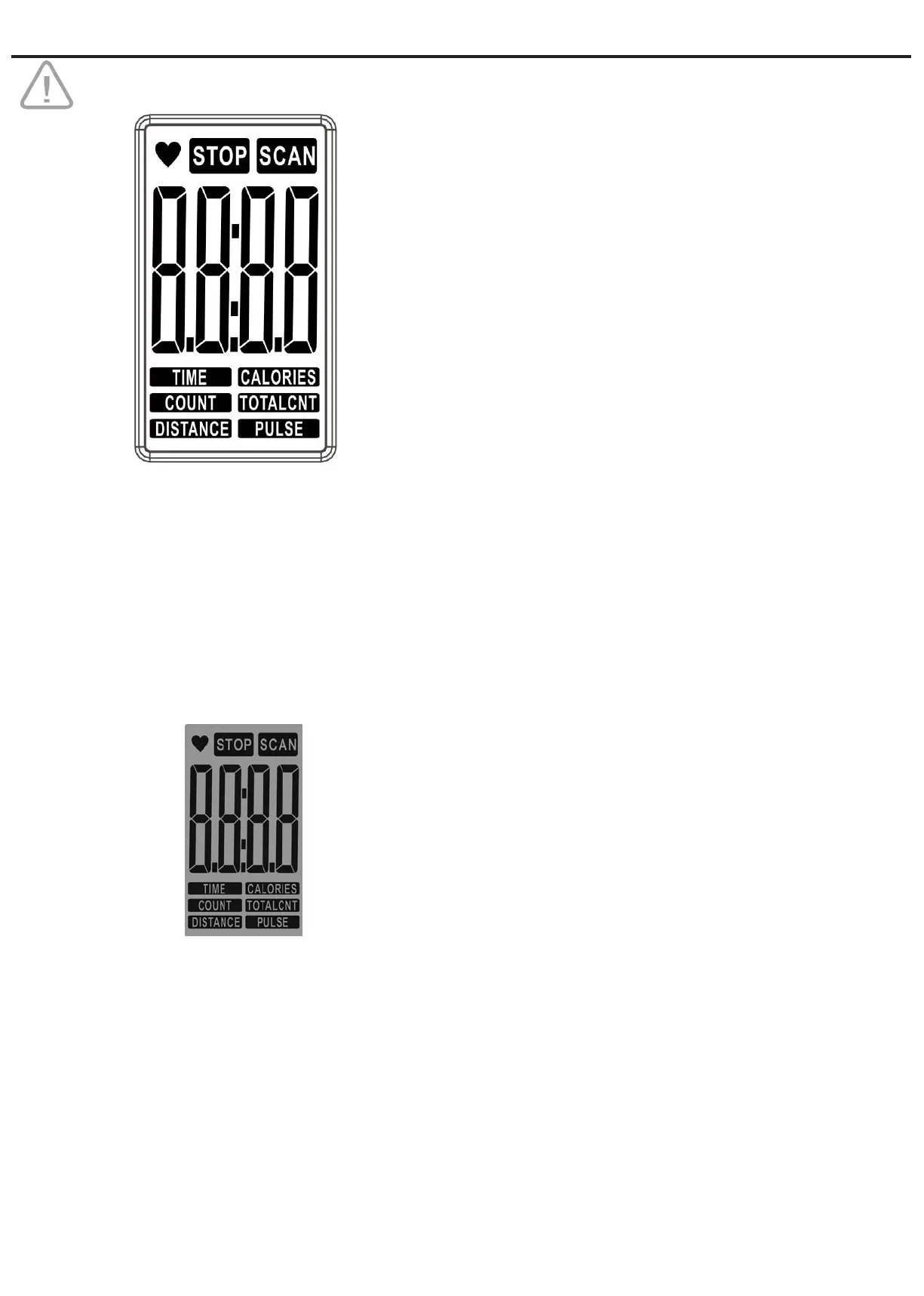
Press ‘MODE’ to select a specic function. The following
functions will be displayed in sequence:
SCAN Automatically scan showing each mode in
sequence every 6 seconds:
SCAN → TIME → COUNT → CALORIES
→ TOTAL COUNT → DISTANCE →
PULSE → SCAN.
.
TIME Press ‘MODE’ to select TIME
Preset a target time by pressing the ‘SET’
each step counting 1 min.
The computer will start automatically once
you start rowing.
When target time is reached an alarm will
sound for 8 seconds, while timer starts
counting up.
COUNT Press ‘MODE’ to select COUNT.
Preset a number by pressing the ‘SET’
each step counting 10 strokes.
The computer will start automatically once
you start rowing.
When you reached 0 an alarm will
sound for 8 seconds, while the number of
strokes starts counting up.
CALORIES Press ‘MODE’ to select CALORIES.
Preset a number by pressing the ‘SET’
each step counting 10 Cal.
The computer will start automatically once
you start rowing.
When you reached 0 an alarm will
sound for 8 seconds, while the calories
start counting up.
TOTAL COUNT This function can not be reset.
The LCD displays the total number of mov
ements.
TOTAL COUNT can only be cleared by
removing the batteries.
DISTANCE Press ‘MODE’ to select DISTANCE.
Preset a number by pressing the ‘SET’
each step counting 0.5 KM.
The computer will start automatically once
you start rowing.
When you reached 0 an alarm will
sound for 8 seconds, while the distance
starts counting up.
READ CAREFULLY BEFORE USING.
Switch on
Insert 2 batteries AAA 1.5 V (Batteries are not
included).
The display will light up when you start rowing and cumulative
values for TIME/COUNT/TOTAL COUNT/DISTANCE/CALO-
RIES will be displayed in scan mode.
The display will switch to Standby Mode if no movement is
registered for 4 minutes. All settings and exercise data are
saved until you start rowing again.
Function buttons
MODE Press to select any function to be displayed
on the main screen.
Hold for 3 seconds to clear the display.
SET To set values for time, calories, count and
distance.
RESET To reset the display.


 To Next Page