2 CELLCOM SERIES COMPLIANCE LISTING GUIDE | DIGITAL MONITORING PRODUCTS
COMPLIANCE
CellComF-LTE Commercial Fire Communicator Installation ANSI/UL 864
Fire Protective Signaling Systems using Internet/Intranet/Cell Networks
A Performance‑Based Technologies system as defined in UL 864 10th Edition may be configured as CELL Primary with
or without a backup path. The system may be configured as follows:
PATH 1 PROGRAMMING
Comm Type = CELL Checkin Min = 58
Path Type = Primary Failtime Min = 60
Test Rpt = No
Checkin = Yes
Table 2: Path 1 Cell as Primary without Backup Path
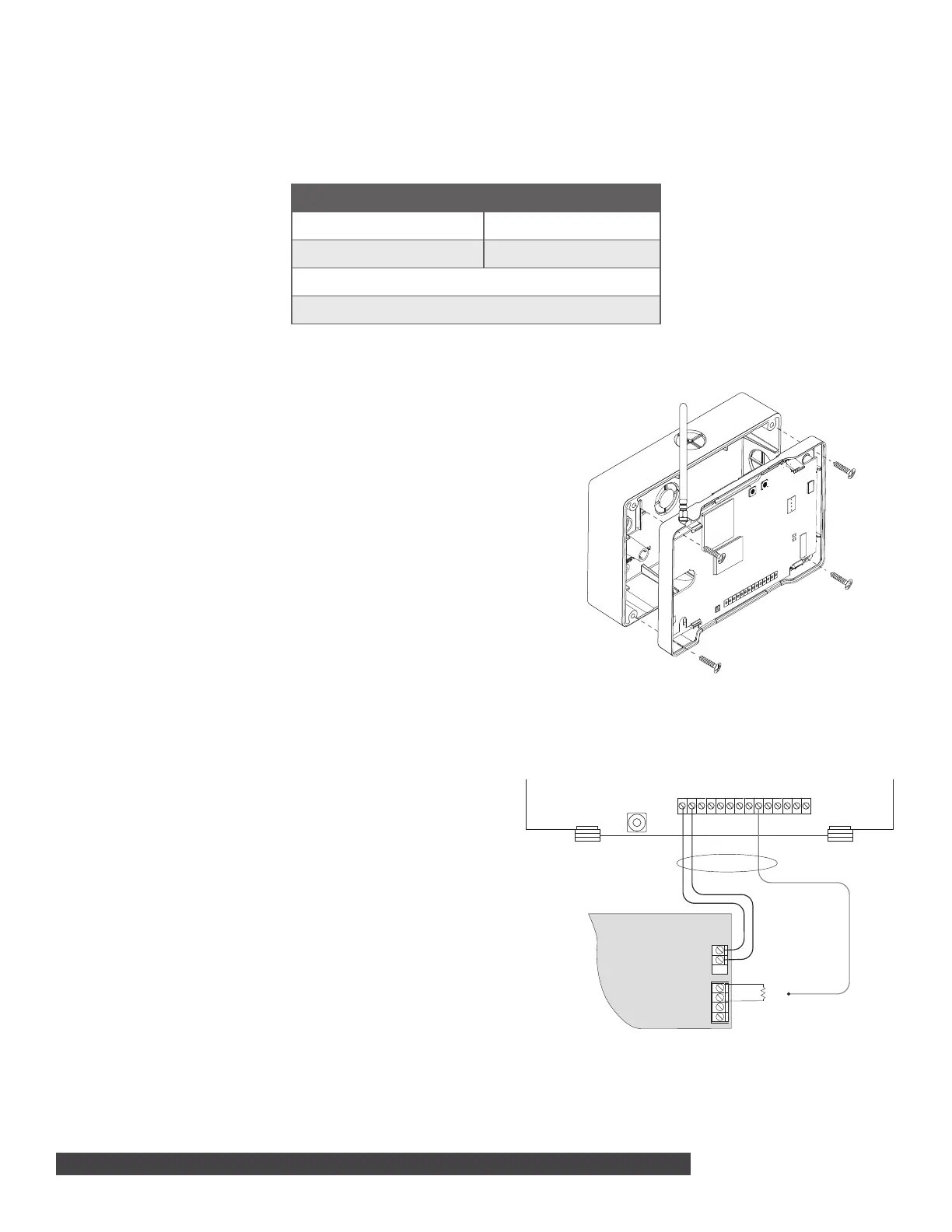
Model 685-R Backbox Installation
For Commercial Fire applications using the CellComF‑LTE
and the included red plastic Model 685‑R backbox, mount
the backbox to a wall or other flat surface with the included
#6 X 1 in. screws. Mount the communicator to the backbox
with the included #6 X 1/2 in.screws. Locate the fire
communicator within 20 feet of the control panel and route
all wire in conduit. Refer to Figure 2.
CellComF-LTE for FACP Communication Fail
Output
24 VDC Applications
For 24VDC applications using the fire communicator,
connect a keypad using a Model 330‑24 4‑wire
programming harness with in‑line resistor.
Output 1
Output 1 must be programmed as a Communication Failure
Output in OUTPUT OPTIONS.
Installation Length
Must be installed in conduit from the fire panel to the 685‑R
conduit box and located within 20 feet.
FACP Zone Input
Program FACP Zone Input to indicate a communication
trouble locally.
PROG
LOAD RESET
S
N
+DC- Z1 Z2 Z3 G +Z4- 01 02 T1 R1 T2 R2
Figure 2: Model 685 Backbox Installation
Figure 3: CellCom to FACP Wiring
+
–
Use 18-22 AWG
for Power Supply
connection
CellComF-LTE-V
+DC- Z1 Z2 Z3 G T1 R1 T2+Z4- R2O1 O2
{
{
Main Fire Alarm
Control Panel (FACP)
FACP Zone Input
FACP Zone Input
Connect to terminal with
lowest voltage
Use EOL specified
by FACP
12/24 VDC Aux Output
Ground
Output 1


 To Next Page
 Loading...