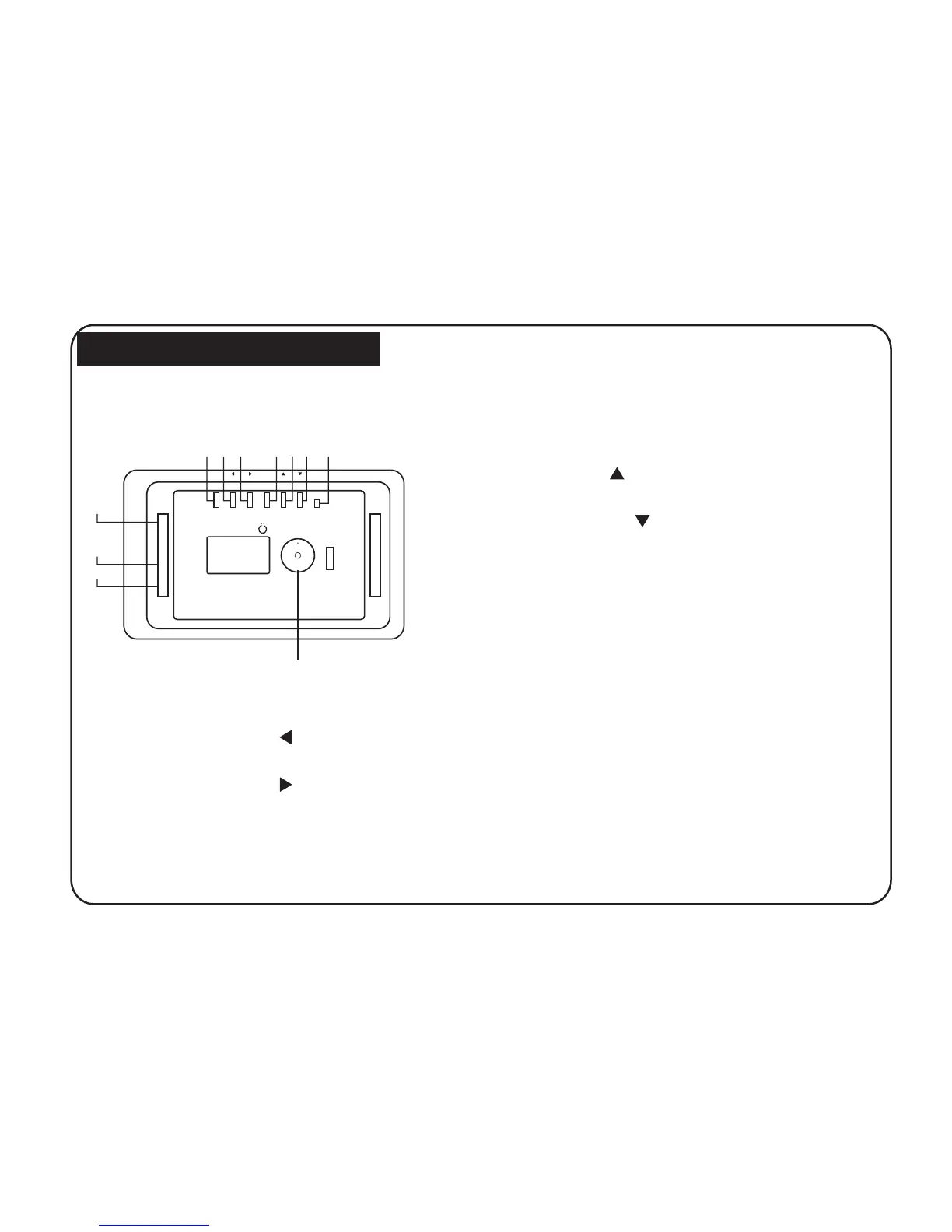
Player Overview
Key control and Key functions:
USB
DC 5V
STANDBY
EXIT
ENTER
1 2 3 4 5 6 7
8
10
11
7
1. ENTER(PLAY/PAUSE) BUTTON: Confirm that what
2. RIGHT SHIFT BUTTON( / NEXT ): Right cursor
selecting function and next photo.
3. LEFT SHIFT BUTTON( / PREV ): Left cursor
selecting function and previous photo.
4. EXIT/SETUP BUTTON: Press EXIT key to return into
5. UP BUTTON( /ROTATE ): Functional selection
6. DOWN BUTTON( / ROTATE ): Functional selection
7. STANDBY BUTTON: Ture ON/OFF the player.
9. SD/MMC CARD: The slot for DPF player to
10. USB: Connect the USB disk.
8. DC 5V:Input the DC power adapter to the DPF
Player.
11. Bracket jack.
SD/MMC
9
and Pause or Play.you choosed
connect the SD or MMC memory card.
button and Rotate 90 degrees clockwise.
PLAY/PAUSE
NEXT PREV
SETUP
ROTA TE
button and Rotate 90 degrees counter-clockwise.
ROTATE
last interface. Use for setup programs, then by pressing
long (above 2 seconds) enter to execute the command.



 To Next Page