8
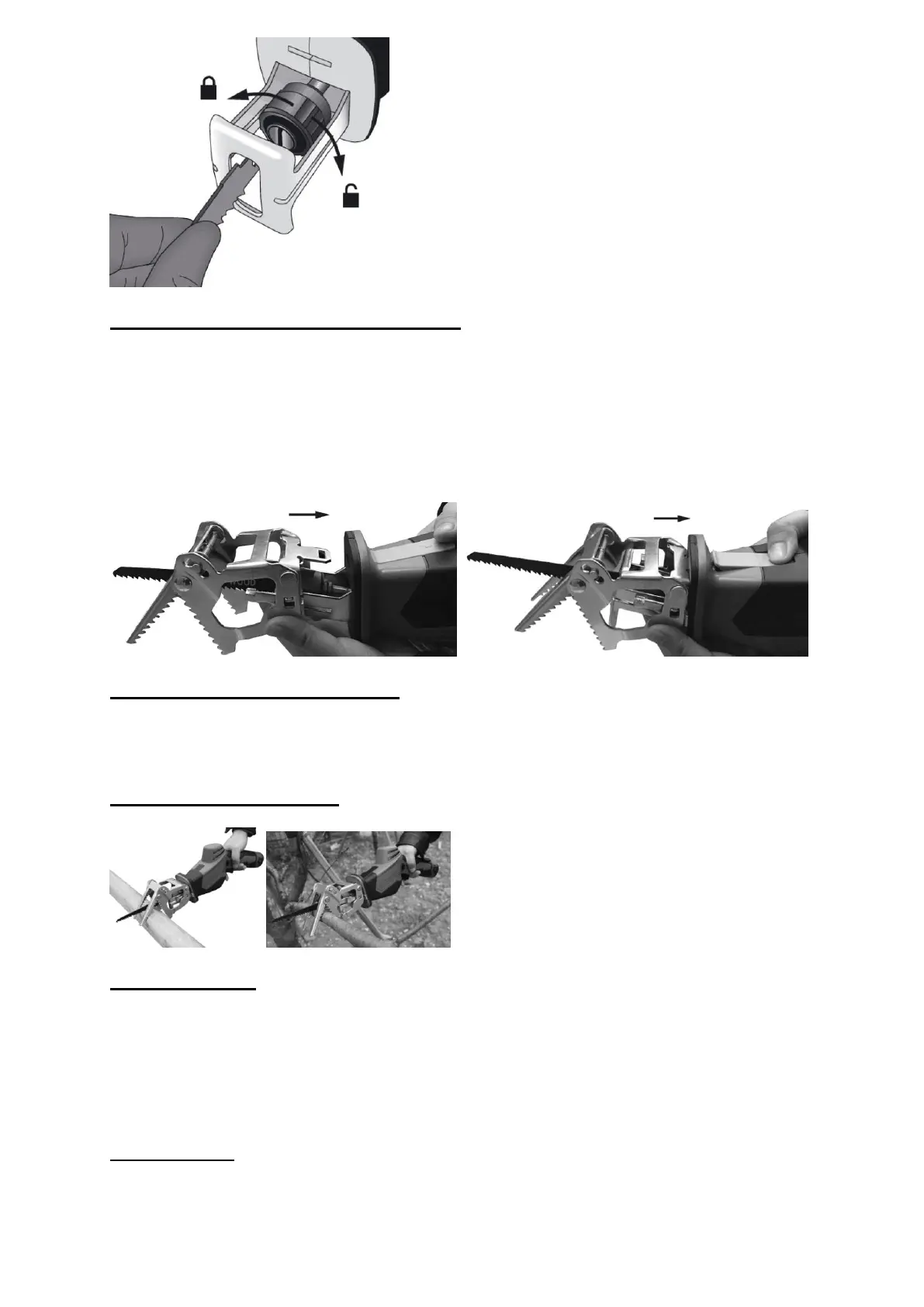
Inserting/Removing the holding bracket
Inserting the holding bracket
Press the release button
Slide the holding bracket over the guides of the shoe into the tool.
Lock the release button
Removing the holding bracket
Press the release and pull the holding bracket forward and out of the guide.
Working without holding bracket
When cutting thicker branches or sawing wood/plastic materials, working WITHOUT
holding bracket. The piece to be sawed must touch the shoe. Use a rocking motion
when cutting round pieces.
Using the holding bracket
Move the saw, applying slight downward pressure.
General Cutting:
Hold your saw firmly in front and clearly away from you. Make sure saw blade is clear
of any foreign material. Be sure material to be cut is held firmly. Small work pieces
should be securely clamped in a vice or with clamps to the work bench or table. Mark
the line of cut clearly. Press the switch to start the cutting action. DO NOT FORCE.
Use only enough pressure to keep the saw cutting. Allow the blade and saw to do the
work.
Metal Cutting:
When cutting metallic material with this tool, be sure to use a sharp blade designed
for this purpose. We recommend lubricating the cutting surface with cutting oil to
avoid heat buildup. Follow general cutting procedure on previous page. Do not force


 To Next Page