1
1 Monitor Tiandy IPC(TC-C35US) by DNAKE Indoor Monitor
1.1 IP camera monitoring
1. Connect the Ethernet cable to both IP Camera and Indoor Monitor. Please keep them under
the same LAN.
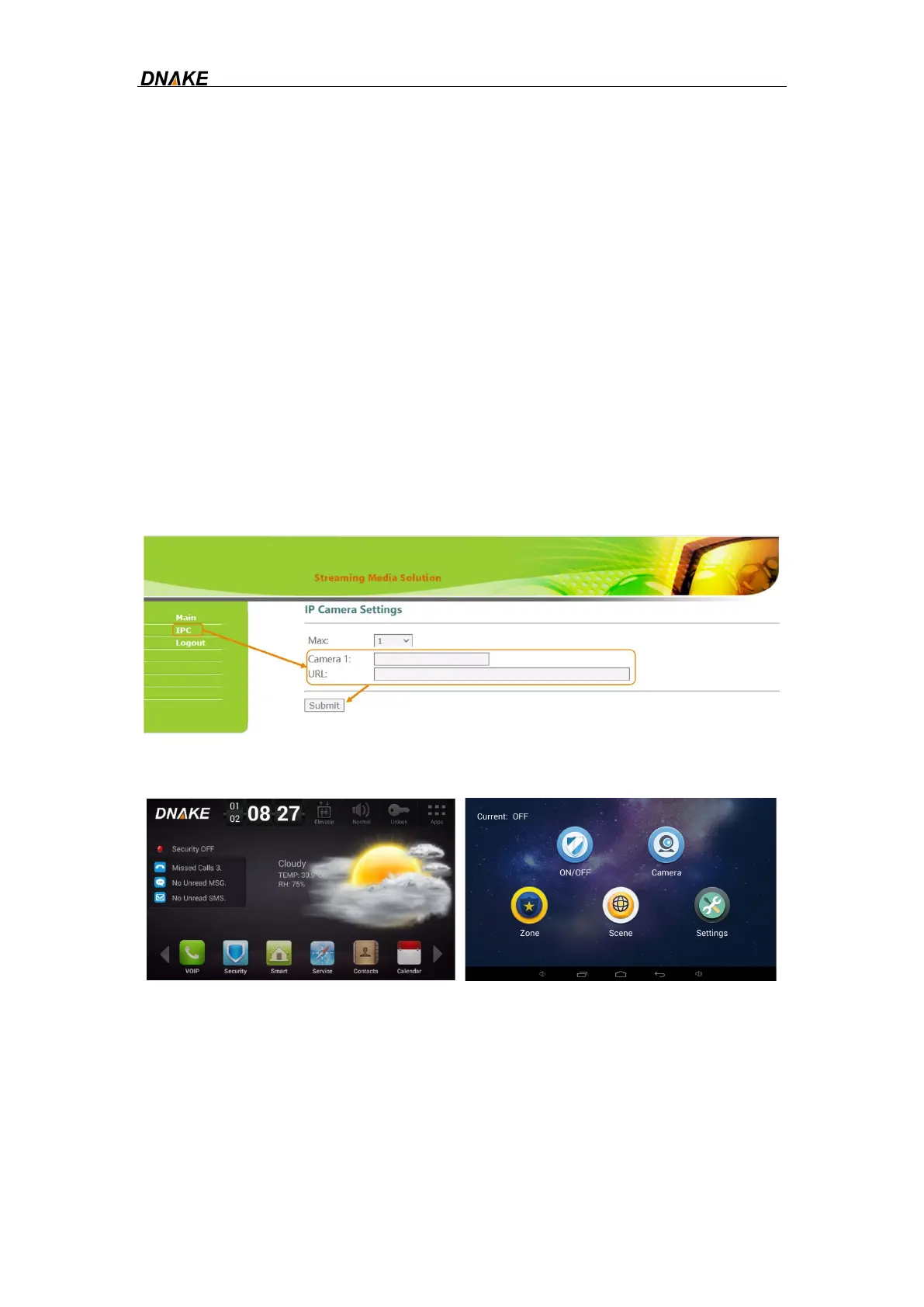
2. Add IP Camera to the Indoor Monitor on the website:
Step 1: You can double click IP address of the Indoor Monitor on the page of Remote
Upgrade to open the website. You can also put Indoor Monitor’s IP address in the
browser’s search bar to log in its webpage with account: user and password: 1234.
Step 2: Go to IPC to name IP camera and type in URL. URL contains account,
password, and IP address. Make sure URL of the IP Camera is right. Do not forget to
Submit. The format of Tiandy IPC URL is: rtsp://<Account>:<Password>@<IP
address>:554/1/1
3. Add
IP Camera to the Indoor Monitor’s Camera page
Step 1: Go to home page of Indoor Monitor and click Security.
Step 2: Click Camera to enter the monitoring page and click the upper camera icon to
monitor the camera.



 To Next Page