User Manual C-6000i Computerized Jigging Reel
10
DISPLAY
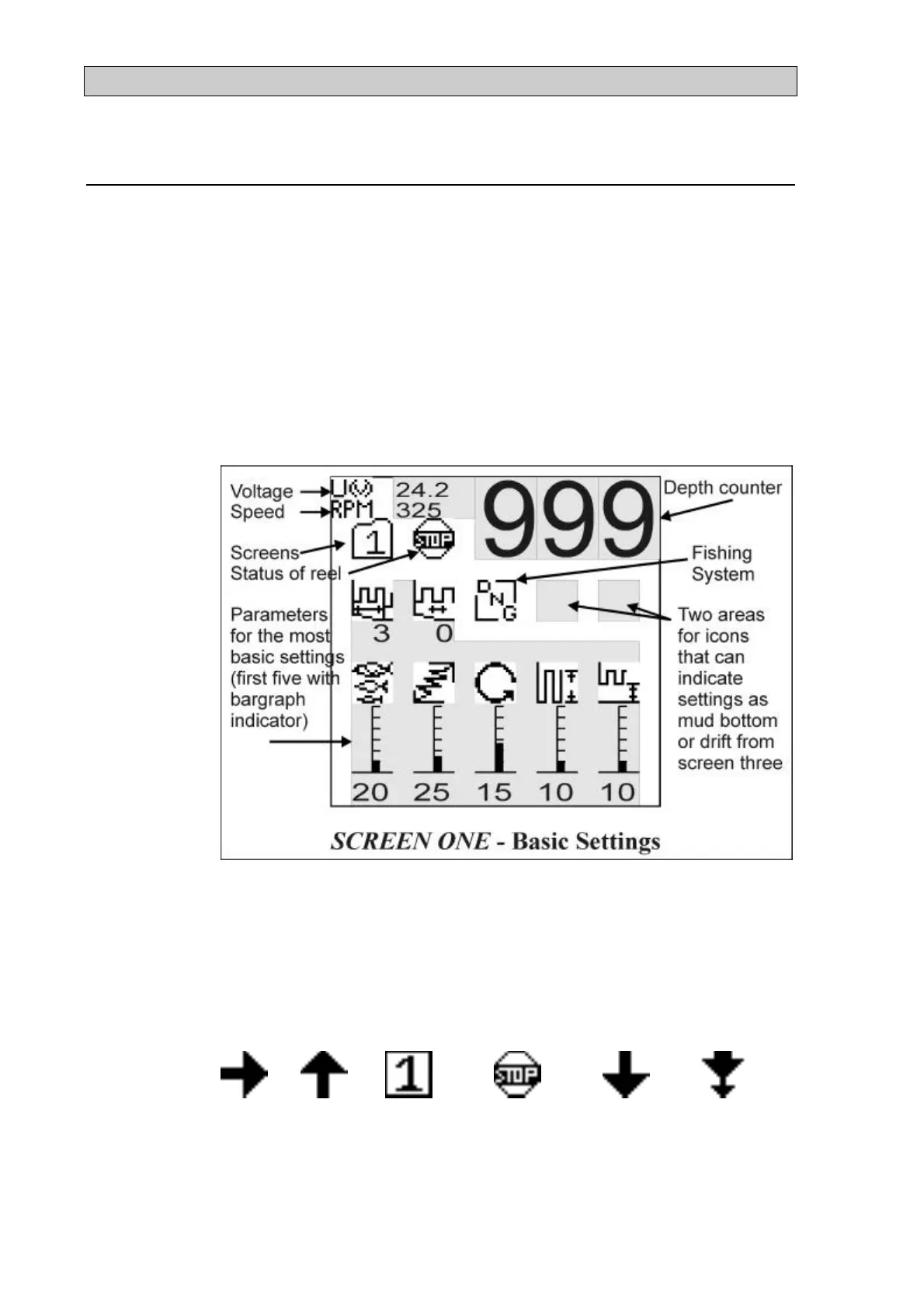
The parameters that control the reel are shown as icons on the display (see
Figure 5 for an illustration). The values of the parameters are shown below
the icons. Only a part of all the parameters can be shown on the display at
one time along with other information. The parameters are grouped into five
categories that we call screens and only one screen is shown on the display at
one time. Each screen is labeled from one to five. These screens also show
other information like the speed of the drum, the battery voltage etc. The
user controls the reel by moving between these screens and adjust the values
of the parameters.
Figure 5
The top third of the display is used for information only and will not change
when moving between screens. It shows the battery voltage and the speed of
the drum. It also shows the depth (the unit is optional: meters, feet and
fathoms) and the status of the reel i.e. if it is jigging, paying out, hauling or in
stop position.
Jigging Hauling Own jig
(the number
can be 1-5)
Stop
position
Paying out Paying out
with slow
down


 To Next Page
 Loading...