- 24 -
Please use the remote control after having removed the
protection sticker.
Press the button and choose the mode between SD
card & USB mode.
Display Press DISPLAY button to change the display mode
into frequency, remaining running time and audio
level.
Repeat Press REPEAT button, the song you are listening to is
played repeatedly. Press repeat button again to stop
the repeat function.
Press the buttons to move to previous folder, first
song of the folder is played.
Press button to move to next song.
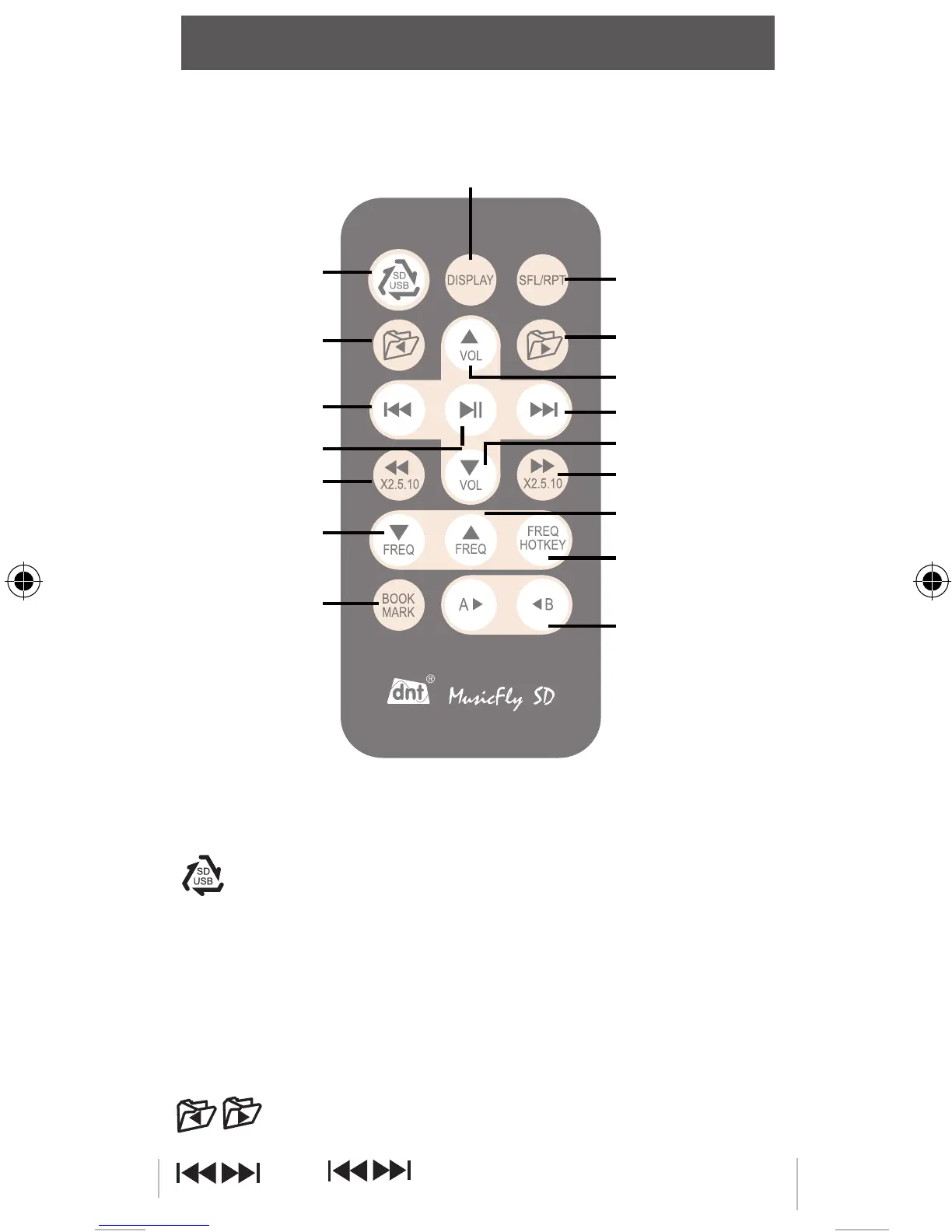
Remote Control
Changing
USB<>SD card
Move to
previous folder
Move to
previous title
Play/Pause
Rewind
Frequency down
Bookmarking
Selecting display mode
(Freq / Audio Level / Remaining time)
Repeat
Move to next
folder
Volume +
Move to next title
Volume -
Fast forward
Frequency up
Frequency
memory
A-B Repeat
MFlysdDEFN-new.indd 24 12.11.2010 11:43:16



 To Next Page