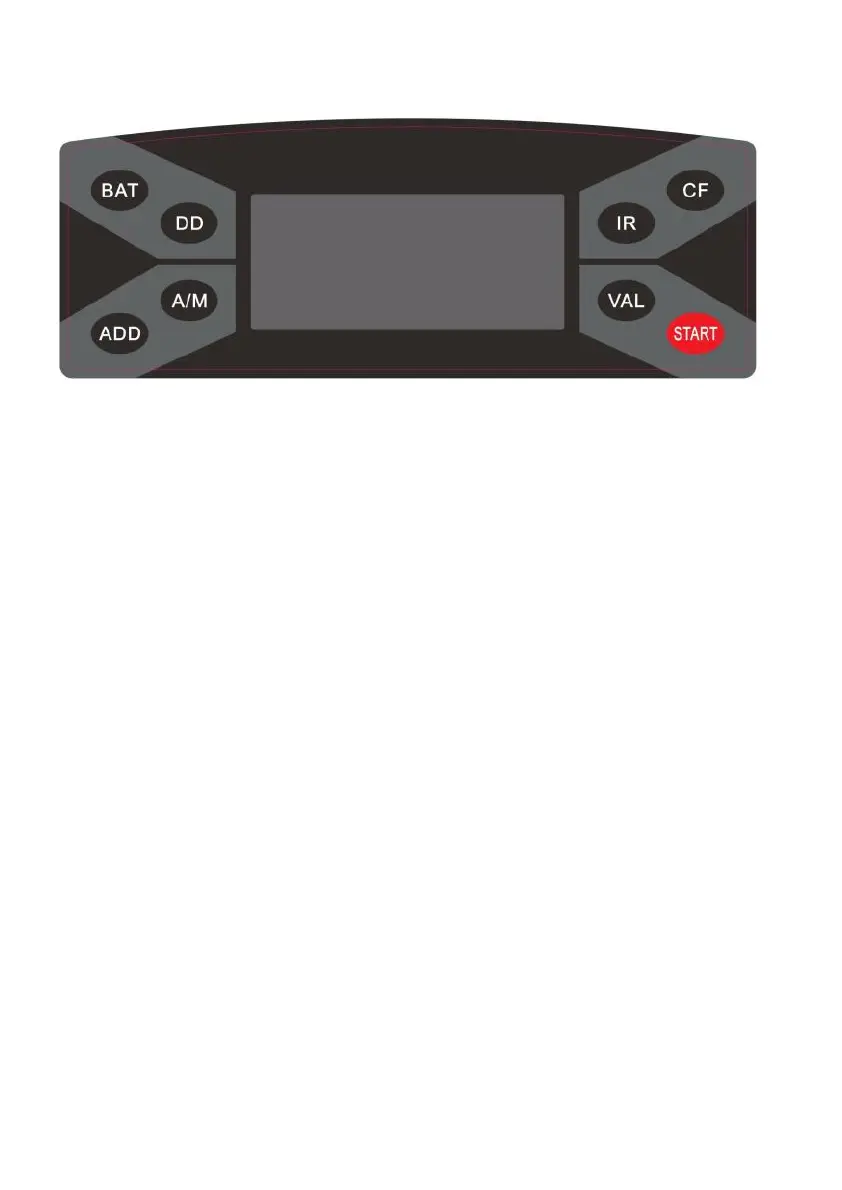
6. Control panel introduction
“BAT” button: press this button to turn on/off the BATCH
function.
“DD” button: pr ess this button to tur n on/off the DD detection.
DD detection can sort the notes whose width is more than 5mm
different from first note counted.
“A/M” button: pr ess this button to choose MANUAL or AUTO
counting mode.
“ADD” button: press this button to turn on/off the ADD function.
“IR” button: press this button to turn on/off the IR detection.
“CF” button: pr ess this button to turn on/off the UV and/or MG
detection.
“VAL” button: pr ess this button to enter denomination
calculation mode. Keep pressing this button to exit the mode.
Meanwhile you can press ADD button to add up the total value.
“START” button: pr ess this button to clear the counting number.
7. Machine start
Connect the power cord to the machine (power outlet), then plug it to
power source and turn the switch on; the unit will conduct a self-
check by spanning the feeding roller while the MG and/or UV
functions will be automatically turned on by default. The counter
display will show «0» when the unit is ready <the machine is in its
normal working condition>.
DoCash 3040 series 7 www.docash.de


 To Next Page