6. Control panel
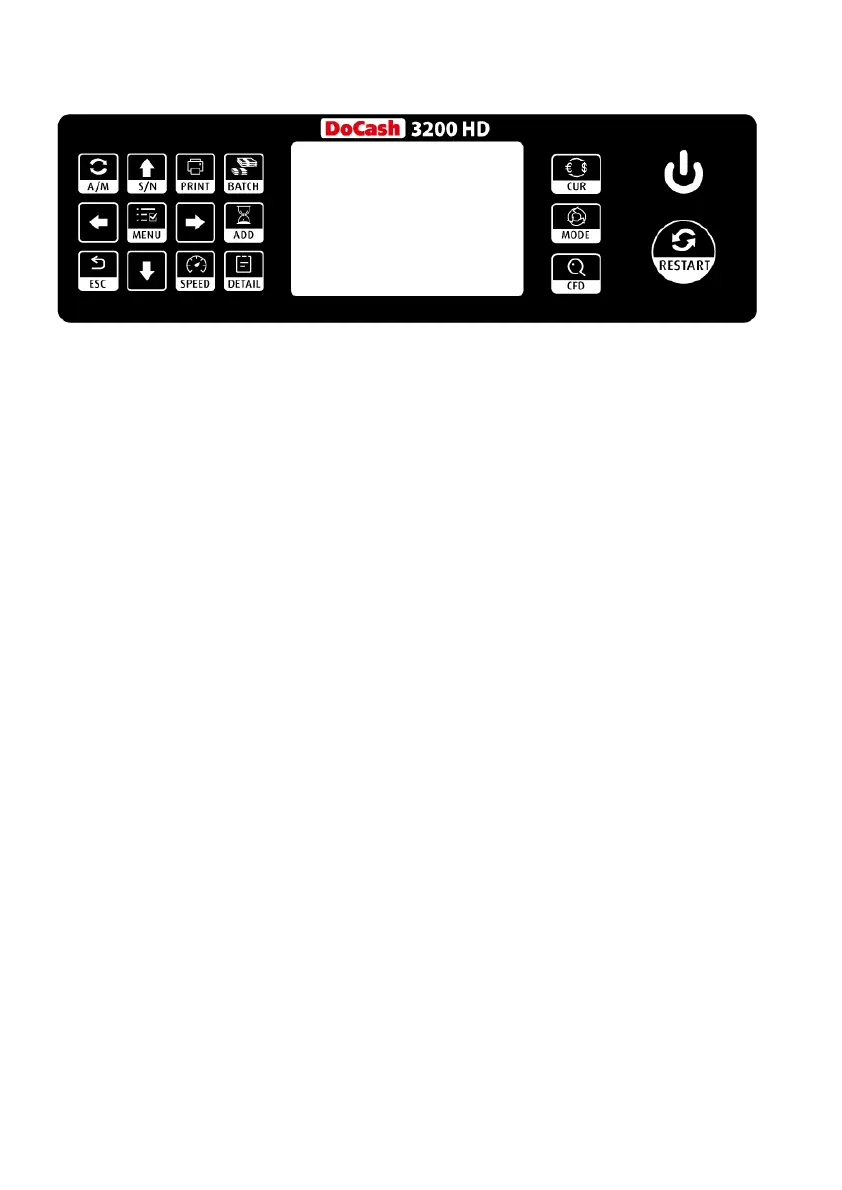
MODE: Choose CNT mode (Count), SDC mode (Single
Denomination Count) & MDC mode (Mixed Denomination Count).
CFD: Pressing this button for 3 seconds, can choose different
Counterfeit Detection Sensitivity level
CUR: Show up the available currency names in your machine and
navigate buttons and MENU to select the currency you want.
BATCH: Switch on/off batch mode.
PRINT: When your value counter is connected with a printer,
then in REPORT mode (press DETAIL to get in), press this PRINT
button to print out the detail.
A/M: Choose Auto or Manual Start
S/N: Switch on/off SN reading function
ADD: The default function is to switch on/off ADD function
SPEED: The default function is to select different available
counting speeds.
↑→ ↓←: When BATCH is on, then use ↑→ ↓←buttons to input the
batch number. And in Menu to choose currency type.
MENU: Pressing this button for 3 seconds to Enter in to Menu
while in main interface.
ESC: The default function is to clear the input or back to upper
level.
RESTART: This button is used to start counting, or back to upper
level in MENU.
DoCash 3200 HD 7 www.docash.de


 To Next Page