12 13
EN
EN
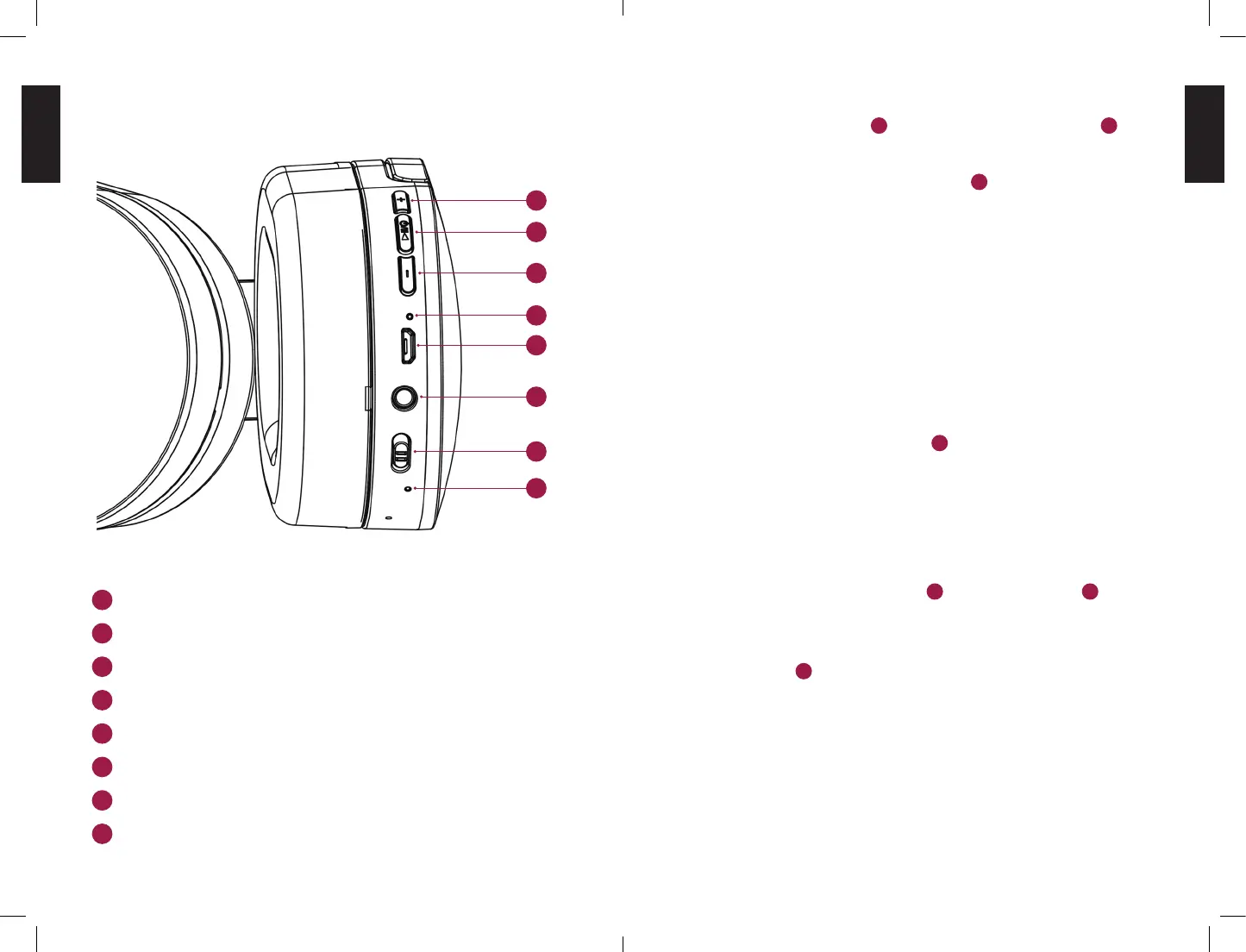
CONTROLS
Short Press: Volume up / Long Press: Next Track
Multifunctions Button / Pairing Button
Short Press: Volume down / Long Press: Previous Track
Status LED
Micro-USB Charging Port
AUX Input
Power Switch
Power Status LED
PAIR YOUR HEADPHONE:
• Slide the power switch
7
to “on” (The power status led
8
lights
up).
• Then press the multifunction button
2
a little onger (approx. 3
Sec.) and the headphones switch to pairing mode. A signal tone
is now heard and the status led ashes alternately red and blue!
• Turn on your mobile device and enable bluetooth to connect it
to your new headphone.
STANDBY MODE:
Your headphones will switch to standby mode after 15min of idle
time!
• Press the multifunction button
2
a little longer (approx. 2 sec.)
to turn the headphones back on and automatically start them
with your already paired mobile device.
UNPAIR YOUR HEADPHONE:
• Press and hold the Volume Up
1
and Volume Down
3
buttons
for 3 to 5 seconds to unpair the headphones from your smart-
phone.
The status LED
4
then ashes red and blue alternately and the
message “Your device is disconnected” is heard.
1
2
3
4
5
6
7
8
1
2
3
4
5
6
7
8


 To Next Page