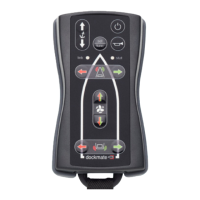
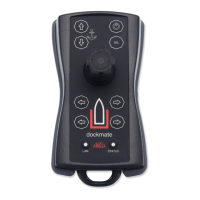
The Dockmate Twist is a wireless remote control system designed to simplify boat maneuvering. It allows users to control various aspects of their vessel with their fingertips, including engines, horn, bow and stern thrusters, and anchor winch. The system comprises two main components: a transmitter (the handheld joystick) and a receiver, which are pre-paired for immediate use.
Function Description
The primary function of the Dockmate Twist is to provide wireless control over a boat's propulsion and auxiliary systems, making docking and close-quarters maneuvering easier and more precise. The handheld transmitter, featuring a 3-axis proportional joystick and several control buttons, sends commands wirelessly to the receiver installed on the boat. The receiver then translates these commands into actions, controlling the boat's engines, thrusters, horn, and anchor winch.
The joystick offers intuitive control over the boat's movement. Moving the joystick forward engages both engines (or a single engine in a single-engine configuration) in forward gear, while moving it astern switches both engines to reverse. Sideways movements of the joystick control the thrusters: moving it to the left causes both thrusters to push the boat to port, and moving it to the right pushes the boat to starboard. For boats with two engines and only a bow thruster, moving the joystick sideways will engage the bow thruster and the two engines to facilitate sideways movement. Diagonal movements of the joystick, such as forward and right at a 45-degree angle, will engage the port engine in forward gear and steer the boat to the right. Other 45-degree angle positions operate on the same principle, allowing for combined engine and thruster actions. The Dockmate Twist is fully programmable by a dealer, enabling customization of engine and thruster combinations for any joystick position.
A unique feature of the Dockmate Twist is the twisting action of the joystick knob. Twisting the knob clockwise causes the boat to rotate clockwise (port engine forward, starboard engine astern), while twisting it counter-clockwise performs the opposite action. Pressing the knob of the joystick will sound the horn.
For enhanced control, if a "SpeedCtrl" Module is installed in the Dockmate Receiver, the joystick can also control the engine throttle proportionally: the harder the joystick is pushed, the more throttle is applied. Similarly, with thruster modules equipped with SpeedCtrl, the joystick can control the thrusters' power proportionally, with harder pushes resulting in more thrust.
Dedicated buttons on the transmitter provide control for other functions. The "Power On / Off" button turns the transmitter on and off. Pressing and holding it for 1 second turns it on. To turn it off, press it three times quickly or hold it down for 3 seconds. For safety, when this button is pressed, other signals are inhibited, and the boat controls return to neutral, regardless of the joystick's position. The "Take Command" button makes the Dockmate the active steering position. However, if a Gearbox driver is installed, this button has no effect as the Dockmate is always active.
The "Anchor Winch" buttons allow for anchor control: the upper button lowers the anchor, and the lower button raises it. Pressing both anchor buttons simultaneously allows selection between windlass 1 and 2 (indicated by 2 or 4 beeps) if the Dockmate Receiver is fitted with an AnchorX2 module. Separate buttons are also provided for the bow and stern thrusters. For the bow thruster, pressing the left button (port) provides thrust to the right, moving the bow to the left, while pressing the right button (starboard) provides thrust to the left, moving the bow to the right. The stern thruster buttons operate similarly, with the left button moving the stern to the left and the right button moving it to the right.
Usage Features
The Dockmate Twist is designed for ease of use and safety. It is highly recommended to wear the provided lanyard around the neck while operating the device to prevent accidental drops. Before taking command with the Dockmate, users must ensure that all engine and thruster levers on the boat are in the neutral position.
The transmitter incorporates several indicators for operational status and safety. A "LINK LED" shows the connection status with the receiver, as well as warnings and errors. A "Status LED" indicates the transmitter's status and if any special options are activated. A "BUZZER & VIBRATOR" provides alerts for no communication, low battery, warnings, or errors.
Upon startup, both LEDs on the transmitter will initially glow white. The LINK light will then go dark, and the STATUS LED will indicate the battery charge level. The system includes built-in safety features that check if any keys are depressed or the joystick is out of neutral during startup. If such a condition is detected, the transmitter will blink blue/violet, beep, and switch off after approximately 5 seconds, requiring a restart. Until the STATUS light is off and the LINK light is on (about 2 seconds), no keys can be pressed, and the joystick cannot be moved.
Once the transmitter is on, the LINK light will display the communication status. A solid green light indicates active communication and data transmission (when moving the joystick or pressing a button). A solid blue light signifies communication is OK in standby mode (when the joystick is not moved or no button is pressed for more than 5 seconds). A red light indicates communication has been lost or interrupted, accompanied by beeps. Yellow/green blinking indicates a warning feedback from the receiver (e.g., external interface not in command), while purple/green blinking indicates an error feedback from the receiver (e.g., external interface not powered on).
Depending on the boat's gear lever system, the Dockmate can automatically take command when the transmitter is switched on. Alternatively, command can be taken over by pressing the "SEL" button.
Maintenance Features
The Dockmate Twist system is designed to be largely maintenance-free, with the primary exception being battery charging. The transmitter is fitted with a Li-Ion battery that requires occasional charging.
When the transmitter is turned on, the Status LED provides clear indications of the battery level:
- More than 3.90V: Battery fully charged (green light).
- Between 3.45V and 3.90V: Battery OK (yellow light).
- Between 3.45V and 3.30V: Battery Warning (orange light).
- Less than 3.30V: Battery Failed (red light).
- Less than 3.00V: Battery Failed (red light).
The transmitter cannot be turned on if the battery voltage drops below 3.30V. It is highly recommended to charge the transmitter when the LED shows orange during startup.
Charging is performed wirelessly by placing the switched-off transmitter on the Dockmate Cradle or a Qi-certified wireless charger. During charging, the LEDs on the charger will change color from solid red to solid green. If the charger indicator flashes red, it means a foreign metal object has been placed on the charging pad or the charger is overheating. The Status LED on the transmitter will also flash in different colors to indicate the battery percentage during charging: orange for 0-50%, yellow for 50-80%, and green for 80-100%. Once fully charged, the Dockmate transmitter will automatically shut down, and the charger will show a red LED. If the battery is fully charged, placing the transmitter on the charger will not elicit a reaction until the voltage drops after some use.
For general cleaning, both the transmitter and receiver can be wiped with a damp cloth.
Precautions and Safety
Several precautions are outlined to ensure safe operation and prevent damage to the device or injury to users. The transmitter is sensitive to magnetic fields and should be kept at least 1 meter away from devices like compasses that generate such fields, as this can disturb joystick operation. When charging, if the Dockmate Cradle is not powered by the receiver but directly by the mains, or if using another Qi-certified charger, the transmitter must always be switched off before charging, as the charger's magnetic field can disturb the joystick if the transmitter is on.
Users are warned not to disassemble the transmitter or receiver, as touching internal parts can lead to injuries, and repairs should only be performed by licensed technicians. The device should not be used near flammable gases or liquids to prevent explosions or fires. It must be kept out of reach of children due to small, swallowable parts and the choking hazard posed by plastic packaging. The lanyard should also be kept away from small children.
The Dockmate may only be used by individuals skilled in maneuvering a yacht. It should not be used if the transmitter or receiver has been immersed in water, as this can cause irreparable damage. Both devices should be tested in a safe environment before use. Communication between the transmitter and receiver can be disturbed by other radio frequency transmitters in the vicinity in exceptional circumstances. Using the Dockmate from ashore or a jetty is a criminal offense in several countries.
The system also includes a troubleshooting guide for common issues, such as the receiver not working (check if the transmitter is off or fuse is blown), transmitter not working or low battery (charge batteries), or the transmitter falling into water (rinse, dry, and allow to ventilate for 24 hours before reassembly and testing). For issues like red Status LED or receiver beeps, checking the power supply or contacting a technician for internal settings is advised.


 To Next Page
 General