3
SR606
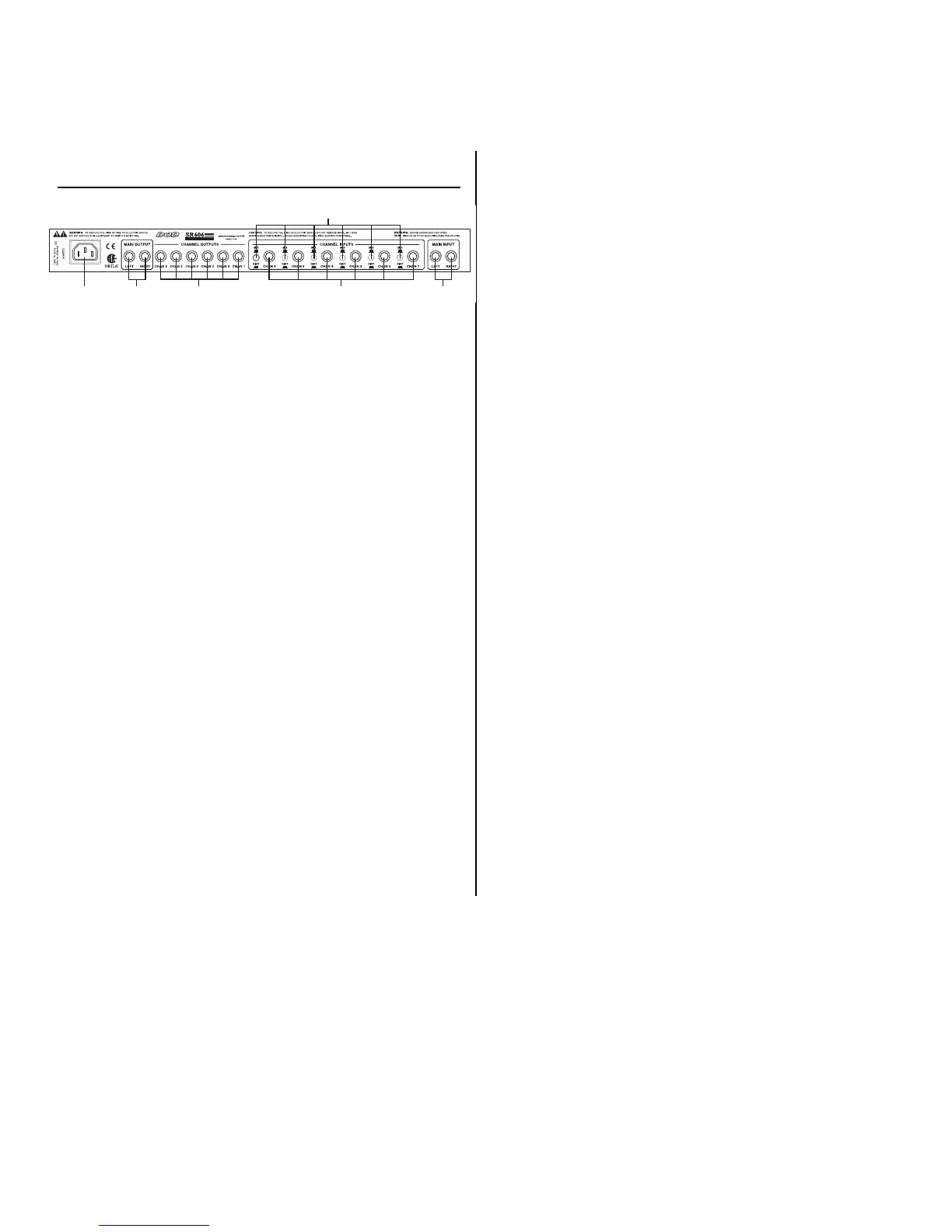
REAR PANEL
1. Power Receptacle - Connect the detachable Power cord from here to an
AC outlet
2. Main Output - These Left and Right Outputs can receive signal from the
Left and Right Inputs, or the Channel 1-6 Inputs, or a combination, depending on
your application.
3. Channel 1- 6 Outputs - The Channel 1-6 Outputs can receive signal from
the Main Inputs, or from the Channel 1- 6 Inputs, or a combination, depending
on your application.
4. Channel 1 - 6 Mix/Dist Switch -These switches selects individual Channels
of the SR606 to be used as a distribution amp, or as a line mixer. When the
switches are depressed, the SR606 will act as a distribution amp. When the
switches are not depressed, the SR606 will act as a line mixer.
NOTE: If using the SR606 as a line mixer, make sure that all switches are out.
This will prevent the unit from self oscillating.
5. Channel 1 - 6 Inputs - These are the Inputs for Channel’s 1 - 6, which can
be routed to the Left and Right Outputs,or the Channel 1- 6 Outputs, or a com-
bination, depending on your application.
6. Main Inputs - These Left and Right Inputs can deliver their signal to the
Channel 1 - 6 Outputs, the Left and Right Outputs, or a combination, depending
on your application.



 To Next Page