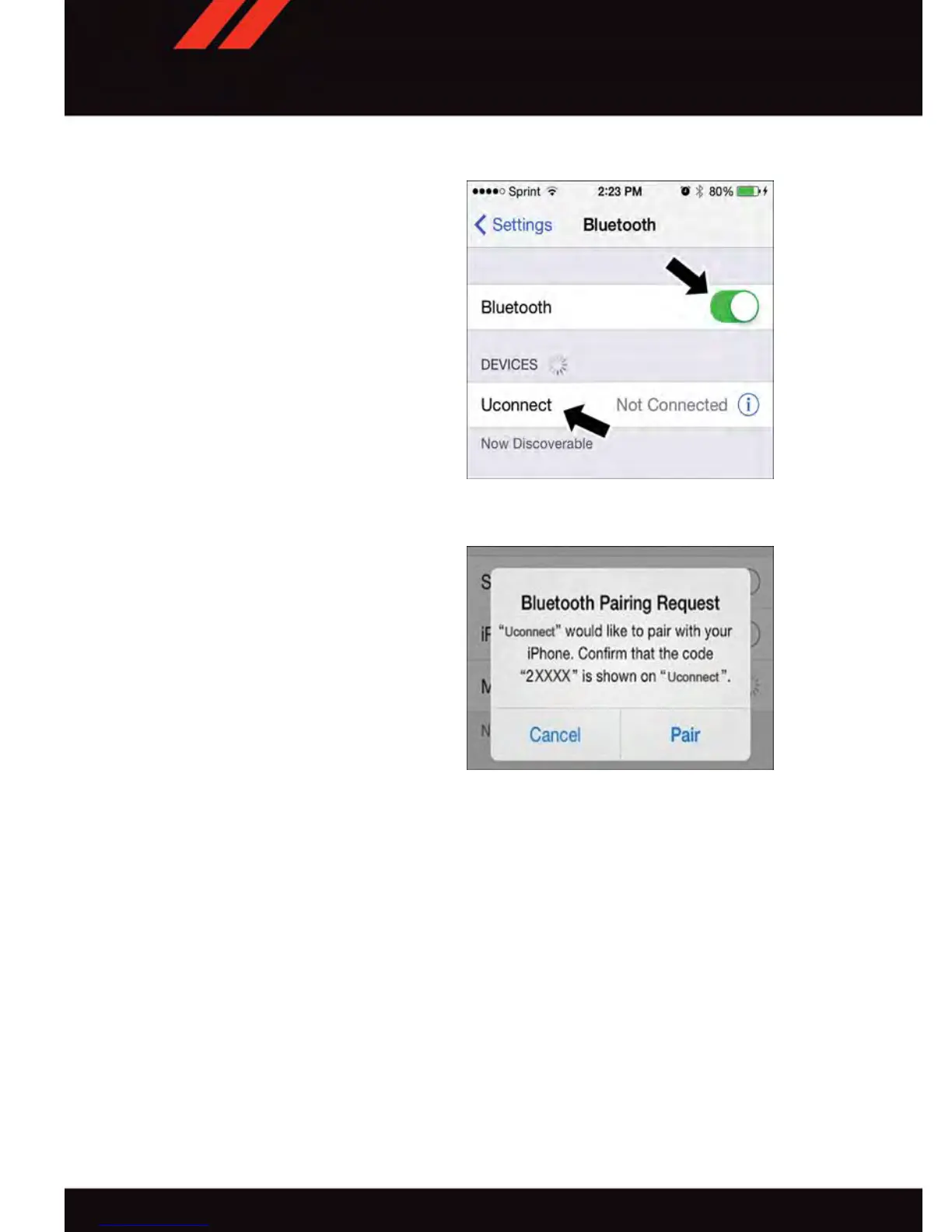
Pair Your iPhone®:
To search for available devices on your
Bluetooth
®
enabled iPhone
®
:
1. Press the Settings button
2. Select Bluetooth
®
•
Ensure the Bluetooth
®
feature is en-
abled. Once enabled, the mobile phone
will begin to search for Bluetooth
®
connections.
3. When your mobile phone finds the
Uconnect
®
system, select “Uconnect.”
Complete The iPhone® Pairing Procedure:
1. When prompted on the mobile phone,
accept the connection request from
Uconnect
®
Phone.
NOTE:
Some mobile phones will require you to
enter the PIN number.
Select The iPhone's Priority Level
When the pairing process has successfully completed, the system will prompt you to
choose whether or not this is your favorite mobile phone. Selecting “Y es” will make this
mobile phone the highest priority. This mobile phone will take precedence over other
paired mobile phones within range and will connect to the Uconnect system automatically
when entering the vehicle. Only one mobile phone and/or one Bluetooth audio device can
be connected to the Uconnect
®
system at a time. If “No” is selected, simply select
“Uconnect” from the mobile phone/audio device Bluetooth screen, and the Uconnect
system will reconnect to the Bluetooth device.
Bluetooth® On/Uconnect Device
Pairing Request
ELECTRONICS
84







 To Next Page