Using The Touchscreen Radio
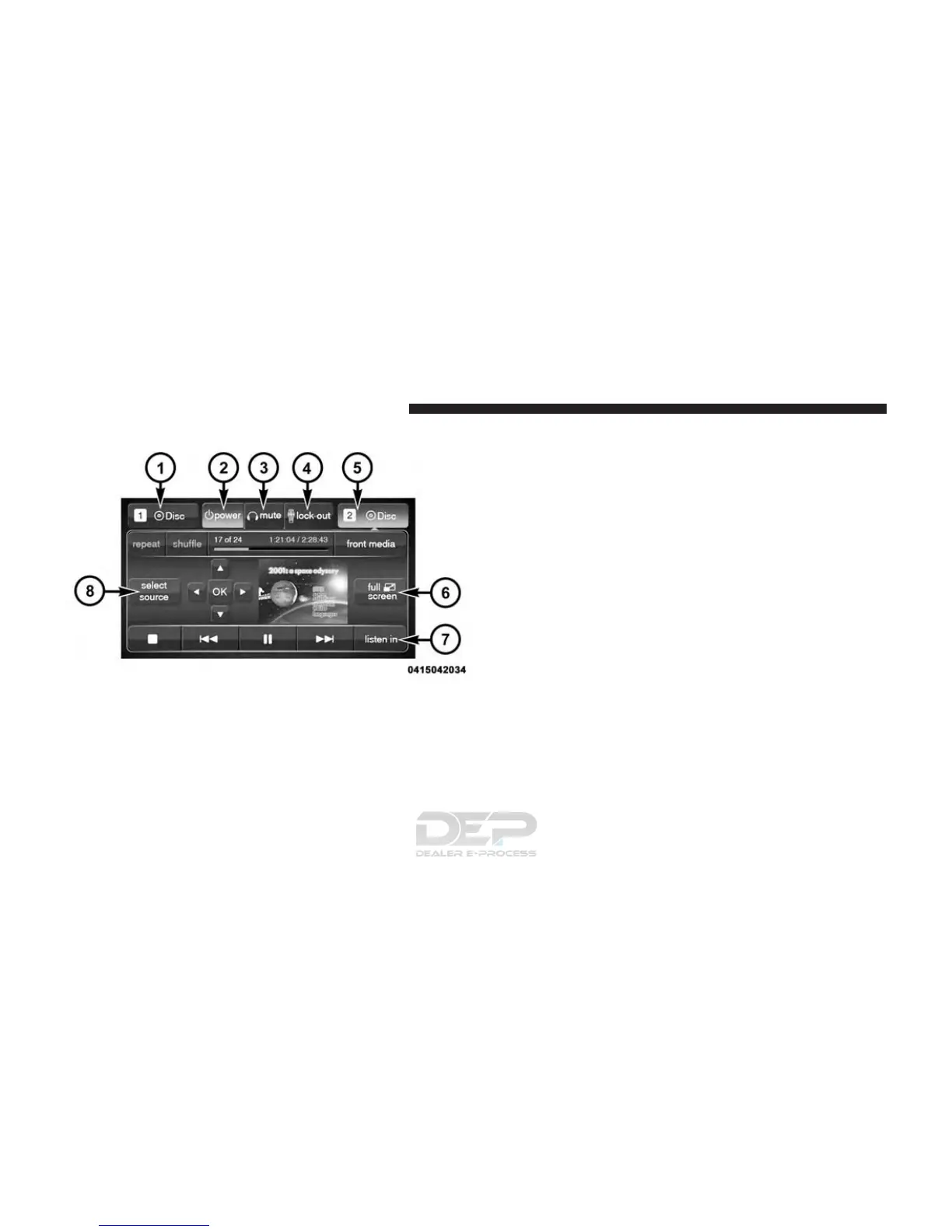
1. RSE Channel 1 Mode
Indicates the current source for Screen 1/Channel 1; This
button will be highlighted when it is the active Screen/
Channel being controlled by the front user. If this button
is not highlighted select button to access controls for
Screen 1/Channel 1 source.
2. RSE Power
Press to turn RSE On/Off.
3. RSE Mute
Mute rear headphones for the current ignition cycle.
Pressing mute again will unmute rear headphones.
4. RSE Remote Control Lock Out
Press to enable/disable Remote Control functions.
5. RSE Channel 2 Mode
Indicates the current source for Screen 2/Channel 2; This
button will be highlighted when it is the active Screen/
Channel being controlled by the front user. If this button
is not highlighted select button to access controls for
Screen 2/Channel 2 source.
Rear Media Control Screen
386 UNDERSTANDING YOUR INSTRUMENT PANEL















 To Next Page