NOTE: Pressing the screen on the radio while a DVD or
Blu-ray Disc is playing, brings up the basic remote
control functions for DVD play such as scene selection,
Play, Pause, FF, RW, and Stop. Pressing the X in the upper
corner will turn OFF the remote control screen functions.
Important Notes For Dual Video Screen System
•
The Rear Seat Entertainment System is able to transmit
two channels of stereo audio and video simultaneously.
• The Blu-ray Disc Player can play CDs, DVDs and
Blu-ray Discs.
• Selecting a video source on Rear 1, the video source
will display on Rear 1 and can be heard on Rear 1.
• Selecting a video source on Rear 2, the video source
will display on Rear 2 and can be heard on Rear 2.
• Audio can be heard through the headphones even
when the screen(s) are closed.
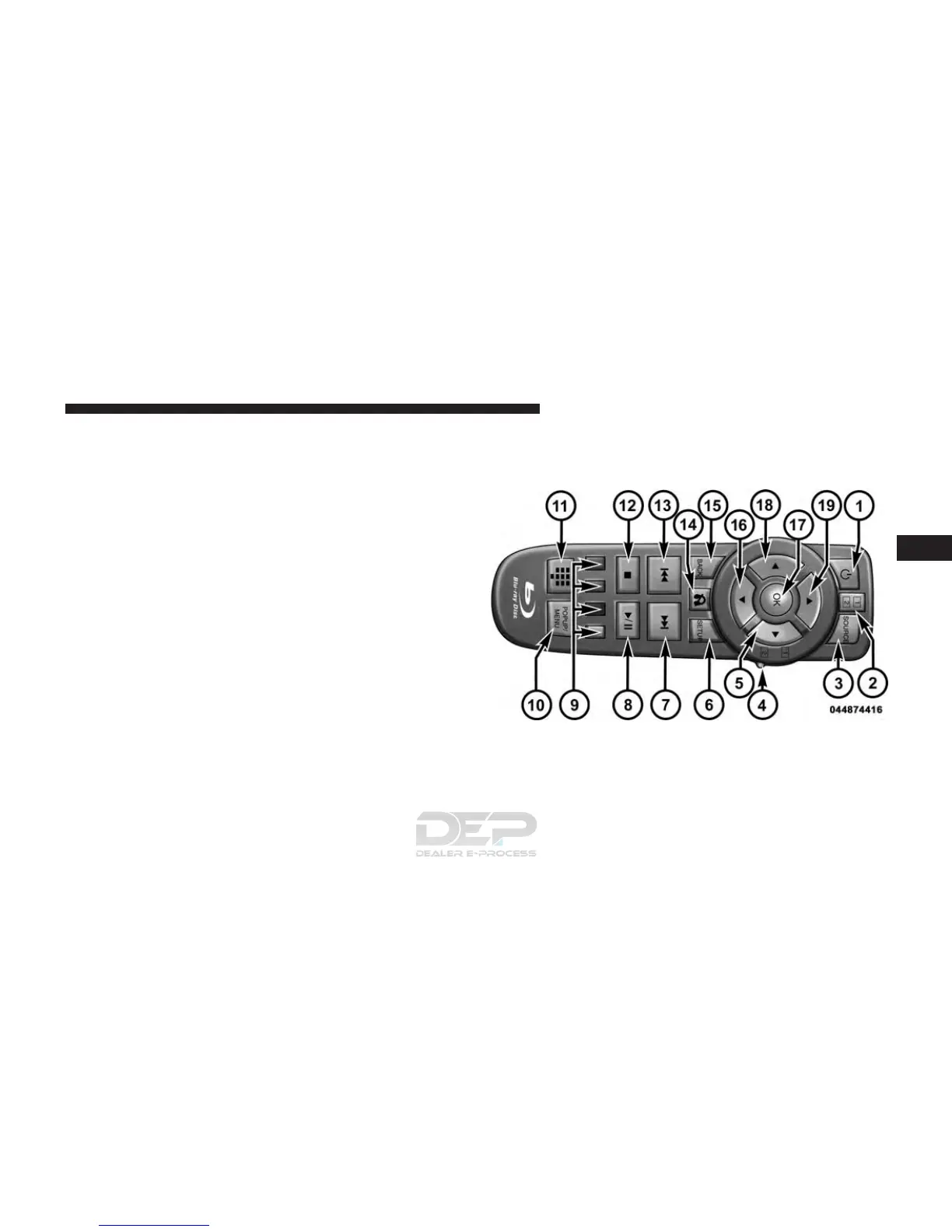
Blu-ray Disc Player Remote Control —
If Equipped
Blu-ray Player Remote Control
4
UNDERSTANDING YOUR INSTRUMENT PANEL 391















 To Next Page