SiriusXM™ Satellite Radio
“39”
“Foxxhole”
SiriusXM™ Navigation
“Navigate to (Address)”
“Navigate to (Point of Interest)”
NOTE:
• For the shortened SiriusXM™ Satellite Radio mode commands to be recognized you
must be in that mode. For example, if you are in SiriusXM™ Satellite Radio mode you
can say “39”, but if you are not in SiriusXM™ mode, you would need to say “Tune to
Satellite Channel 39.”
• For additional information on available V oice Commands, visit
www.driveuconnect.com/features/entertainment/ and select V oice Commands.
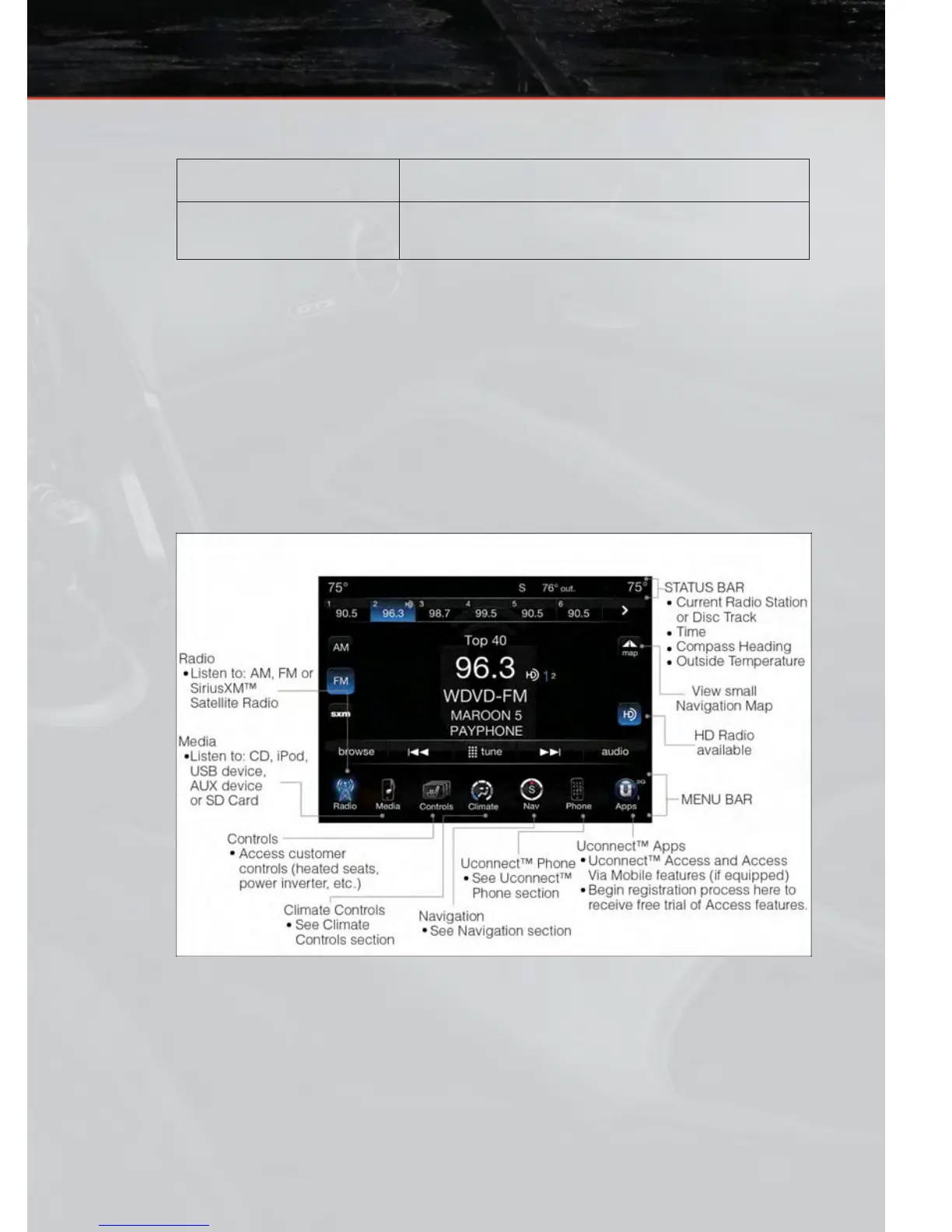
Uconnect™ 8.4AN
Uconnect™ 8.4AN AT A GLANCE
Displaying the Time
• If the time is not currently displayed on the radio or player main page, touch the
Settings soft-key or the Apps soft-key and then the Settings soft-key. In the Settings list,
touch the Clock soft-key then touch the check box next to Show Time in Status Bar .
ELECTRONICS
43









 To Next Page