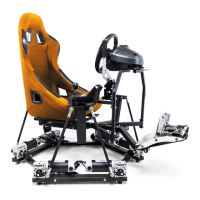
5.9 The simulator behaves strangely while playing games
There are many reasons you may experience this behavior, but the most common reasons are:
- The simulator is not in balance.
- The simulator doesn’t have the right settings for you. (We supply generic settings, but they
might not match your preferences, weight distribution, or accessory setup).
- The rig might be too heavy.
5.10 Platform sometimes shakes while in motion
The platform is not a precise scientific tool and designed for amusement purposes.
SRS -> Setup -> Motion test sliders motions can't be used to test platform coordination and
smoothness. Moving the sliders with the mouse or keyboard won't do proper coordinated
commands to the platform to judge the smoothness. In order to do proper testing:
1) check that all 6 motors black arms are at the same level when at natural position: Remove
all rods and shock absorbers, set the angles of all black arms on the motors exactly the
same level according to instructions in chapter 5.3
2) unzip this file to a new folder https://dofreality.com/HeaveTest.zip
3) run RunTest.bat. if you don’t have running numbers in the black window check error
messages with a link in it. You might need to download MS .Net 3.5. and run RunTest.bat
again until you see running numbers .
4) set following tuning settings in SRS https://dofreality.com/wp-content/uploads/2020/11/teststune1.png
https://dofreality.com/wp-content/uploads/2020/11/teststune2.png
5) make sure you are sitting in the sim and weight is about balanced and center of weight is in
the center of the platform. You can experiment with moving your body around the crib.
6) Make a video filmed from the side of the platform with this test and someone in the seat so
we can clearly see all 6 motors moving in pairs. https://www.youtube.com/watch?v=l8RRoI1uMIE
and email it to sales@dofreality.com
6 Repairing the simulator
The simulator should under no circumstances be repaired by unauthorized personnel without
consulting DOF Reality first. Failing to comply may cause damage to equipment and/or injury.
7 Technical Specifications
Motion Simulator for computer gaming
Brand: DOF Reality
Model: DOF REALITY H6/P6
Power input: 100-120/210-240VAC, 50/60Hz
Power consumption: 2400Watt
Peak current: 20.0/10.9A
Short-circuit rating: 60A (30A for each control box)
IP number: 1P190305.DR0W93
Total Weight: 87.300 kg
Made in Ukraine by: “DOF REALITY” LLC
Zaporizhzhya, Harchova, 17/94, Ukraine, 69014
EN 60204-1:2006/AC:2010, EN 60335-2-82:2003/A1:2008, EN 60335-1:2012+A11:2014; EN
55014-1:2006+A1:2009+A2:2011; EN 61000-3-2:2014; EN 61000-3-3:2013. 2019
http://dofreality.com/CE.pdf


 To Previous Page
 Loading...