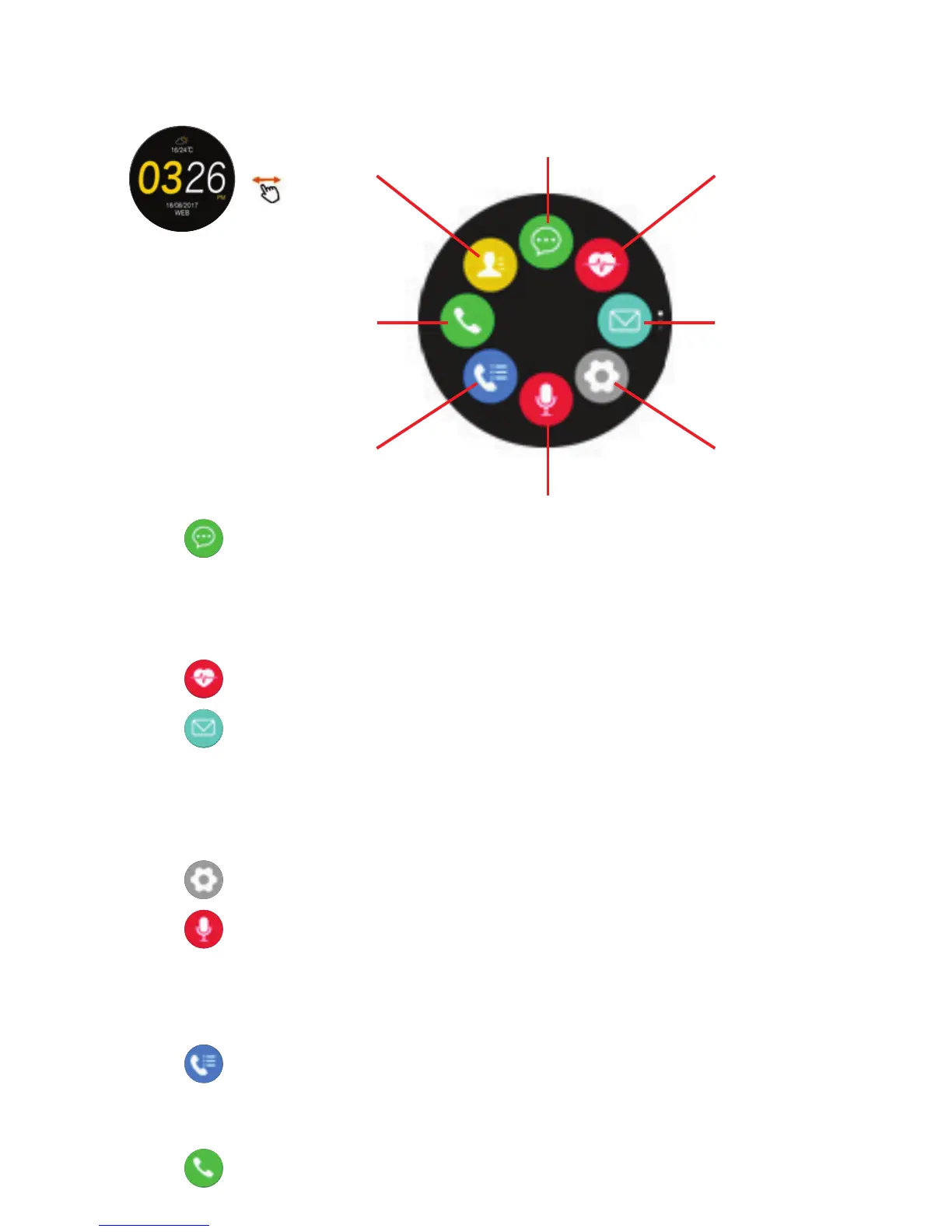
4.1 Notification:
4.1.1 In ME page of the App, select Device Setting/Message Push and
select those message applications you with to receive on your
Smartwatch.
4.1.2 Tap on message for details.
4.2 Heartrate: (See sections 2.3.5 and 3.7).
4.3 Message:
4.3.1 Check messages received.
4.3.2 Tap on message to see details.
4.3.3 To make a short reply to Smartphone, scroll through message and
select reply: iPhone does not support this message synchronization
function yet: (see later software updates).
4.5 Siri:
4.5.1 Once connected with your Smartphone device, you can search for
information, weather, and set the alarm, etc. through the Siri
function.
4.5.2 This function is only available for iPhone.
4.6 Call logs:
4.6.1 Displays calls received, missed, dialed from your Smartphone.
4.6.2 Tap on call to reply or phone back. iPhone does not support this
function yet: (see later software updates).
4.7 Dialer:
Make phone calls by dialing appropriate number.


 To Next Page
 Loading...