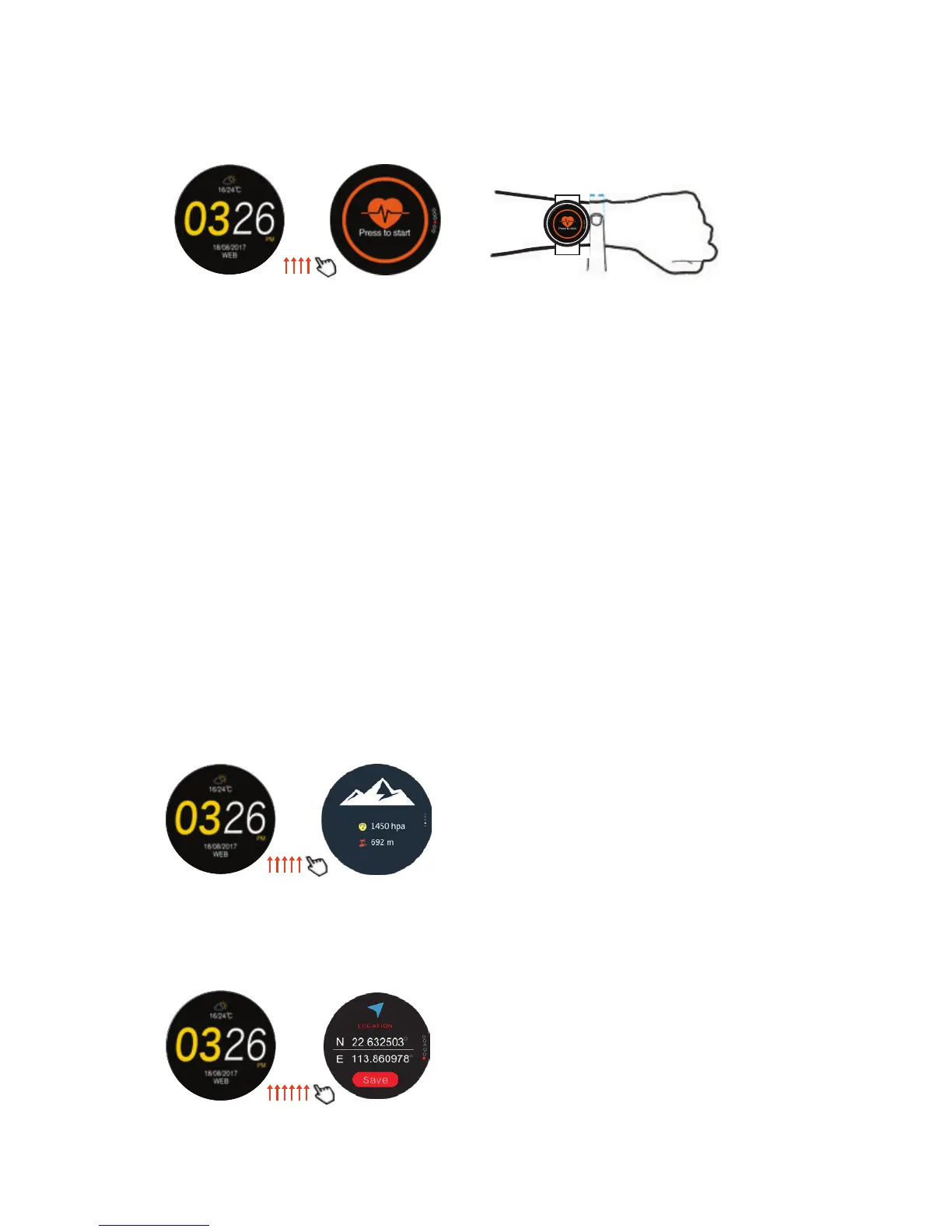
3.8 Air pressure / Altitude:
3.8.1 Will be given in imperial or metric as selected in App
(see settings 7.4 for calibration).
3.9 Location:
3.9.1 Ensure that GPS is on to determine the current location.
3.9.2 Tapping save button no longer necessary due to firmware update.
Main screen Pressure/
Altitude
Main screen Location
3.7 Dynamic Heart rate:
3.7.1 Ensure that Smartwatch is tightly attached in correct position as
indicated below.
3.7.2 Tap heart icon to determine current heart rate.
3.7.3 Swipe right to left to select manual or auto for heart rate monitoring.
3.7.3.1 Manual will only measure your heart rate when requested
(tap “press to start” to measure heart rate).
3.7.3.2 Select auto to continually have your heart rate recorded
(whenever you enter this mode the current heart rate will reflect).
3.7.3.3 When in Sports mode and heart rate is selected, you will receive
continual heart rate whether you are in manual mode or auto mode.
3.7.3.4 While in auto mode (and not in a sports mode) the heart rate will
not sync with Smartphone: only when it is reverted to manual.
3.7.4 When determining heart rate the initial readings might be inaccurate:
request heart rate more than once if readings received are considered
unrealistic.
Heart rate
Main screen


 To Next Page
 Loading...