08
Use the unit
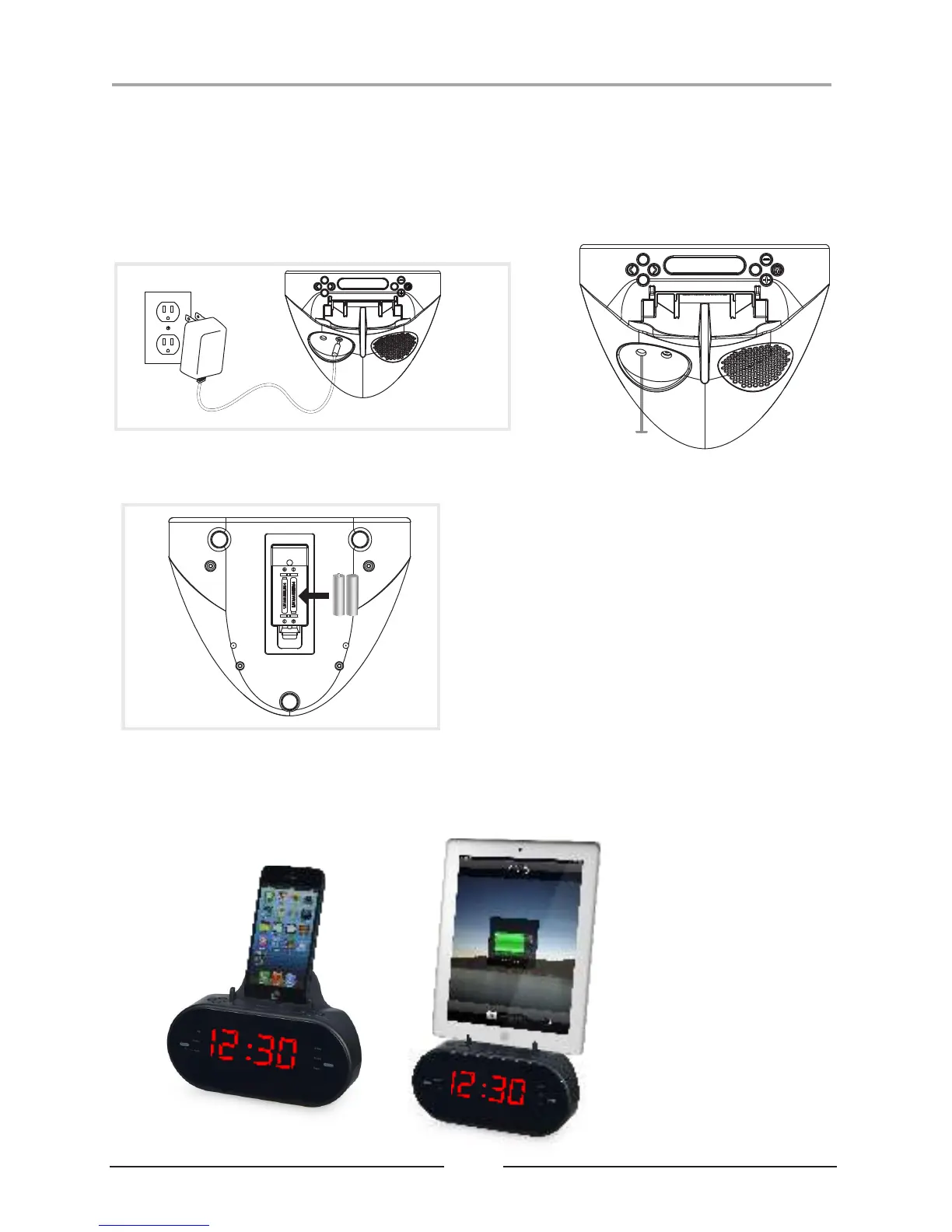
Power
Plug the included AC/DC power adapter
(100-240V ~50/60Hz 1.5A max) into the
DC POWER INPUT on the dock and an
AC power outlet to power the dock.
SNOOZE/SLEEP
VOL+/AL1
VOL-/AL2
POWER
SOURCE
DIMMER
TUN-/
TIME-
TUN+/
TIME+
PRESET/CLK
Line Input
SNOOZE/SLEEP
VOL+/AL1
VOL-/AL2
POWER
SOURCE
DIMMER
TUN-/
TIME-
TUN+/
TIME+
PRESET/CLK
The battery backup is intended
for short power outages only
The clock radio's primary
functions cannot run off of the
battery backup alone.Requires
2 AAA-size, batteries (not included)
.
Battery Back up
1. iPhone/iPad or other phones stand.
Put them on your desk, table etc.
When placing a tablet or
large device in the
cradle, pull out the
extendable board for
stability and preventing
the unit from falling over.
How to Charge Your Devices


 To Next Page