14
Operation (continued)
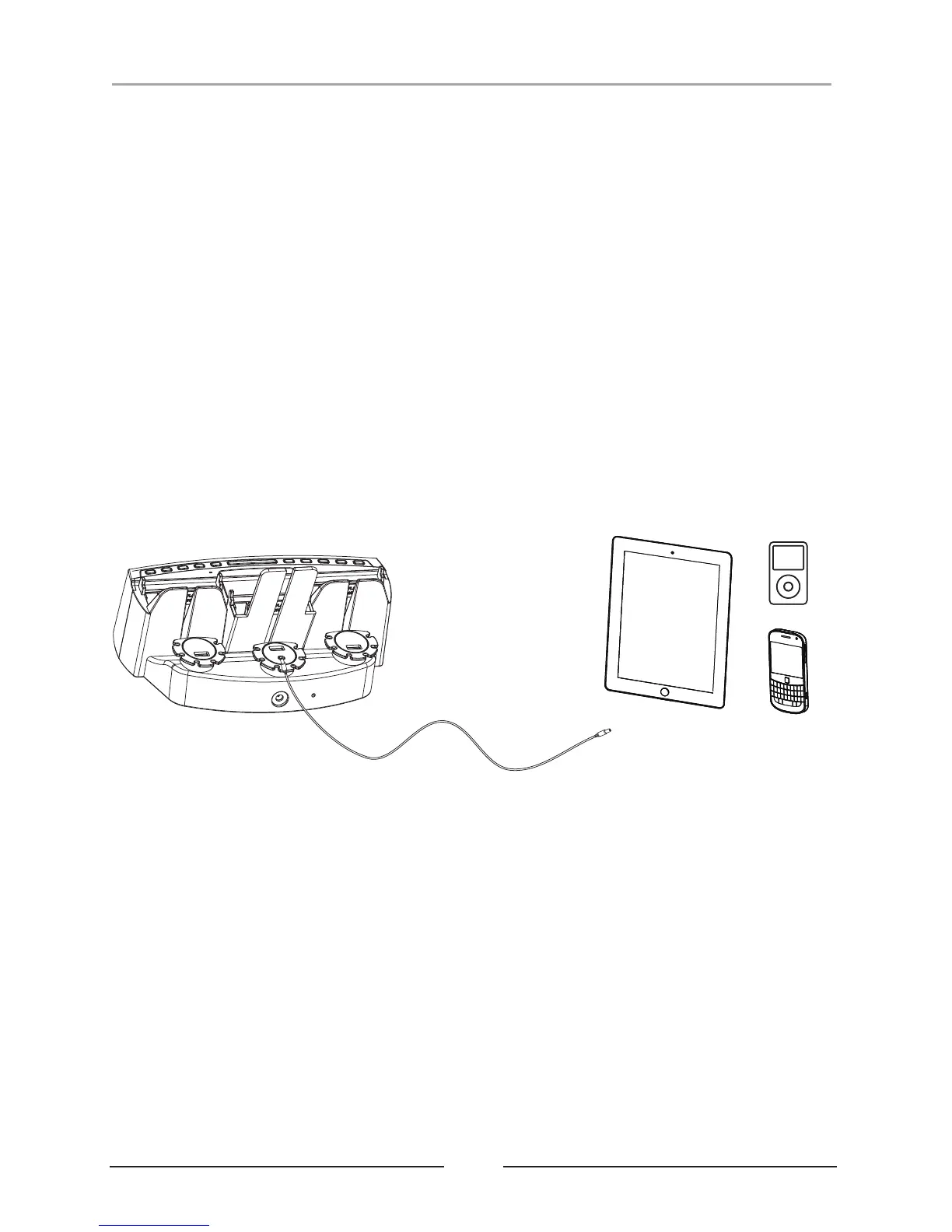
Using the Audio Input/Line Input (AUX-In) Jack Cable (included):
You can play your portable audio device and/or smart device with a standard 3.5mm
headphone jack audio patch cord/speaker cable (included) using the AUX-In Jack.
1. Plug one end of a standard Aux-In cord into the Aux-Out/Headphone Jack of your
device and the other end into the unit's Aux-In Jack, located on the back of the unit.
2. Power ON the unit and select to AUX IN mode by using SOURCE button
3. Turn on and play the personal/smart device.
4. Press and release the + or - to adjust the system volume. You may need to adjust
the volume on your external device as well;
6. You can answer the phone while AUX IN is plugged in. The caller’s voice will come
through the speaker (talk to your phone's mic only, do NOT talk to the unit mic area).
When the caller hang ups, your music will be automatically resumed.
5. Select SOURCE again to turn the unit off. Your personal/smart device will continue
playing until you use the device's controls to stop.
WARNING: When the AUX IN Speaker Cable is plugged into the Unit, the Bluetooth
feature will not work.
Connect to the Smart
Devices AUX IN/Line In
Headphone Jack
or
or


 To Next Page