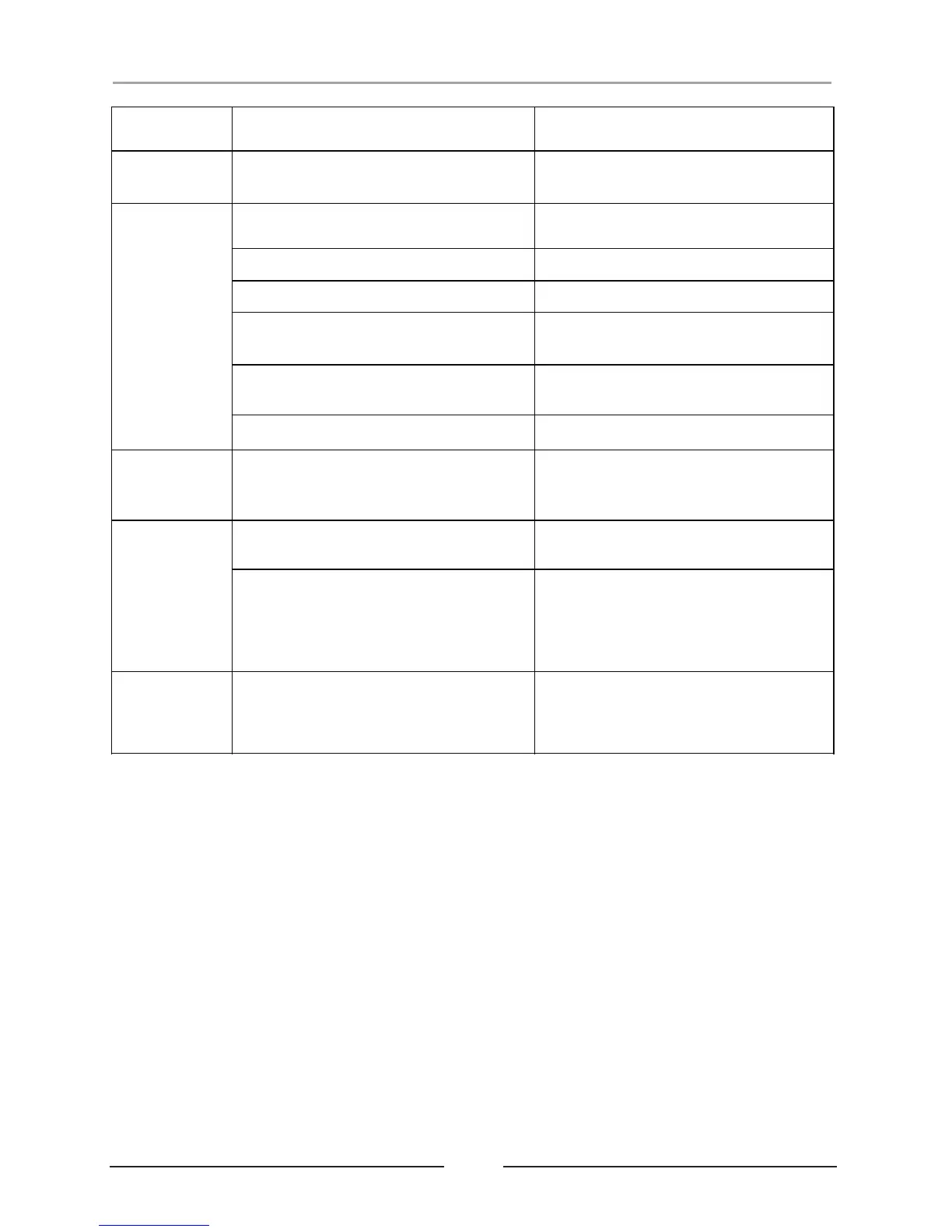
Power cord does not plug into the wall
socket.
Plug the power cord into a working wall
socket.
Power cord disconnected or loose.
Check the connection or the power cord.
Bluetooth not paired or disconnected.
AUX IN cable disconnected or loose.
Listen the Bluetooth but AUX IN cable is
connected.
Disconnect the AUX IN cord.
Your personal/smart device volume
setting is too low.
Turn up the volume on your personal/
smart device.
Can not get
paired with
Bluetooth:
AUX IN cable is connected.
Unplugged the AUX IN cord from the
unit.
Volume level is set too high.
Decrease the volume on your personal/
smart device.
Sound source is distorted.
If the personal/smart device sound
source is old or of poor quality, distortion
and noise are easily noticed with high-
power speakers. Try a different audio
file from a trusted source.
Tablet/MID's/
Smart Device
won't charge:
You may have plugged into the wrong
USB Charging ports (5V/1.1A-white).
Plug the device into the RED USB
Charging Port. Only the RED port
provides the necessary 5V/2.1A power
for most tablets or smart devices.


 To Next Page