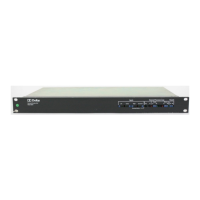
The Dolby DP590 Object Authoring Tool is a specialized device designed for creating immersive audio broadcasts for television and set-top box users. It functions as a metadata authoring and emulation tool, enabling broadcast audio mixers to craft immersive environments, particularly for live events like sports. The DP590 integrates dynamic objects into broadcast and streaming transmissions, aiming to enhance viewer involvement and connection to the content.
Function Description:
The DP590 receives Pulse Code Modulation (PCM) audio, processes it to create presentations of dynamic objects, and facilitates local monitoring of the resulting audio experience. Subsequently, it transmits metadata information about these dynamic objects and presentations to the next stage in the broadcast chain, typically the DP591 Dolby Audio Encoder. This collaborative system, which also includes the DP580 Dolby Reference Decoder, works to improve the audio experience for viewers. The DP590 generates user-defined presentations by combining "beds" (static audio channels) and dynamic objects, along with positional and gain metadata. The DP591 then receives this dynamic metadata from the DP590 and encodes it with source PCM signals, making them usable audio signals for other broadcast stream components. The DP580 decodes and renders these signals using Dolby technologies for reception by TVs or set-top boxes.
Key features of the DP590 include:
- Support for various speaker configurations: stereo, 5.1, 5.1.2, and 5.1.4.
- Ability to render a selected presentation and monitor mode to a Multichannel Audio Digital Interface (MADI) output.
- Ingestion of 32 out of 64 PCM channels via a MADI input, and rendering of created presentations (up to 16 channels per presentation) to the MADI output.
- Capability to send metadata to other units within the system.
- A mix graph for placing up to 16 dynamic objects and 16 presentations of designated object environments for repeated use.
- Provision of metering information for both inputs and outputs.
Important Technical Specifications:
- Dimensions:
- Height: 44 mm (1.75 in)
- Width: 483 mm (19 in)
- Depth: 394 mm (15.5 in)
- Weight: 6.84 kg (15.05 lb)
- Power Requirements: 100 to 240 V AC, 50-60 Hz, 350 W.
- Environmental Specifications:
- Operating Temperature: 0° to 40° C
- Storage Temperature: -20° to 70° C
- Relative Noncondensing Humidity: 20% to 80%
Connectivity (Rear Panel Components):
- AC power connector
- MADI or AES IN port (unbalanced 75Ω female BNC connector per AES-10id-2005 (SMPTE 276M) for PCM signals)
- Gigabit Ethernet port (not in use)
- MADI OUT port (for PCM signals)
- Four AES OUT ports
- Video IN port
- Two SDI IN ports
- Two SDI OUT ports
- Four USB 2.0 ports
- Gigabit Ethernet port (COMMAND) - Connects to a network for unit administration via a PC web-based user interface.
- Gigabit Ethernet port (MEDIA)
- VGA video port
- Serial video port
Usage Features:
The DP590 offers a comprehensive set of features for authoring and managing immersive audio content:
- Session Management: Users can create new sessions or open existing ones. A session file stores a collection of presentations with defined beds and dynamic objects. New sessions open automatically upon client launch. Sessions can be saved for reuse.
- Adding Beds and Dynamic Objects: The tool allows the creation of beds (static audio channels) and dynamic objects. Supported bed types include Stereo (2.0), 5.1, 5.1.2 (5.1 with two height speakers), and 5.1.4 (5.1 with four height speakers). Note that only 2.0 and 5.1 beds are supported across the entire broadcast chain for transmission, while other configurations are for DP590 rendered output monitoring only. Dynamic objects can be added to beds.
- Assigning to Input Channels: Beds and dynamic objects must be mapped to MADI input channels to become active. This is done via a routing interface where users drag and drop bed types and dynamic objects to desired MADI channels.
- Enabling Dynamic Objects for Presentations: Dynamic objects and beds are enabled for specific presentations, making them available for reuse. Presentations can be named and customized.
- Setting Dynamic Object Parameters: Individual dynamic objects can have parameters configured, including gain (-49 to +15 dB), sound category (None for general audio, Dialog for voices), and 3D field placement (X, Y, and Z values, where Z represents height from 0 to 1.00).
- Creating Target Device Configurations: For each presentation, users can create configurations tailored to different target devices (e.g., TVs or set-top boxes with stereo, 5.1, or Dolby Atmos capabilities) to accommodate various speaker layouts.
- Setting Speaker Configuration: The number of Dolby Atmos speakers used for monitoring the unit's output can be selected via the settings menu.
- Setting Production Renderers: This feature allows the creation of legacy transmission format alternatives (2.0 and 5.1 mixes) to the main Dolby Atmos mix. These alternative mixes are sent through a console to a legacy encoder or embedder via the MADI output.
- GPIO Configuration: The General Purpose Input/Output (GPIO) option enables control of some DP590 functions from a connected console, typically through a JNIOR Ethernet controller (a third-party product). This allows selection of presentations or monitoring configurations.
- Monitoring Local Output: Users can listen to the output of any configuration using the target device drop-down list, enabling them to assess how a dynamic object rendering configuration will sound before generating metadata.
- Monitoring Loudness Value: The DP590 can monitor loudness values according to ITU-R BS.1770-3, ITU-R BS.1770-3 with DI, and EBU R128 standards.
- Monitoring Audio Meters: Audio meters display input and output signals, allowing verification of PCM inputs and rendered presentation outputs across the 64 MADI channels.
- Connecting to a DP591: The DP590 connects to a DP591 Dolby Audio Encoder to send metadata as part of the broadcast. This involves configuring the IP address of the DP591.
- Sending Metadata to the DP591: After establishing presentations, metadata is transmitted to the DP591 for encoding. Users can select which presentations to include in the metadata transmission. Program IDs can be generated to reflect presentation name changes in the metadata.
Maintenance Features:
- Installation: The DP590 is designed for rack mounting in a 1-U rackspace. Proper ventilation is crucial, and the front-panel ventilation area should not be blocked.
- Network Configuration: The COMMAND port network connection is used for management via a web browser. Network settings (Static IP or DHCP) can be configured using the front-panel navigation keys. The IP address can be checked on the user-control screen.
- Client Software: The DP590 client software, compatible with Microsoft Windows 7 or later, is downloaded and installed to control unit functions. The GUI allows connection to the DP590 server or offline work.
- Front Panel Indicators: The front panel includes LEDs for Input, Audio, Video, and Error, providing visual status feedback. It also features a power failure indicator and an over-temperature indicator for diagnostic purposes.
- Reset Button: A reset button is available on the front panel.
- User Interface: A user-control screen and navigation keys on the front panel provide direct control and information display.
- Headphone Jack and Volume Control: A headphone jack with a volume control knob allows for local audio monitoring.
- Dim Button: A dim button is available on the front panel.

 Need help?
 General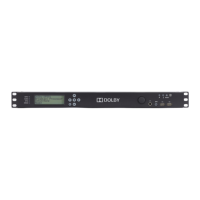

 To Next Page