CFF20, CFF35, CFF45, CFF70DZ Operation
27
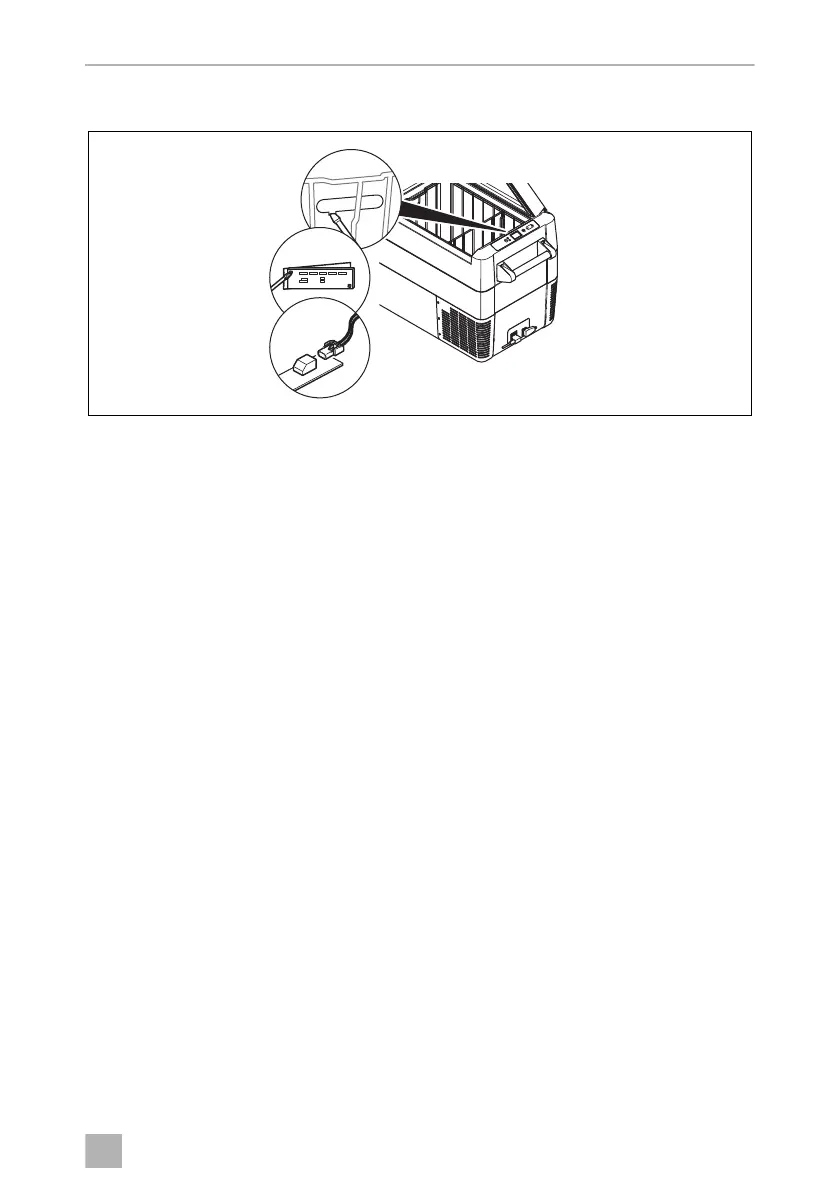
6.14 Replacing the light PCB
➤ Disconnect the power supply to the device.
➤ Pry out the transparent cover with a screwdriver (1).
➤ Unscrew the PCB mounting screws (2).
➤ Pull out the plug from the PCB (3).
➤ Replace the defective light PCB with a new one.
➤ Fit new PCB using reverse of removal instructions.
➤ Press the transparent cover back into the housing.
➤ Reconnect the power supply to the device.
DometicCFF20-35-45-75DZ_OPM_4445103133_APAC(en)_202x-xx-xx.book Seite 27 Dienstag, 20. Oktober 2020 4:16 16


 To Next Page