4
EN
Cooktop
4 INSTALLATION
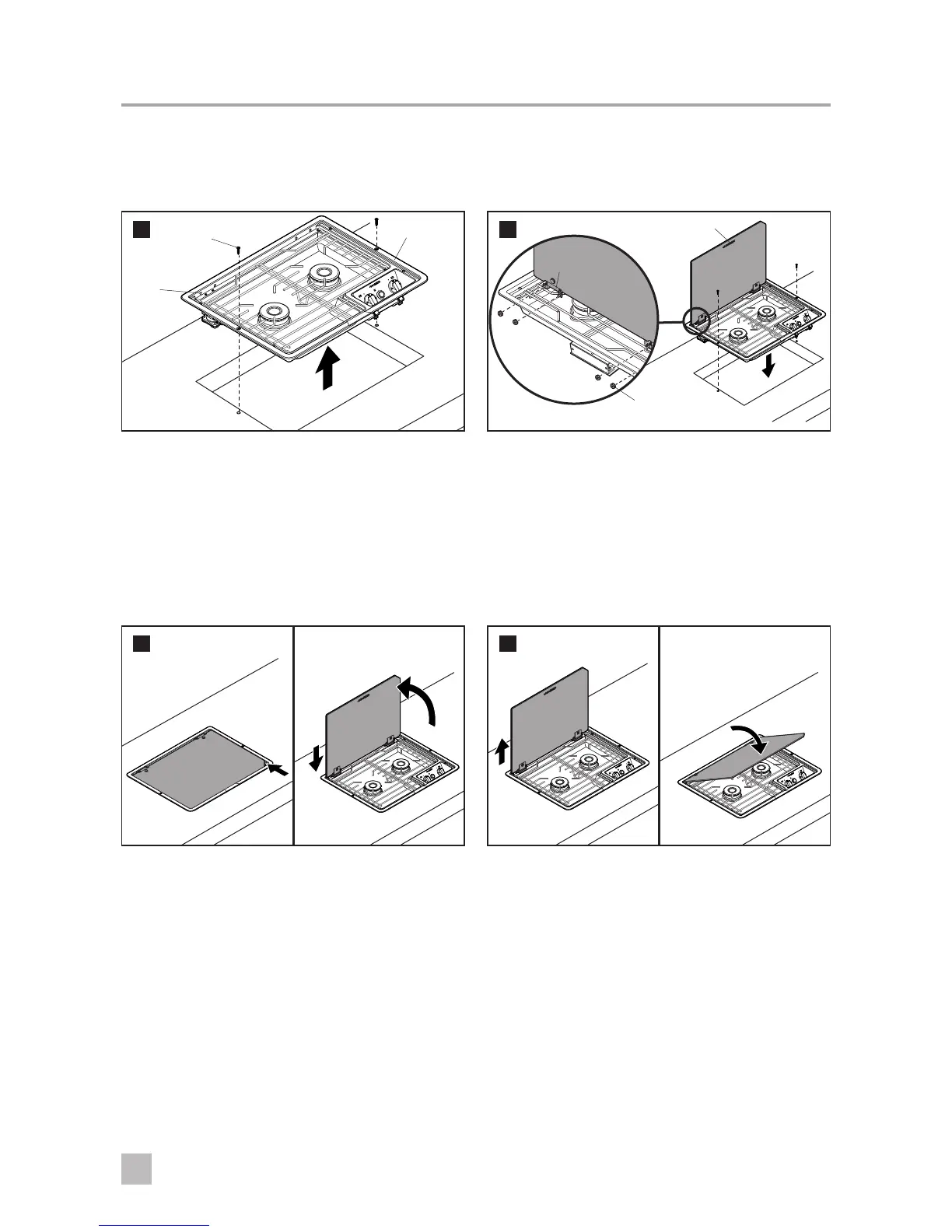
4.1 Preparing the cooktop
1
Screw
Mounting
Holes
Cooktop
➤ Remove the two screws holding the cooktop into
the counter.
➤ Raise the cooktop to expose the mounting holes
for the Cover.
4.2 Attaching the cover
2
Glass Cover
Nut with
Toothwasher
Cooktop
Bracket
➤ Thread the nuts into the cooktop bracket as
shown.
➤ Tighten the nuts, being careful not to overtighten
and crack the glass.
➤ Lower the cooktop into the counter and reinstall
the screws.
4.3 Opening the cover
3
➤ Li the Cover from the center slot. Raise it
completely, then drop the Cover down to lock into
the back of the cooktop.
➤ Li the Cover from the corner slot. Raise it
completely, then drop the Cover down to rest on
the back of the cooktop.
4.4 Closing the cover
4
➤ Li the Cover up, then gently lower it down onto
the cooktop.



 To Previous Page