Automatic Door Control (ADC)
The following descriptions only apply to devices with ADC.
1. Open the miniBar, check its contents and - if applicable- stock it up
again.
2. Close the miniBar.
4. Remove ADC key.
Automatic Door Control (electrical)
When the miniBar is opened, a magnetically operated approximation switch
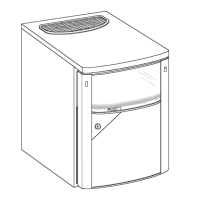
located underneath on the fridge is activated (FIG 1.)
Depending on the connection (opening/closing mechanism), an electric
circuit is closed or opened. Accordingly, this is registered and processed at
the hotel reception. Note: Electrical rating!
The miniBar´s wiring connection is
situated at the rear of the appliance and
consists of a 3-pin terminal strip (1).
11
5.5
1.
The red dot has disappeared now.
Using a red dot in the display window (A, point 3), the ADC shows that
the miniBar´s door has been opened.
1.
2.
RH456LD/E
All other models
A
A
2.
3. Insert ADC key and turn to the
right.
3. Insert ADC key and turn to the
left.
5.5.1
1= terminal strip
2= approximation switch
A= blue (opening mechanism)
B= black (closing mechanism)
C= white
FIG.1



 To Next Page
