Troubleshooting
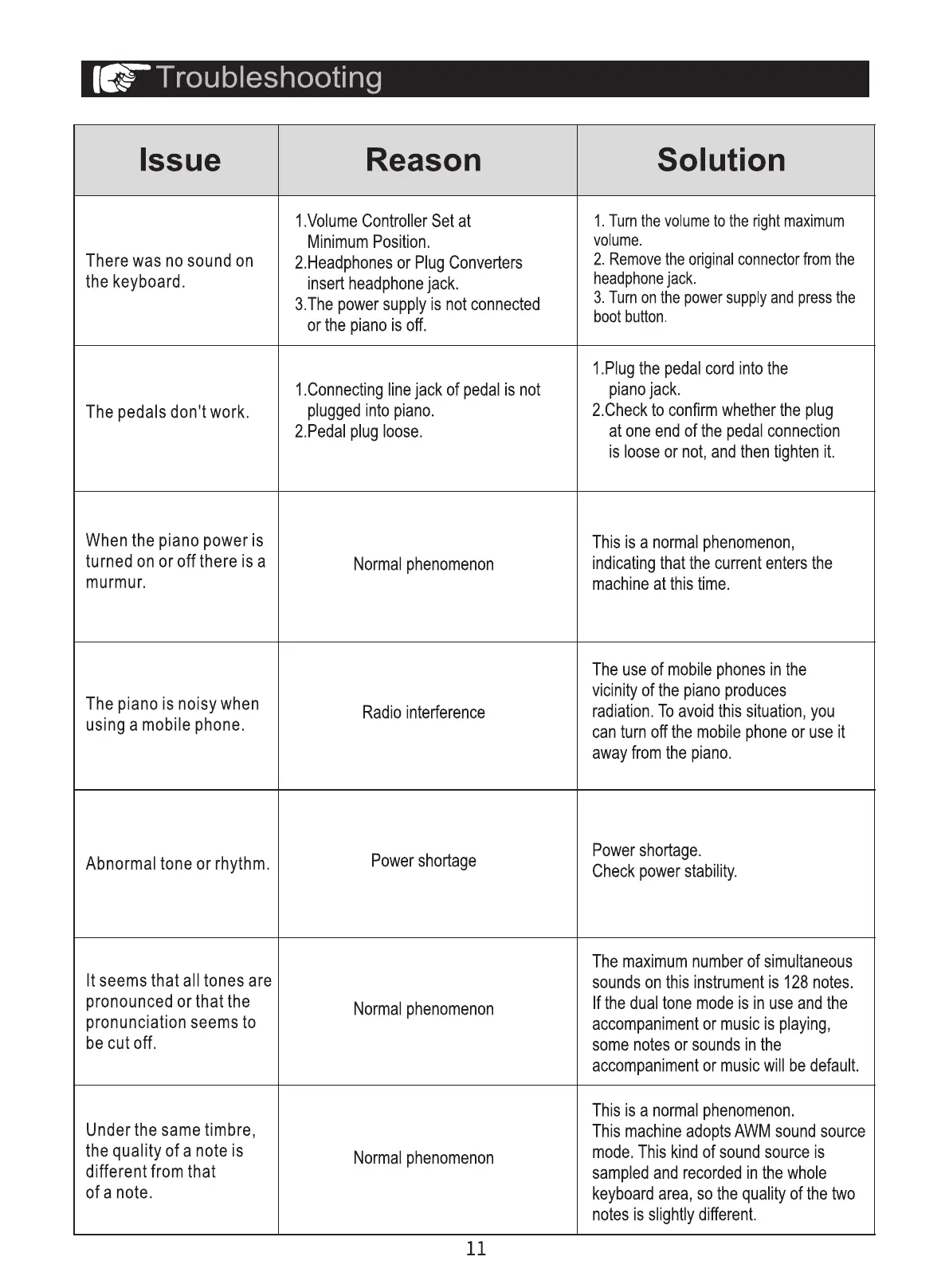
Issue
There was no sound on
the keyboard.
The pedals don't work.
When the piano power is
turned on or off there is a
murmur.
The piano is noisy when
using a mobile phone.
Abnormal tone or rhythm.
It seems that all tones are
pronounced or that the
pronunciation seems to
be cut off.
Under the same timbre,
the quality of a note is
different from that
of a note.
Reason
1.Volume Controller Set at
Minimum Position.
2.Headphonesor PlugConverters
insertheadphonejack.
3.Thepowersupplyis notconnected
or the pianois off.
1.Connectinglinejack of pedal is not
pluggedinto piano.
2.Pedalplugloose.
Normalphenomenon
Radio interference
Powershortage
Normalphenomenon
Normalphenomenon
11
Solution
1.Turnthe volumeto the right maximum
volume.
2. Removetheoriginalconnectorfromthe
headphonejack.
3. Turnon the powersupplyand press the
boot button.
1.Plugthe pedalcord intothe
pianojack.
2.Checkto confirmwhetherthe plug
at one endof the pedal connection
is looseor not, and then tightenit.
This is a normalphenomenon,
indicatingthat the currententersthe
machine at this time.
The use of mobilephonesin the
vicinityof the pianoproduces
radiation.Toavoidthis situation,you
can turn off the mobilephoneor useit
awayfromthe piano.
Powershortage.
Check powerstability.
The maximum number of simultaneous
sounds on this instrument is 128 notes.
If the dual tone mode is in use and the
accompanimentor music is playing,
some notes or sounds in the
accompanimentor musicwill be default.
This is a normalphenomenon.
This machine adopts AWM sound source
mode. This kind of sound source is
sampledand recordedin the whole
keyboardarea, so the qualityof the two
notes is slightlydifferent.



 To Previous Page