TROUBLE SHOOTING
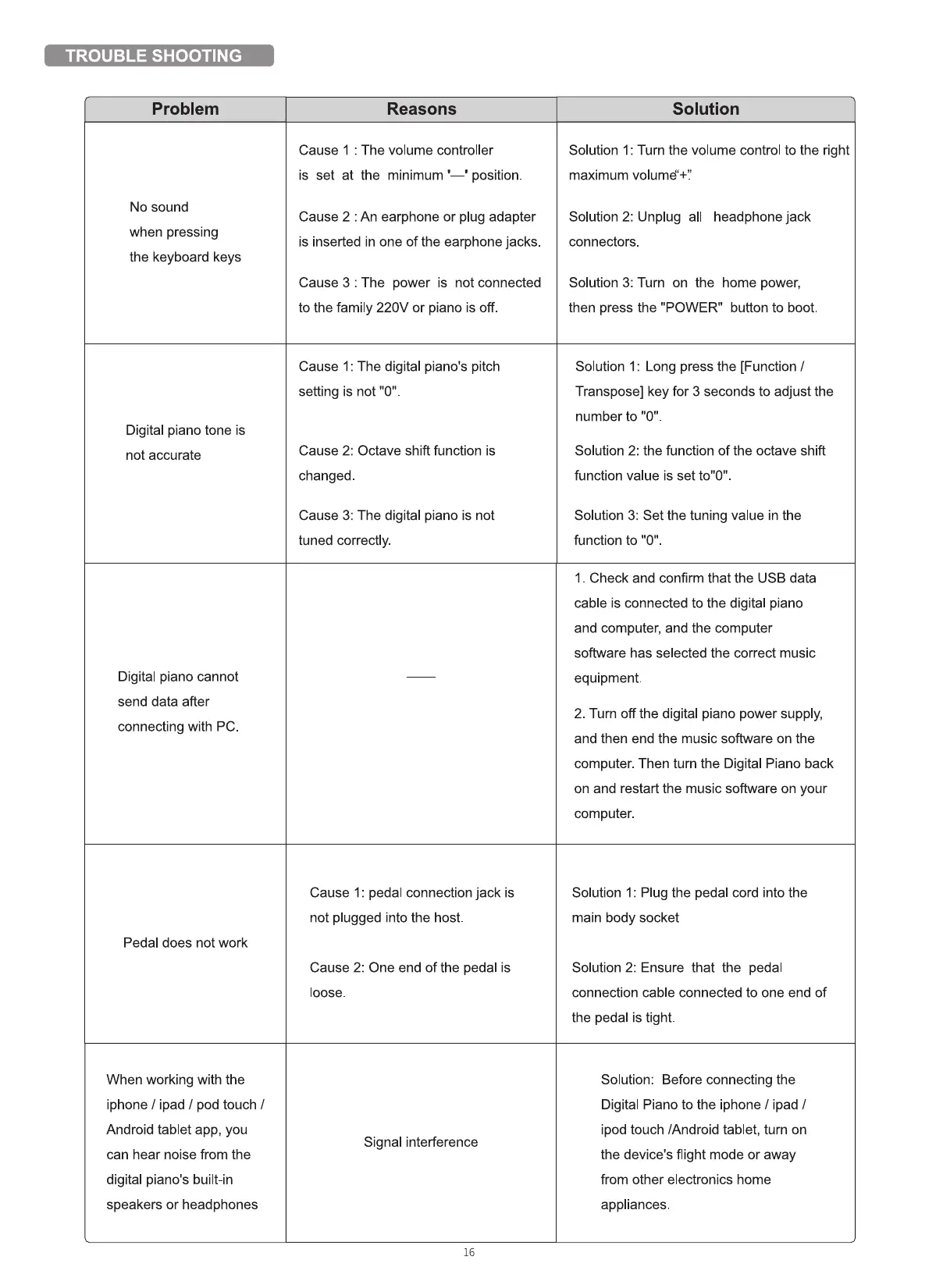
Problem
No sound
when pressing
the keyboard keys
Digital piano tone is
not accurate
Digital piano cannot
send data after
connecting with PC
Pedal does not work
When working with the
iphone / ipad / pod touch /
Android tablet app, you
can hear noise from the
digital piano's built-in
speakers or headphones
Reasons
Cause I : The volume controller
is set at the minimum position.
Cause 2 : An earphone or plug adapter
is inserted in one of the earphone jacks.
Cause 3 : The power is not connected
to the family 220V or piano is off.
Cause 1: The digital piano's pitch
setting is not "O"
Cause 2: Octave shift function is
changed.
Cause 3: The digital piano is not
tuned correctly.
Cause 1: pedal connection jack is
not plugged into the host
Cause 2: One end of the pedal is
loose.
Signal interference
16
Solution
Solution I: Turn the volume control to the right
maximum volumé'+'.'
Solution 2: Unplug all
connectors.
headphone jack
Solution 3: Turn on the home power,
then press the "POWER" button to boot.
Solution 1: Long press the [Function /
Transpose] key for 3 seconds to adjust the
number to "O"
Solution 2: the function of the octave shift
function value is set to"O"
Solution 3: Set the tuning value in the
function to "O"
I Check and confirm that the USB data
cable is connected to the digital piano
and computer, and the computer
software has selected the correct music
equipment.
2. Turn off the digital piano power supply,
and then end the music software on the
computer. Then turn the Digital Piano back
on and restart the music software on your
computer.
Solution 1: Plug the pedal cord into the
main body socket
Solution 2: Ensure that the pedal
connection cable connected to one end of
the pedal is tight.
Solution: Before connecting the
Digital Piano to the iPhone / ipad /
ipod touch [Android tablet, turn on
the device's flight mode or away
from other electronics home
appliances.



 To Previous Page