EasyManua.ls Logo

Donner DED-70 - Page 4

Donner DED-70
6 pages
Print Icon
To Next Page IconTo Next Page
To Previous Page IconTo Previous Page
Loading...
3
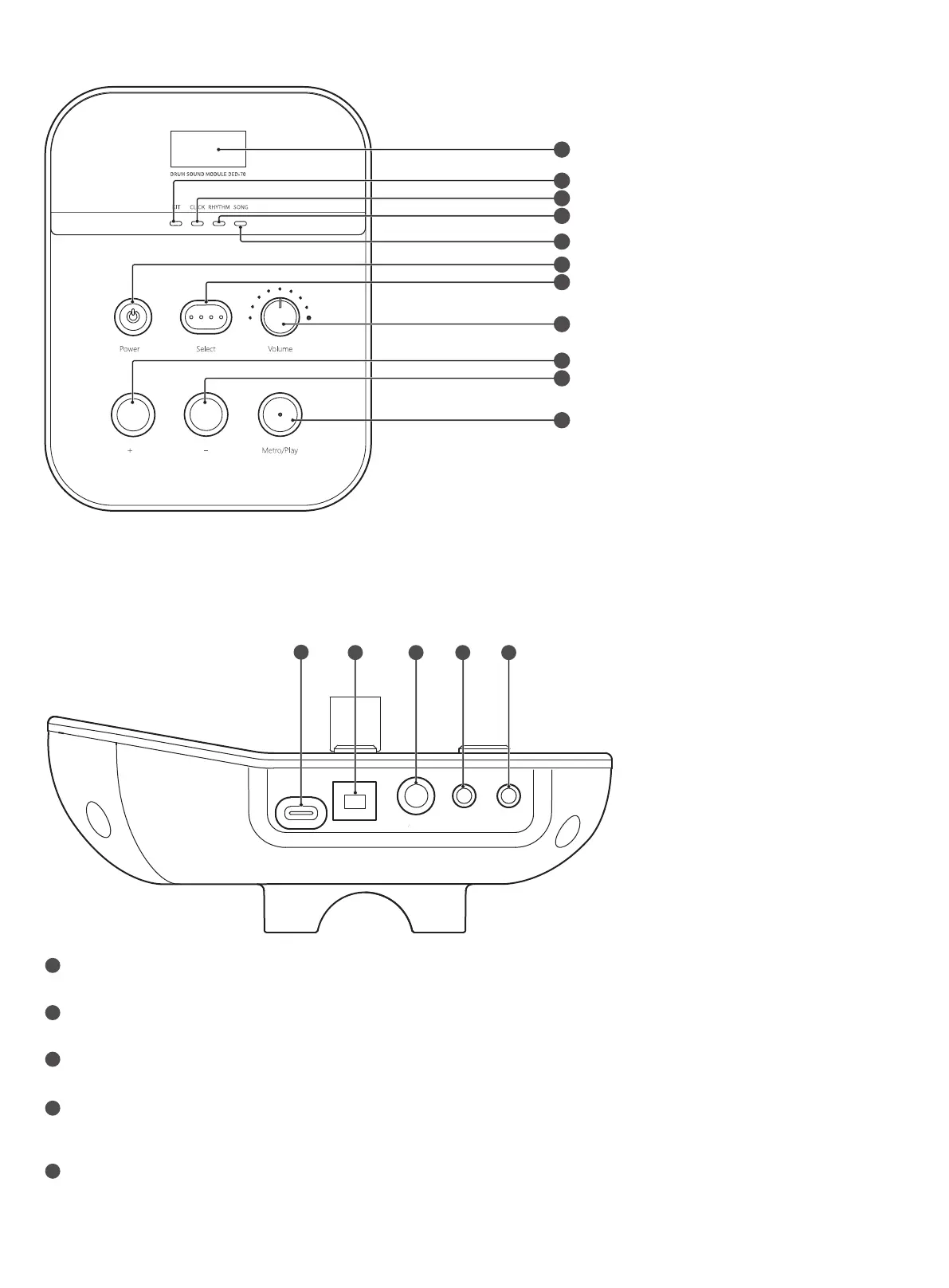
Display
[KIT] Indicator
[CLICK] Indicator
[RHYTHM] Indicator
[SONG] Indicator
Power Button
[Select] Button
Volume Knob
[+] Button
[-] Button
[Metro/Play] Button
1.2 Panel Description
1.3 Socket Description
1
2
3
4
5
DC 5V Jack:
For TYPEC Power supply.
USB Jack (USB-MIDI):
Connect the module to your computer with a USB cable to transmit and receive USB MIDI, and to receive USB audio data.
L/MONO Jack:
Connect to an amplifier or external audio devices.
AUX Jack:
Connect to your audio player or other audio sources (MP3 or CD player). The sound input from this jack will be output from the
L/MONO and PHONE jack.
PHONE Jack:
Connect to headphones. Sound will still be output from the L/MONO jack even if headphones are connected.
1
2
3
4
5
6
7
8
9
10
11
DC 5V
USB L MONO AUX PHONE
1 2 3 4
5

Related product manuals