4
2. GET READY TO PLAY
3. PLAYING THE DRUMS
2.1 Turn power on
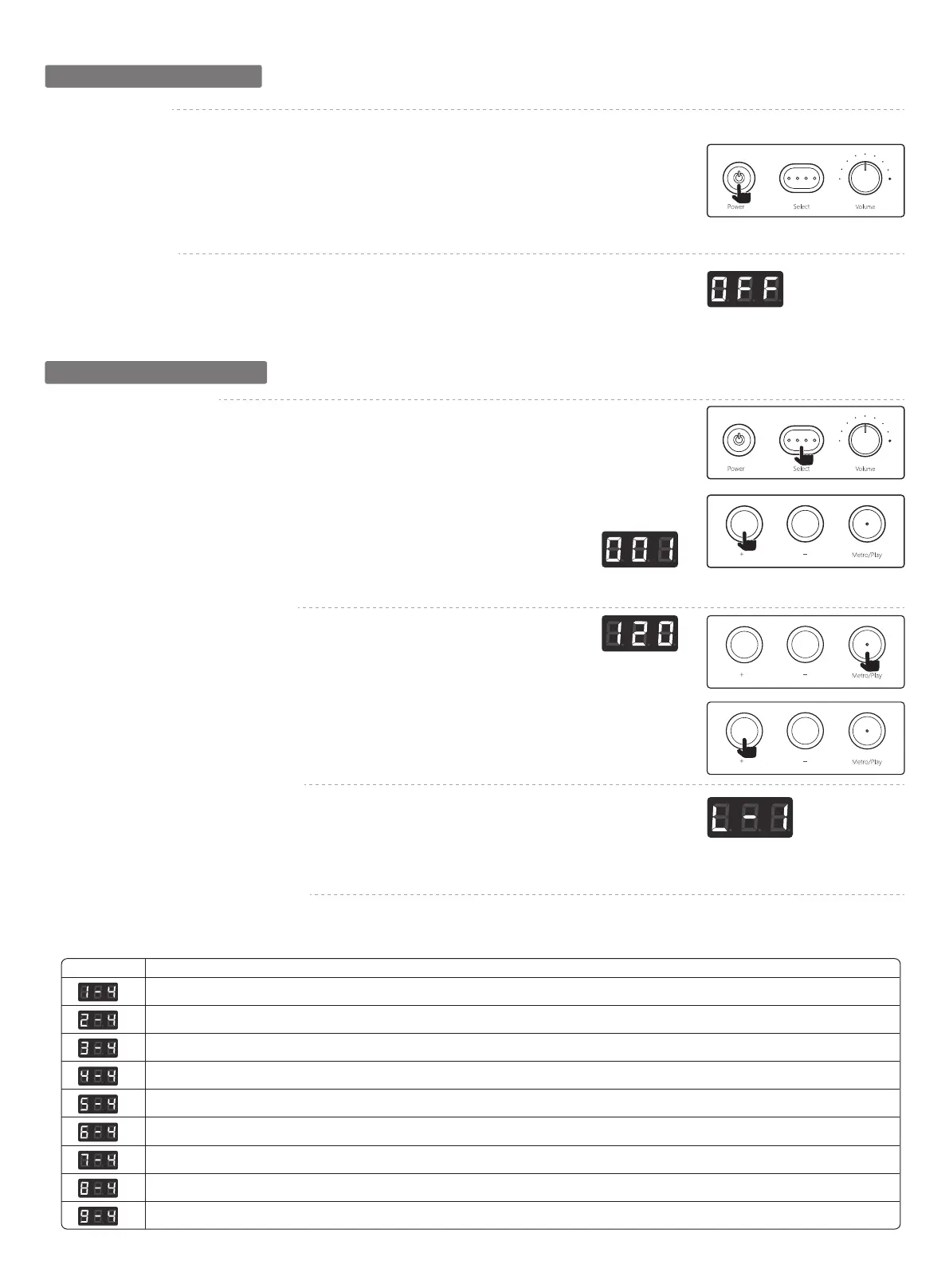
① Turn the [VOLUME] knob counterclockwise to minimize the volume. Minimize the volume of the connected amp
or audio sources.
② Press the [POWER] button to turn the power on.
③ Power on the amp or other audio sources that are connected.
④ While striking the pads to hear the sound, adjust the volume by gradually turning the [VOLUME] knob.
* It is in Kit mode by default after being powered on, and the Kit indicator is on.
2.2 Turn power off
① Long press the [POWER] button until the screen indicates power off.
② Minimize the volume of the connected sound module or audio sources.
③ Power off audio sources that are connected.
3.1 Adjusting a Drum Kit
① Use the [Select] button to select a drum kit.
* It is in Kit mode by default after being powered on, and the Kit indicator is on
② The screen will appear drum kit number, press [+] [-] to select a drum kit from the list (total of 10 groups).
3.2 Changing the Metronome Tempo
① Use the [Select] button to select the [Click] mode of Metronome Tempo.
② The screen will appear tempo.
* Tempo represents beats per minute (BPM), and the adjustment range is 20-340.
③ Press the [Metro/Play] button can turn on the Metronome, press again can turn it off.
④ Press [+] [-] to adjust tempo, long press can adjust quickly.
3.3. Changing the Metronome Volume
① In Click mode, long press the [Metro/Play] button to adjust metronome volume.
② The screen will appear volume value (20 levels).
③ Press [+][-] to adjust the volume.
④ Long press the [Metro/Play] button to exit volume adjustment, then save settings. Or short press the [Select]
button to exit the current setup status, and switch to next mode.
3.4. Changing the Metronome Rhythm
① Use the [Select] button to select the Rhythm mode the metronome.
② The screen will appear Rhythm to be set.
* In Rhythm mode, press [+] [-] to adjust the beat.
Display Description
1/4 would mean quarter note gets one beat and one beat per measure.
2/4 would mean quarter note gets one beat and two beats per measure.
3/4 would mean quarter note gets one beat and three beats per measure.
4/4 would mean quarter note gets one beat and four beats per measure.
5/4 would mean quarter note gets one beat and five beats per measure.
6/4 would mean quarter note gets one beat and six beats per measure.
7/4 would mean quarter note gets one beat and seven beats per measure.
8/4 would mean quarter note gets one beat and eight beats per measure.
9/4 would mean quarter note gets one beat and night beats per measure.
④
③
②
①
②
③
④
②


 To Next Page
 Loading...