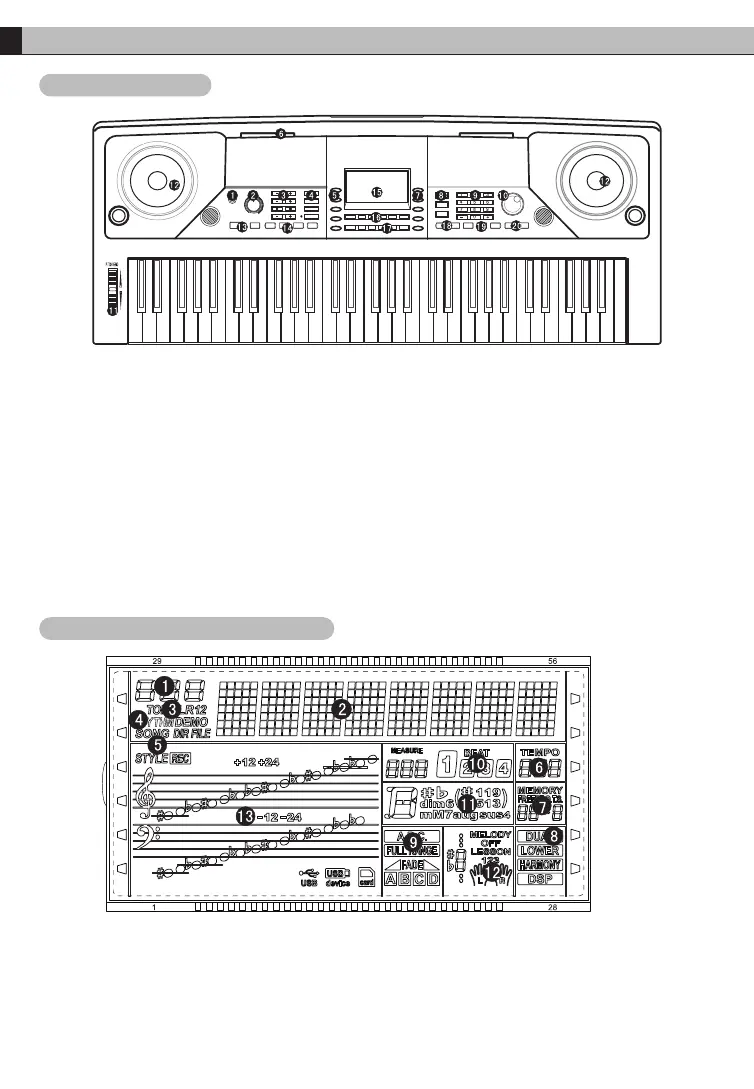
1.Power switch
2.Volumb knob
3.Accom volume/Octave/
Transpose/ Tempo
4.Function menu/Mixer/
Metronome/ Chord mode
5.Direct rhythm
6.Inserted holes of music stand
7.Direct tone
8.Tone/Rhythm/Song
9.Number0-9/+,-buttons
10.Data wheel
02
PANEL CONTROL AND EXTERNAL FUNCTION
1.Digital display area
2.Characters display area
3.Voice
4.Rhythm
5.Song
6.Tempo
7.Status memory
8.Dual voice
9.Chord mode
10.Metronome
11.Chord display area
12.Learn mode
13.Staff display area
Panel Control
LCD display screen diagram
11.Pitch bend
12.Speakers
13.Start/Stop/Sync/Intro/Ending
14.Fill in A/Fill in B/Fade-in/Fade-out
15.LCD display
16.Record/Play/Dual voice/
Sustain/ Modulation/O.T.S.
17.Memory/M1/M2/M3/M4/Bank
18.Learn/Left/Right
19.Touch
20.MP3/Previous song/Volume-/
Next song/ Volume+



 To Next Page