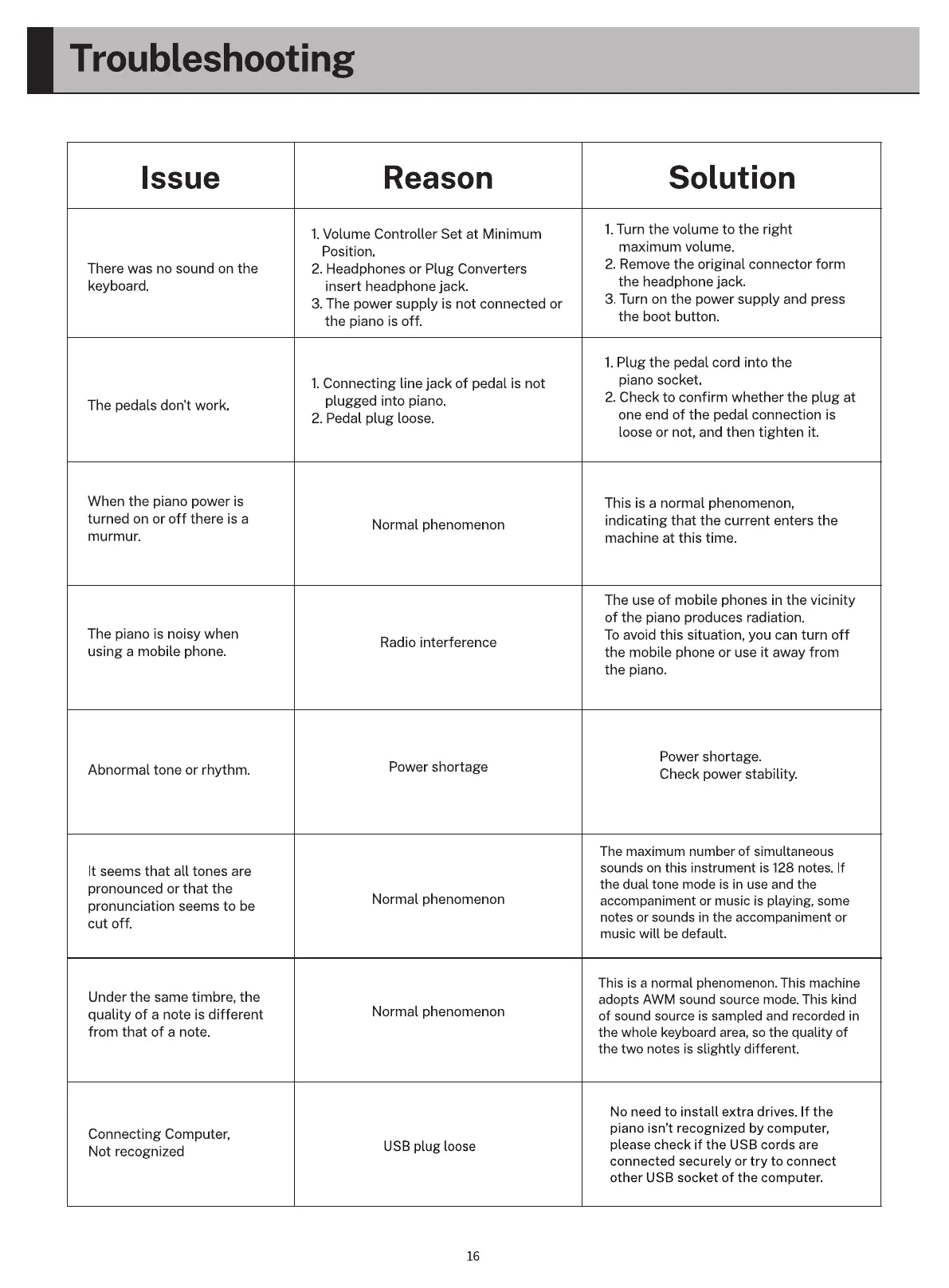
Troubleshooting
Issue
There was no sound on the
keyboard.
The pedals don't work.
When the piano power is
turned on or off there is a
murmur.
The piano is noisy when
using a mobile phone.
Abnormal tone or rhythm.
It seems that all tones are
pronounced or that the
pronunciation seems to be
cut off.
Under the same timbre, the
quality of a note is different
from that of a note.
Connecting Computer,
Not recognized
Reason
I. Volume Controller Set at Minimum
Position.
2. Headphones or Plug Converters
insert headphone jack.
3. The power supply is not connected or
the piano is off.
I. Connecting line jack of pedal is not
plugged into piano.
2. Pedal plug loose.
Normal phenomenon
Radio interference
Power shortage
Normal phenomenon
Normal phenomenon
USB plug loose
16
Solution
1.Turn the volume to the right
maximum volume.
2. Remove the original connector form
the headphone jack.
3. Turn on the power supply and press
the boot button
1. Plug the pedal cord into the
piano socket.
2. Check to confirm whether the plug at
one end of the pedal connection is
loose or not, and then tighten it.
This is a normal phenomenon,
indicating that the current enters the
machine at this time.
The use of mobile phones in the vicinity
of the piano produces radiation.
To avoid this situation, you can turn off
the mobile phone or use it away from
the piano.
Power shortage.
Check power stability.
The maximum number of simultaneous
sounds on this instrument is 128 notes. If
the dual tone mode is in use and the
accompaniment or music is playing, some
notes or sounds in the accompaniment or
music will be default.
This is a normal phenomenon. This machine
adopts AWM sound source mode. This kind
of sound source is sampled and recorded in
the whole keyboard area, so the quality of
the two notes is slightly different.
No need to install extra drives. If the
piano isn't recognized by computer,
please check if the USB cords are
connected securely or try to connect
other USB socket of the computer.



 To Next Page