3.FRONT PANEL FUNCTION
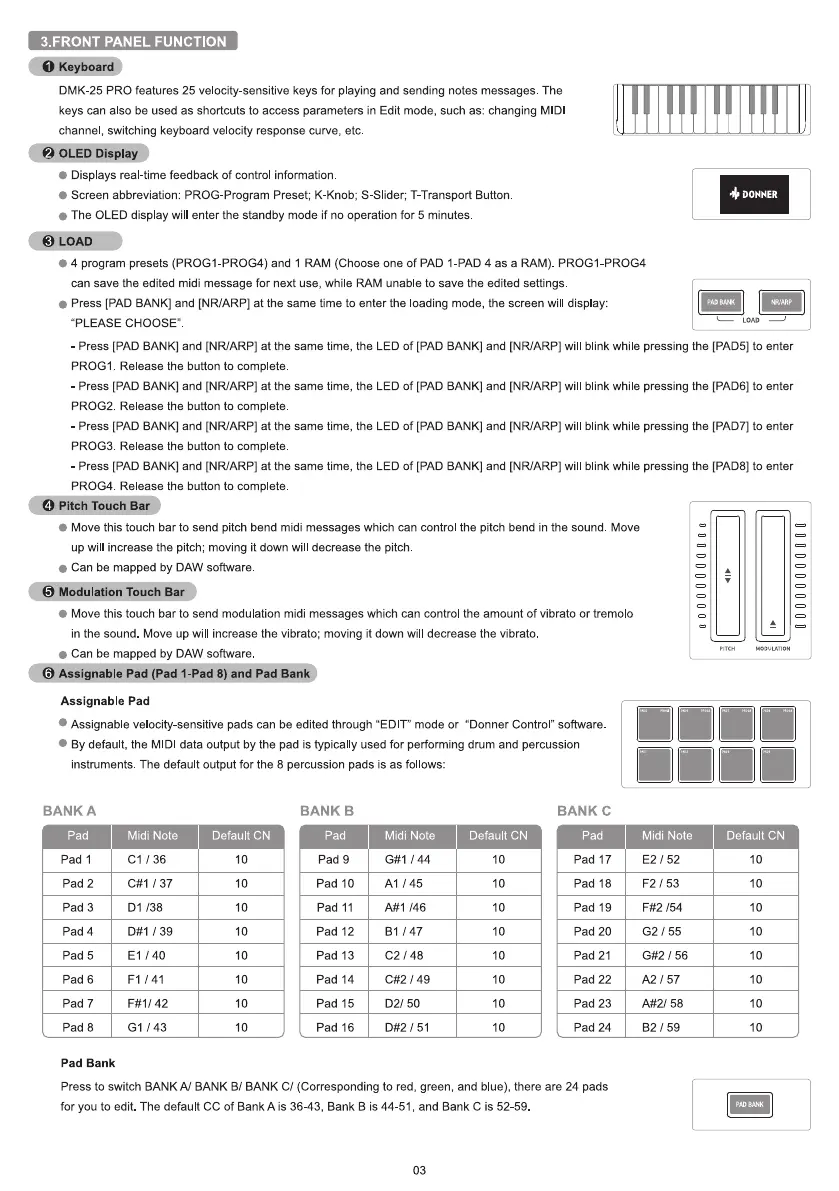
•@eyboarg.)
DMK-25 PRO features 25 velocity-sensitive keys for playing and sending notes messages. The
keys can also be used as shortcuts to access parameters in Edit mode, such as: changing MIDl
channel, switching keyboard velocity response curve, etc
ayDDOLED Displ
Displays real-time feedback of control information
Screen abbreviation: PROG-Program Preset; K-Knob; S-Slider; T-Transport Button
The OLED display wil enter the standby mode if no operation for 5 minutes.
0 4 program presets (PROGI-PROG4) and 1 RAM (Choose one of PAD I-PAD 4 as a RAM) PROGI-PROG4
can save the edited midi message for next use, while RAM unable to save the edited settings.
Press [PAD BANK] and [NR/ARP] at the same time to enter the loading mode, the screen will display:
"PLEASE CHOOSE"
DONNER
LOAD
- Press [PAD BANK] and [NRIARP] at the same time, the LED of [PAD BANK] and [NR/ARP] wil blink while pressing the [PAD5] to enter
PROGI Release the button to complete
- Press [PAD BANK] and [NRIARP] at the same time, the LED of [PAD BANK] and [NRIARP] WII blink while pressing the [PAD6] to enter
PROG2. Release the button to complete
- Press [PAD BANK] and [NR/ARP] at the same time, the LED of [PAD BANK] and [NR/ARP] wil blink while pressing the [PAD7] to enter
PROG3. Release the button to complete
- Press [PAD BANK] and [NR/ARP] at the same time, the LED of [PAD BANK] and [NR/ARP] wil blink while pressing the [PAD8] to enter
PROG4 Release the button to complete
O Pitch Touch Ba
Move this touch bar to send pitch bend midi messages which can control the pitch bend in the sound. Move
up will increase the pitch; moving it down wil decrease the pitch
Can be mapped by DAW software
Modulation Touch Bar
Move this touch bar to send modulation midi messages which can control the amount of vibrato or tremolo
in the sound. Move up will increase the vibrato; moving it down wil decrease the vibrato.
Can be mapped by DAW software
Assignable Pad (Pad I-Pad 8) and Pad Ban
Assignable Pad
Assignab e velocity-sensitive pads can be edited through "EDIT" mode or "Donner Control" software
By default, the MIDl data output by the pad is typically used for performing drum and percussion
instruments The default output for the 8 percussion pads is as follows:
BANK A
pad
Pad 1
Pad 2
Pad 3
Pad 4
Pad 5
Pad 6
Pad 7
Pad 8
Pad Bank
Midi Note
Cl / 36
/ 37
Dl 138
/ 39
El / 40
Fl / 41
F#l/ 42
GI / 43
Default CN
10
10
10
10
10
10
10
10
BANK B
pad
Pad 9
Pad 10
Pad 11
Pad 12
Pad 13
Pad 14
Pad 15
Pad 16
Midi Note
/ 44
A1 / 45
146
Bl 147
C2 / 48
/ 49
D2/ 50
/ 51
Default CN
10
10
10
10
10
10
10
10
BANK C
pad
Pad 17
Pad 18
Pad 19
Pad 20
Pad 21
Pad 22
Pad 23
Pad 24
Midi Note
E2 / 52
F2 / 53
154
G2 / 55
G#2 / 56
A2 57
A#2/ 58
82 / 59
Default CN
10
10
10
10
10
10
10
10
Press to switch BANK A1 BANK B/ BANK C/ (Corresponding to red, green, and blue), there are 24 pads
for you to edit The default CC of BankA is 36-43, Bank B is 44-51 , and Bank C is 52-59
03


 To Next Page
 Loading...


