EDIT Mode
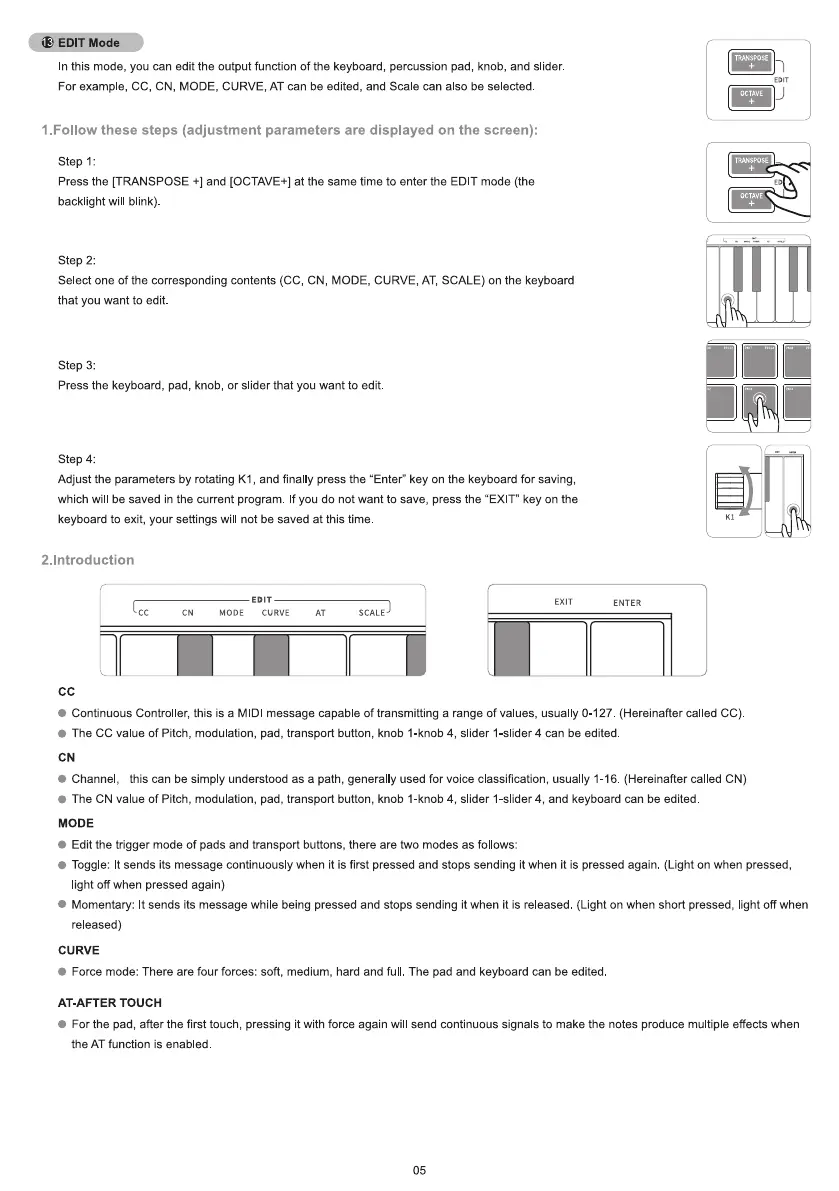
n this mode, you can edit the output function of the keyboard, percussion pad, knob, and slider.
For example, CC, CN, MODE, CURVE, AT can be edited, and Scale can also be selected
I.Follow these steps (adjustment parameters are displayed on the screen):
Step 1:
Press the [TRANSPOSE +1and [OCTAVE+] at the same time to enter the EDIT mode (the
backlight will blink).
step 2:
Select one of the corresponding contents (CC, CN, MODE, CURVE, AT, SCALE) on the keyboard
that you want to edit.
step 3:
Press the keyboard, pad, knob, or slider that you want to edit.
Step 4:
Adjust the parameters by rotating KI , and finally press the "Enter" key on the keyboard for saving,
which will be saved in the current program f you do not want to save, press the "EXIT" key on the
keyboard to exit, your settings will not be saved at this time
OCTAVE
TRANSPOSE
ocrAVE
2. Introduction
EDIT
MODE CURVE
cc
EXIT
ENTER
SCALE
Continuous Controller, this is a MIDI message capable of transmitting a range of values, usually 0-127. (Hereinafter called CC)
e The CC value of Pitch, modulation, pad, transport button, knob I-knob 4, slider I-slider 4 can be edited
e Channel, this can be simply understood as a path, generally used for voice classification, usually 1-16 (Hereinafter called CN)
The CN value of Pitch, modulation, pad, transport button, knob I-knob 4, slider I-slider 4, and keyboard can be edited
MODE
Edit the trigger mode of pads and transport buttons, there are two modes as follows:
Toggle: It sends its message continuously when it is first pressed and stops sending it when it is pressed again. (Light on when pressed,
light off when pressed again)
Momentary: It sends its message while being pressed and stops sending it when it is released (Light on when short pressed, light off when
released)
CURVE
Force mode: There are four forces: soft, medium, hard and full The pad and keyboard can be edited
AT-AFTER TOUCH
For the pad, after the first touch, pressing it with force again will send continuous signals to make the notes produce mu tiple effects when
the AT function is enabled
05


 To Next Page
 Loading...


