SCALE
Select 16 scales respectively
Scales Notes
Chrom
China 1
China2
Japanl
Japan2
Blues 1
C, bE F,
Blues 2
C, D, bE,E GA
BeBop
Whole Tone
Middle East
C,bD,E, F, G, bA, B
Dorian
C, D, bE, F, G, A, bB
Lydian
Harmonic Minor
C, D, bE, F, G, bA, B
Minor
C, D, bE ,F, G, bA, bB
Phrygian C, bD, bE, F, G, bA, bB
Hung Min
Egypt
C ,bD, bE, E, G, bA, bB
EXIT
In EDIT mode, press the "EXIT" key to exit the EDIT mode and cancel the modification in EDIT mode
ENTER
In EDIT mode, press the "ENTER" key to exit EDIT mode and save the modifications in EDIT mode.
3.The followings are operation examples in Edit mode
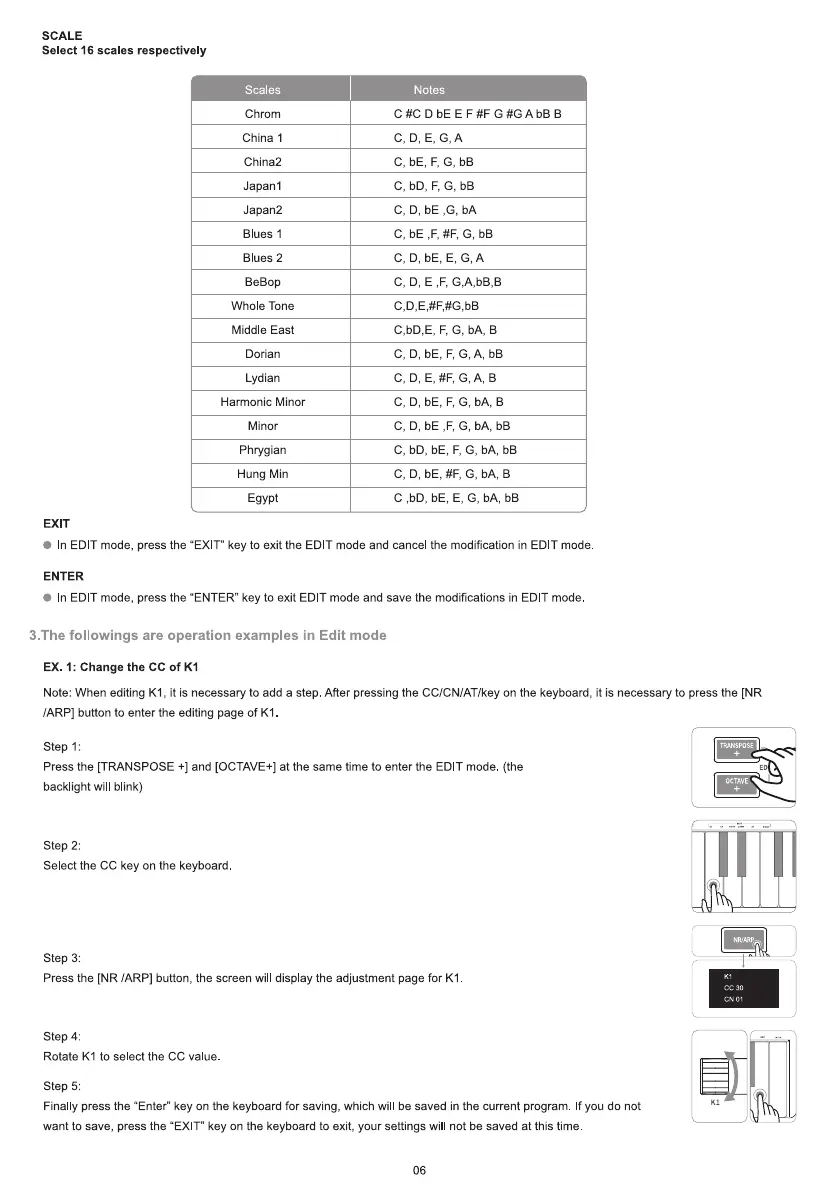
EX. 1: Change the CC of KI
Note: When editing KI , it is necessary to add a step. After pressing the CC/CN/AT/key on the keyboard, it is necessary to press the [NR
/ARP] button to enter the editing page of KI
Step 1:
Press the [TRANSPOSE +] and [OCTAVE+] at the same time to enter the EDIT mode (the
backlight wil blink)
step 2:
Select the CC key on the keyboard
step 3:
Press the [NR /ARPI button, the screen will display the adjustment page for KI
Step 4:
Rotate KI to select the CC value.
step 5:
Finally press the "Enter" key on the keyboard for saving, which wil be saved in the current program. If you do not
want to save, press the "EXIT" key on the keyboard to exit, your settings will not be saved at this time
06
TRANSPOSE
OCTAVE
CC 30
CN 01


 To Next Page
 Loading...


