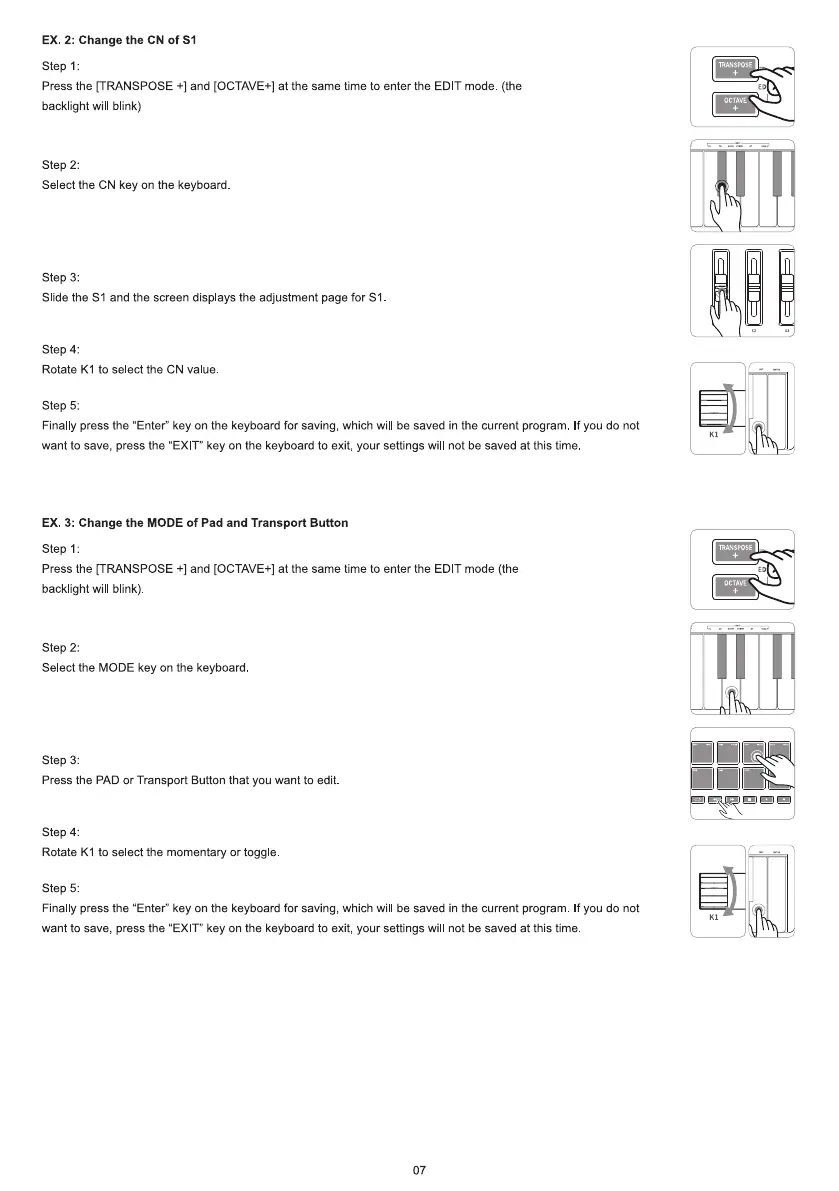
EX. 2: Change the CN of
Step 1:
Press the [TRANSPOSE +1and [OCTAVE+] at the same time to enter the EDIT mode. (the
backlight will blink)
step 2:
Select the CN key on the keyboard
step 3:
Slide the Sl and the screen displays the adjustment page for Sl
Step 4:
Rotate KI to select the CN value.
Step 5:
Finally press the "Enter" key on the keyboard for saving, which will be saved in the current program. If you do not
want to save, press the "EXIT" key on the keyboard to exit, your settings will not be saved at this time
EX. 3: Change the MODE Of Pad and Transport Button
step 1:
Press the [TRANSPOSE +1and [OCTAVE+] at the same time to enter the EDIT mode (the
backlight will blink)
step 2:
Select the MODE key on the keyboard
step 3:
Press the PAD or Transport Button that you want to edit
Step 4:
Rotate KI to select the momentary or toggle
step 5:
Finally press the "Enter" key on the keyboard for saving, which will be saved in the current program. If you do not
want to save, press the "EXIT" key on the keyboard to exit, your settings will not be saved at this time.
07
TRANSPOSE
o CTAVE
TRANSPOSE
OCTAVE



 To Next Page