TROUBLE SHOOTING
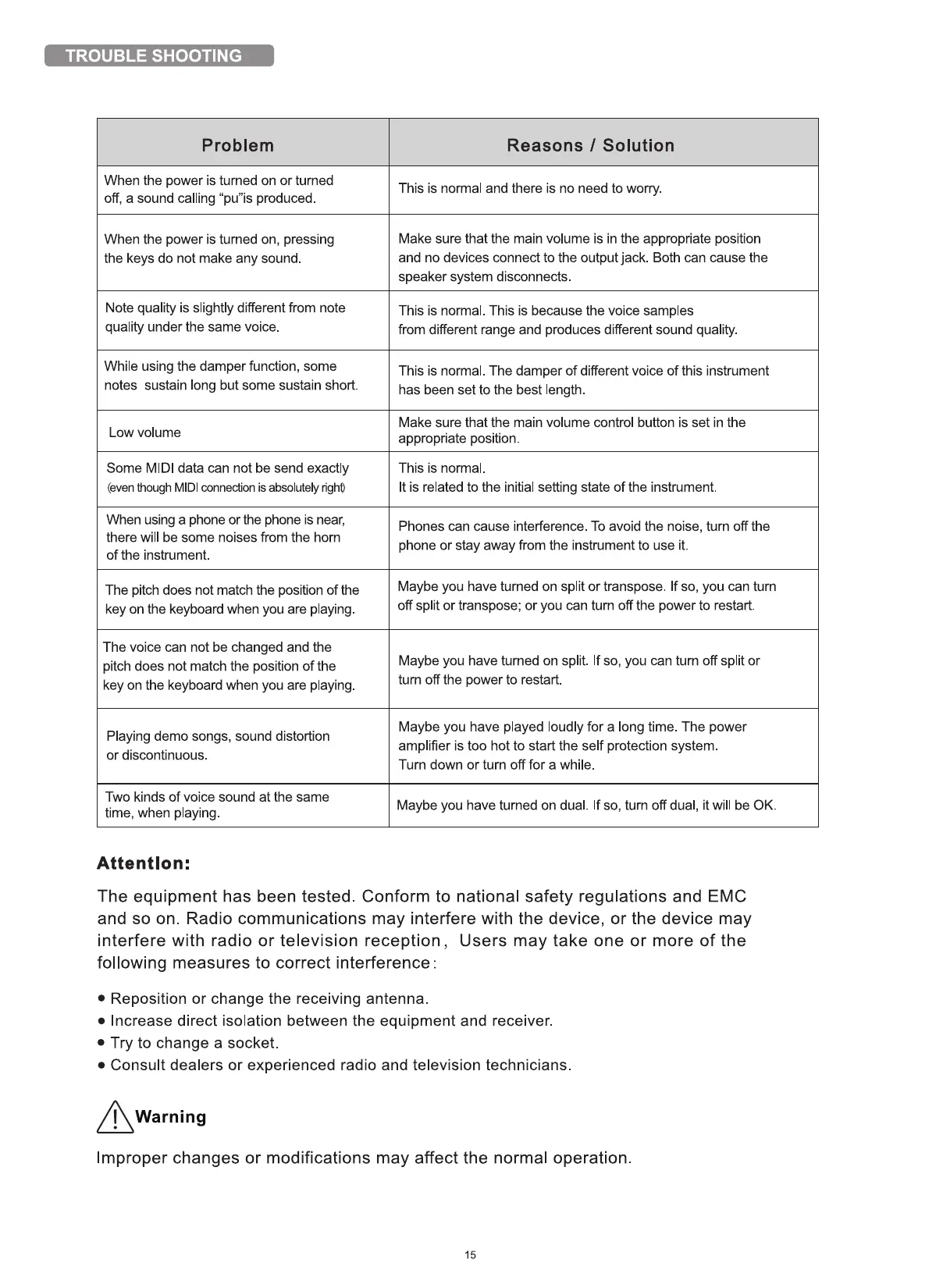
Problem
When the power is turned on or turned
off, a sound calling "pu"is produced
When the power is turned on, pressing
the keys do not make any sound.
Note quality is slightly different from note
quality under the same voice
While using the damper function, some
notes sustain long but some sustain short.
Low volume
Some MIDl data can not be send exactly
(eventhough MIDl connection is absolutelyright)
When using a phone or the phone is near,
there will be some noises from the horn
of the instrument.
The pitch does not match the position of the
key on the keyboard when you are playing
The voice can not be changed and the
pitch does not match the position of the
key on the keyboard when you are playing.
Playing demo songs, sound distortion
or discontinuous.
Two kinds of voice sound at the same
time, when playing
Attention:
Reasons I Solution
This is normal and there is no need to worry.
Make sure that the main volume is in the appropriate position
and no devices connect to the output jack Both can cause the
speaker system disconnects
This is normal. This is because the voice samples
from different range and produces different sound quality.
This is normal. The damper of different voice of this instrument
has been set to the best length
Make sure that the main volume control button is set in the
appropriate position.
This is normal.
It is related to the initial setting state of the instrument
Phones can cause interference To avoid the noise, tum off the
phone or stay away from the instrument to use it.
Maybe you have turned on split or transpose. If so, you can tum
off split or transpose; or you can turn off the power to restart
Maybe you have turned on split. If so, you can turn off split or
tum off the power to restart.
Maybe you have played loudly for a long time. The power
amplifier is too hot to start the self protection system
Turn down or turn off for a while.
Maybe you have turned on dual. If so, turn off dual, it will be 0K.
The equipment has been tested. Conform to national safety regulations and EMC
and so on. Radio communications may interfere with the device, or the device may
interfere with radio or television reception, Users may take one or more of the
following measures to correct interference :
• Reposition or change the receiving antenna.
• Increase direct isolation between the equipment and receiver.
• Try to change a socket.
• Consult dealers or experienced radio and television technicians.
Warning
Improper changes or modifications may affect the normal operation.
15


 To Previous Page
 Loading...