EasyManua.ls Logo

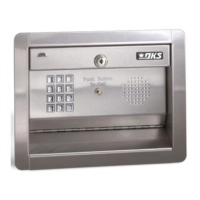
DoorKing 1506-080 - User Manual

DoorKing 1506-080
25 pages
Print Icon
To Next Page IconTo Next Page
Loading...
Models 1506 and 1504
Programmable Stand Alone Digital Keypad Entry Devices
Owner’s Manual
P/N 1506-065 REV F, 3/14
Copyright 2001 DoorKing, Inc. All rights reserved.
DoorKing, Inc.
120 Glasgow Avenue
Inglewood, California 90301
U.S.A.
Phone: 310-645-0023
Fax: 310-641-1586
www.doorking.com

Questions and Answers

  • P
    Patrick Stewart MDAug 12, 2025
    What to do if DoorKing 1506-080 Keypad system is dead?
    • M
      Matthew CharlesAug 12, 2025
      If your DoorKing Keypad system appears dead, there are a few things to check. First, verify that there is power at terminals 13 and 14. Next, ensure the keypad is correctly plugged in by unplugging it and reconnecting it. Also, the X strikes feature may be activated; if so, wait 3 minutes and try again.
  • J
    Jennifer OrtizAug 16, 2025
    Why do DoorKing Keypad relays lock on for long periods?
    • C
      cgillAug 16, 2025
      If the relays on your DoorKing Keypad lock on for extended periods, several factors could be responsible: * Excessive voltage-drop on power wires. Check the transformer and wire size. * The transformer has too low VA rating. Check the transformer and wire size. * The relay hold feature may be activated. Reprogram the hold boundaries. * The relay strike time may be programmed too long. Reprogram the relay strike time.
  • J
    johnwilsonAug 19, 2025
    What to do if DoorKing 1506-080 emits a long tone and cancels programming mode?
    • C
      Courtney GrayAug 19, 2025
      If your DoorKing Keypad emits a long tone and cancels the programming mode, it could be due to several reasons. You might be waiting too long between button presses while programming, in which case you should delete some codes or erase the entire memory. Another reason could be that the memory is full, so deleting codes or erasing the memory is suggested. Also, ensure you press * first when programming.
  • G
    Gina WilliamsAug 25, 2025
    Why won't four-digit codes activate relay 1 on DoorKing 1506-080 Keypad?
    • B
      Billy WardAug 25, 2025
      If four-digit entry codes are not activating relay 1 on your DoorKing Keypad, it could be that the entry code is not programmed into the keypad. Ensure the entry code is programmed correctly. Also, the code may be time zone restricted, so reprogram the time zone or disable time zone input. Finally, make sure the entry code is less than the divide number, or reprogram the divide number.
  • D
    drochaAug 27, 2025
    Why don't four-digit entry codes activate relay 2 on DoorKing 1506-080 Keypad?
    • M
      Mark CarterAug 27, 2025
      If four-digit entry codes are not activating relay 2 on your DoorKing Keypad, verify that the entry code is programmed into the keypad. Also, the code may be time zone restricted, so reprogram the time zone or disable time zone input. Ensure that the entry code is greater than the divide number, or reprogram the divide number.
  • A
    aprilshawAug 30, 2025
    Why won't five-digit codes activate relay 1 on DoorKing 1506-080 Keypad?
    • J
      Jason KnoxAug 31, 2025
      If five-digit entry codes are not activating relay 1 on your DoorKing Keypad, first, be sure the entry code is programmed into the keypad. Second, ensure the user presses # first before entering the five-digit code directly on the keypad. Lastly, verify that the entry code is less than the divide number, or reprogram the divide number.
  • A
    Alex JohnsonSep 4, 2025
    Why doesn't a five-digit entry code activate relay 2 on DoorKing 1506-080?
    • B
      Bobby CamachoSep 4, 2025
      If a five-digit entry code is not activating relay 2 on your DoorKing Keypad, it could be because the entry code is not programmed into the keypad, so ensure it is programmed. Also, make sure the user presses # first, then enters the five-digit code directly on the keypad. Finally, the entry code must be greater than the divide number, so check and reprogram the divide number if necessary.
  • Y
    yreynoldsSep 7, 2025
    What to do if request to exit input will not operate relay on DoorKing Keypad?
    • C
      Carla MasseySep 7, 2025
      If the request to exit input will not operate the relay on your DoorKing Keypad, check the wiring connected to terminals 1 and 12.

Summary

IMPORTANT NOTICES

SECTION 1 - INSTALLATION

1.1 Mounting

Details the physical mounting options and dimensions for surface and flush mount keypads.

1.2 Wiring

Explains proper wiring practices for power and control lines, including wire gauge and distance.

1.3 Wiring Diagram

Provides a schematic illustrating the circuit board connections for various system components.

1.4 Circuit Board Terminal Identification

Identifies the function and purpose of each terminal on the main circuit board.

1.5 Model 1504 Aiphone Intercom Station Connections

Wire diagrams for integrating the Model 1504 keypad with Aiphone intercom systems.

1.6 Secondary Keypad Wiring

Instructions for wiring a secondary keypad, detailing cable type and maximum length.

SECTION 2 - PROGRAMMING

2.1 Master Code

Guides users on setting, managing, and protecting the master code for programming access.

2.2 Relay Strike Time

Configuration of the duration relays activate, allowing individual strike time settings.

2.3 X-Strikes Programming

Sets the number of invalid entry attempts before the system lockout feature is activated.

2.4 Programming Four-digit Entry Codes

Step-by-step guide to adding new four-digit user entry codes to the system.

2.5 Erasing Individual Four-digit Entry Codes

Instructions for selectively removing specific four-digit entry codes from memory.

2.6 Erasing ALL Four-digit Entry Codes

Procedure for clearing all previously programmed four-digit entry codes from the system.

2.7 Four-digit Entry Code Divide Number

Sets a numerical threshold to determine which relay four-digit codes activate.

2.8 Programming Five-digit Entry Codes

Procedure for adding new five-digit user entry codes to the system.

2.9 Erasing Individual Five-digit Entry Codes

Instructions for selectively removing specific five-digit entry codes from memory.

2.10 Erasing ALL Five-digit Entry Codes

Procedure for clearing all previously programmed five-digit entry codes from the system.

2.11 Five-digit Entry Code Divide Number

Sets a numerical threshold to determine which relay five-digit codes activate.

2.12 Hold Boundary Programming

Configures four-digit codes to latch relays ON indefinitely, requiring specific codes to unlatch.

2.13 Time Zone 1 Boundary Programming

Sets entry code ranges denied access when Time Zone 1 input is activated.

2.14 Time Zone 2 Boundary Programming

Sets entry code ranges denied access when Time Zone 2 input is activated.

SECTION 3 - OPERATING INSTRUCTIONS

3.1 Four-digit Entry Codes

Explains how to use four-digit codes, including relay activation and time zone/divide number effects.

3.2 Five-digit Entry Codes

Explains how to use five-digit codes, including relay activation and divide number effects.

3.3 Request to Exit Input

Details the operation of the Request to Exit input and its impact on Relay 1.

3.4 Door Open Input

Describes the function of the Door Open input and how it affects activated relays.

3.5 Hold Feature Operation

Explains how four-digit codes can latch relays and the process for deactivating latched relays.

3.6 Time Zone Operation

Details how time zone settings restrict access for four-digit entry codes based on boundaries.

SECTION 4 - APPENDIX

4.1 Troubleshooting

Lists common system symptoms and provides potential solutions for troubleshooting.

4.2 Data Tables

Provides tables for recording system programming data such as master and entry codes.

DoorKing 1506-080 Specifications

General IconGeneral
CategoryKeypad
Model1506-080
Number of Buttons12
BacklightingYes
Weight1.5 lbs
MountingSurface mount
Operating Temperature-40°F to 150°F

Related product manuals